
Setting up a home automation system is about so much more than just plugging in a few cool gadgets. The real goal is to build a connected ecosystem where all your devices work in concert, making your life easier, safer, and more efficient. It’s a process of careful planning, smart hardware choices, and thoughtful software configuration.
Your Smart Home Journey Starts Here
Jumping into your first home automation project is an exciting move toward creating a living space that truly works for you. This isn't just about chasing the latest tech trend; it’s about making real, tangible improvements to your daily life. Think of it as building a home that anticipates your needs, bolsters security, and cuts down on energy waste, all without you having to lift a finger.
This goes way beyond simply telling a smart speaker to turn on the lights. A genuinely smart home is a fully integrated environment where different devices communicate seamlessly. Consider this guide your roadmap, breaking down the essential pieces and steps you'll need to know.
What Makes a Home Truly Smart?
A great installation all comes down to understanding how the different pieces of the puzzle fit together. I like to think of it as building a team, where every player has a distinct and vital role.
- The Hub (The Brain): This is your central command center. It’s the device that lets all your other gadgets talk to each other, translating between different smart home languages like Zigbee or Z-Wave.
- Sensors (The Senses): These are your system's eyes and ears. They detect changes in the environment—things like motion, temperature fluctuations, or an open door. These sensors act as the triggers for all your automated routines.
- Actuators (The Muscles): These are the devices that actually do something. We're talking about smart locks, light bulbs, thermostats, and motorized blinds. They're the ones that carry out the commands sent by the hub.
The real magic happens when these three components work together. For example, a door sensor (the senses) detects you’ve come home after dark and tells the hub (the brain), which then signals the entryway lights (the muscles) to turn on. Simple, effective, and completely automatic.
This is more than a niche hobby; it's a huge shift in how we live. The proof is in the numbers: the global home automation market is on track to blow past USD 324.60 billion by 2034. You can read the full research about home automation market growth to see just how fast this is moving.
Ultimately, this journey is about crafting a system that fits your lifestyle, giving you peace of mind, convenience, and a little piece of the future in your own home.
To get started, it helps to visualize the core parts of your system.
Key Components in Your Smart Home Toolkit
Here’s a quick look at the essential building blocks for your installation, what they do, and why they matter.
| Component | Primary Function | Why It's Essential |
|---|---|---|
| Smart Hub | Acts as the central nervous system, connecting all devices. | Ensures devices from different brands can communicate with each other. |
| Sensors | Detect environmental changes (motion, light, temperature). | Provides the "triggers" that initiate automated actions and routines. |
| Actuators | Perform physical actions (e.g., locking a door, dimming a light). | These are the "doers" that execute commands and bring your smart home to life. |
| Network Router | Provides the Wi-Fi and internet connection for your devices. | A stable, robust network is the foundation for a reliable smart home system. |
| Control App | The software interface on your phone or tablet to manage the system. | Gives you direct control, setup options, and monitoring capabilities on the go. |
Having a solid grasp of these components is the first step toward a successful and frustration-free installation.
Blueprint Your Ideal Smart Home System
A great smart home doesn’t happen by accident. Before you start adding devices to your online cart, the most important work happens with a pen and paper—or maybe a spreadsheet. It all starts with a clear plan, not an impulse buy.
So, what do you actually want to achieve? Are you aiming for a fortress with smart locks and cameras keeping watch? Maybe your goal is to slash your energy bills with an intelligent thermostat and lights that know when to turn off. Or perhaps it's all about convenience, like having your morning coffee start brewing the moment your alarm goes off.
Nailing down your "why" from the very beginning will shape every decision you make down the road. If you're just starting, getting a handle on what a home automation system is can give you a solid foundation.
Conduct a Smart Home Audit
Let's get practical. Walk through your home, room by room, and think about your daily routines. The whole point here is to find the little annoyances and opportunities where automation could genuinely lend a hand.
Ask yourself what would make life easier in each space:
- Living Room: How about a "Movie Night" scene that dims the lights, lowers the blinds, and turns on the TV with a single voice command?
- Kitchen: Could smart plugs on your coffee maker or slow cooker save you time in the morning?
- Bedrooms: Imagine your blackout curtains automatically opening at sunrise to help you wake up naturally.
- Entryways: Would a smart lock that sends an alert when the kids get home from school give you a little more peace of mind?
This simple exercise turns vague wishes into a concrete shopping list. Thinking about smart energy-efficient home design during this phase can also help you build a system that pays for itself over time.
Choose Your Ecosystem Wisely
This is a big one. You need to pick the "brain" of your smart home—the ecosystem that will connect all your gadgets. The three main contenders are Amazon Alexa, Google Assistant, and Apple HomeKit. While they all do similar things, they have different strengths and device compatibility.
Committing to one ecosystem early on will save you a world of frustration.
I’ve seen it countless times: people buy a random assortment of cool gadgets only to discover they don’t talk to each other. Sticking to one primary platform is the secret to a reliable and seamless smart home.
Understand the Language of Your Devices
Finally, you need to understand how your devices will actually communicate. They use different wireless languages, known as protocols, and your central hub needs to be multilingual.
Here’s a quick rundown of the most common protocols you'll encounter:
- Wi-Fi: Perfect for devices that need a lot of bandwidth, like security cameras and video doorbells. The downside is that too many Wi-Fi gadgets can clog up your home network.
- Bluetooth: Best for short-range communication, like a smart lock connecting to your phone when you're at the front door.
- Zigbee & Z-Wave: These two are the workhorses of home automation. They are low-power mesh networks, meaning each device acts as a repeater, strengthening the signal and extending its reach. They also operate on a separate frequency, so they won't interfere with your Wi-Fi.
Making sure your devices speak the same language—or that your hub can translate between them—is the final, critical piece of your plan. This ensures everything from your smallest sensor to your main light switch works together flawlessly.
Choosing Your Smart Devices and Hub
Alright, with your blueprint sorted, we get to the really fun part: picking out the gear. A great smart home isn't just about cool gadgets; it's about choosing reliable, compatible hardware that actually works together. This is where your plan turns into a real shopping list.
The market is flooded with smart devices for lighting, security, climate control—you name it. Go back to your goals. If saving on your energy bill is the main driver, a smart thermostat and automated blinds should be at the top of your list. If it's about security and peace of mind, then you'll want to focus on smart locks, door sensors, and a good set of cameras.
It's tempting to get dazzled by flashy features, but I can't stress this enough: prioritize stability and compatibility. A device that constantly loses its connection or won't play nice with your system is just an expensive paperweight.
Picking Your Core Devices
Let's walk through the main categories and what you should actually be looking for. Functionality in the real world is what matters most.
- Smart Lighting: Don't just settle for on/off. Look for bulbs that are dimmable, can change colors, and can be tied into routines, like slowly brightening to wake you up in the morning. That’s where the magic really happens.
- Smart Locks and Security: Your front door lock should have multiple ways to get in—a keypad, maybe a fingerprint reader, and always a physical key backup for emergencies. For cameras, think about video resolution, how well the night vision works, and whether you want recordings stored locally or in the cloud.
- Climate Control: For most homes, a smart thermostat is a must-have. Find one that learns your schedule, lets you control it from your phone, and can use remote sensors to even out the temperature in different rooms.
- Sensors: These are the quiet workhorses of a truly smart home. Motion sensors, in particular, are incredibly versatile. You can use them to trigger lights, send you an alert if there's movement when you're away, or even shut things down in an empty room to save power.
The demand for these little guys is exploding. In fact, motion sensors are projected to make up 25% of the total revenue share in the home automation sensors market by 2025. It’s because they pull double duty for both security and energy savings. You can find more data on the home automation sensors market on futuremarketinsights.com.
The Role of the Smart Hub
Now for the most critical decision you'll make: choosing the smart hub. This is the central brain of your entire system. A hub is basically a universal translator, letting devices that speak different languages (like Zigbee, Z-Wave, and Wi-Fi) all talk to each other.
Sure, you can get by without a hub if all your devices are Wi-Fi, but for a truly robust and expandable system, a dedicated hub is almost always the right call. It creates a private, local network for your devices, so basic commands don't rely on your internet connection. This means less lag and fewer things that can go wrong.
A dedicated hub is the foundation of a truly responsive smart home. It ensures that when you hit a button or a sensor is triggered, the action happens instantly, without waiting for a signal to travel to a server and back.
When you're looking at hubs, make sure it supports the protocols used by the devices you want to buy. A multi-protocol hub gives you the most flexibility to add more gadgets down the road.
To help you sort through the options, I've put together a quick comparison of some popular choices.
Finding the Right Smart Home Hub
Picking the perfect central controller is key to building a seamless ecosystem. This table breaks down some of the top contenders to help you see how they stack up head-to-head.
| Hub Name | Key Protocols (Zigbee, Z-Wave, Wi-Fi) | Ecosystem Compatibility | Best For |
|---|---|---|---|
| Amazon Echo (4th Gen) | Zigbee, Wi-Fi, Bluetooth | Alexa, Ring, Philips Hue, an extensive library of "Skills" | Beginners and those heavily invested in the Amazon/Alexa ecosystem. |
| Hubitat Elevation | Zigbee, Z-Wave, Wi-Fi, Lutron | Broad device support, local processing focus | DIY enthusiasts who want powerful local control and privacy. |
| Aeotec Smart Home Hub | Zigbee, Z-Wave, Wi-Fi | Works with SmartThings, broad compatibility | Users looking for a versatile and reliable hub backed by the massive SmartThings platform. |
| Homey Pro | Zigbee, Z-Wave, Wi-Fi, 433MHz, Infrared | Extremely broad, connects thousands of devices | Advanced users who want to connect literally everything, including older or obscure devices. |
Ultimately, the best hub is the one that fits your specific needs and technical comfort level. For a deeper dive, it's really worth exploring a detailed smart home hub comparison to see how different models handle compatibility, automation rules, and user interfaces. This step will ensure you choose a controller that can grow right alongside your smart home.
Bringing Your Smart Home to Life
Alright, you’ve got your plan and your gear. Now for the fun part: installation. This is where the blueprint you've put together starts to feel like a real, functioning smart home. Let's walk through getting the heart of your system online and then add a few devices to get you started.
First thing's first: the central hub. This is the brain of your operation, so its placement matters. Find a central spot in your house, ideally close to your router for a solid internet connection. Just plug it in, connect it to your network with an Ethernet cable, and fire up the manufacturer's app. Follow the on-screen steps to get it set up and updated—this creates the foundation for everything else you'll connect.
Installing Your First Devices
With the hub humming along, it’s time to start adding your devices. My advice? Start small. Grab a smart plug or a single lightbulb. It’s a great way to score a quick win and get comfortable with the pairing process before you tackle anything more complex.
The process is usually pretty straightforward:
- Put the device into "pairing mode" (this often involves holding a button or plugging it in).
- Open your hub's app and tell it to look for new devices.
- Let the app discover and add it to your network.
Test each device the moment it’s connected. Can you toggle the light from the app? Does the smart plug show up as "on"? It's so much easier to troubleshoot one device at a time than to connect ten things and then try to figure out why half of them aren't working.
Placement is everything, especially for sensors. A motion sensor, for instance, can be brilliant or useless depending on where you stick it. If you put it too high, it might miss your dog, but put it too low, and you'll have blind spots where people can walk right by. A good rule of thumb is to place it in a corner, about seven feet off the ground, and angle it down to cover the room's main pathways.
This chart gives you a nice visual of the basic installation flow.
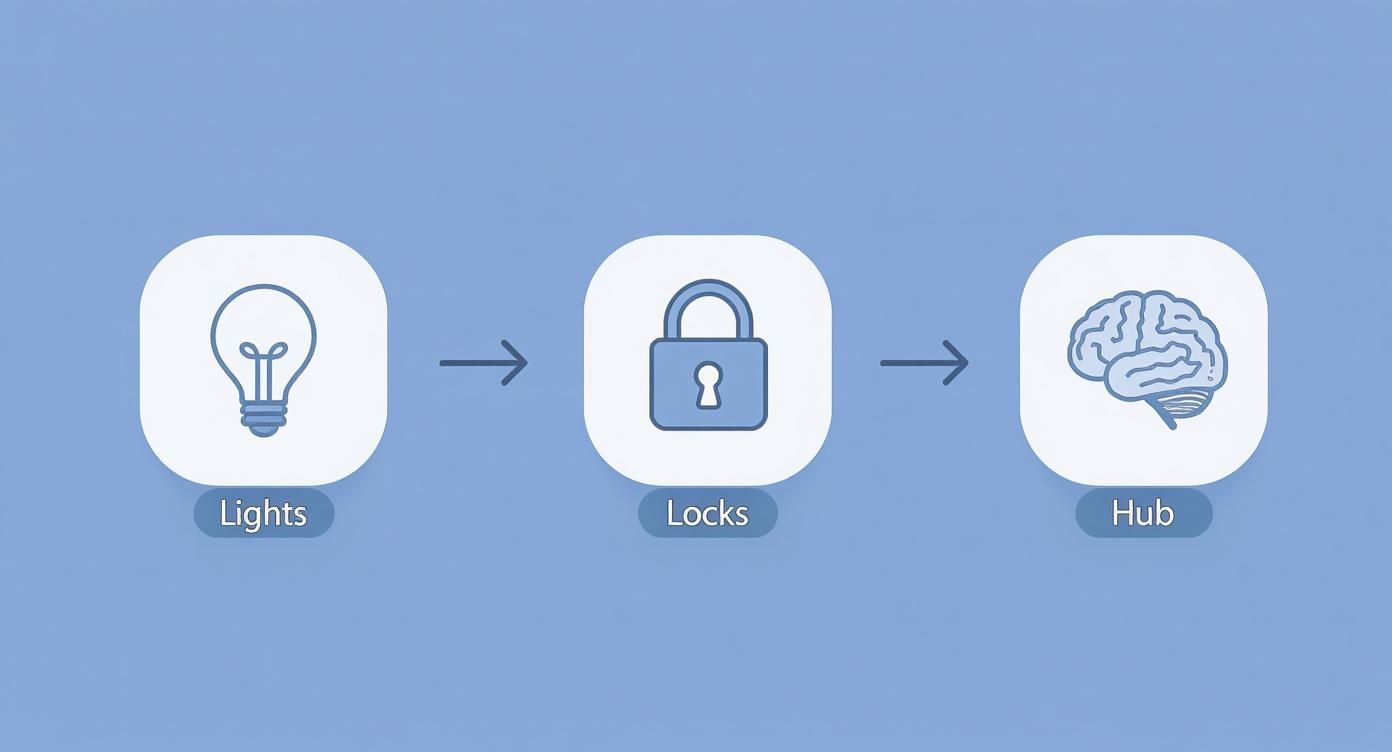
As you can see, the idea is to build from simple devices up to more complex ones, all while making sure they communicate properly with the hub. These devices chat using a few different languages—protocols like Wi-Fi, Bluetooth, Zigbee, and Z-Wave are the most common you'll run into. The push for more energy-efficient homes is a big reason these technologies are becoming so popular.
Safety First: Know your limits. Plugging in a smart display or screwing in a bulb is one thing. But if a job involves hardwiring—like replacing a wall switch or a thermostat that wires directly into your HVAC—it’s time to call a licensed electrician. It's just not worth the risk.
If you’re ready to get hands-on, this DIY home automation system installation guide offers some great, granular steps.
One last tip: don’t neglect the cables. A tangled rat's nest behind your TV isn't just ugly, it can be a maintenance nightmare. For bigger projects, taking some time to learn the basics of https://automatedhomeguide.com/home-smart-wiring/ can make a world of difference for both looks and performance down the road. A little extra effort now saves a lot of headaches later.
Giving Your Smart Home a Personality
Alright, the physical work is done. Your smart plugs are plugged in, your bulbs are screwed in, and your hub is connected. Now for the fun part: bringing it all to life. This is where you move from being an installer to being a director, teaching all these individual gadgets how to work together as a single, smart system.
The magic happens inside your smart hub's app, where you'll create scenes and routines. Think of these as the "plays" your smart home will run. You're setting the stage for everything to happen just how you want it, either on command or completely on its own. It's what separates a house with smart devices from a truly smart home.
Creating Your First Scene
A "scene" is your way of telling multiple devices what to do all at once to create a specific vibe or get a task done. It’s a snapshot of your ideal setting for any given moment. This is where your creativity really comes into play, molding your home's behavior to fit your life.
Let's start with a classic: a "Movie Night" scene. It’s a perfect first project because the payoff is immediate. Instead of fumbling with four different remotes and apps, you tap one button, and boom:
- The main living room lights dim down to a nice 20%.
- Any accent lighting shifts to a cozy, warm color.
- Your smart blinds close, killing the glare.
- The smart TV and soundbar fire up, ready to go.
That's the convenience we're after—taking four or five separate steps and boiling them down to a single, effortless tap.
Making it Automatic with Routines
Scenes are great for things you want to trigger yourself, but the real power of automation is when your home anticipates your needs. That's where routines come in. A routine is just a simple "if this, then that" rule that your system follows without you lifting a finger. The "if" is the trigger, and the "then" is the action.
A great example is a "Welcome Home" routine. The trigger could be your phone's GPS detecting you're close to home after 5 PM. The action? The porch light turns on, the thermostat adjusts to your preferred temperature, and your favorite playlist starts quietly in the living room.
The best automations are the ones you set up and then forget exist. They should weave so smoothly into your daily rhythm that you don't even think about them—they just happen.
Adding Voice Control for the Final Touch
The last piece of the puzzle is bringing in a voice assistant. By linking your system to Amazon Alexa or Google Assistant, you add a layer of conversational, hands-free control.
Once you’ve connected your accounts, you can simply speak your scenes into existence. "Hey Google, activate Movie Night" does the same thing as tapping the button in your app. You could create a "Good Morning" routine that slowly fades up your lights, opens the blinds, and starts the coffee maker, all triggered by you saying, "Alexa, good morning."
This is what elevates your setup from a bunch of remote-controlled gadgets to an environment that truly responds to you.
Fixing Common Smart Home Glitches
So you've spent the weekend setting up your new smart home system, and… something's not working. Maybe a smart plug is ignoring you, or that "welcome home" routine you were so excited about just isn't firing. Don't throw in the towel just yet. Even the most carefully planned systems hit a few bumps, and most of these glitches are surprisingly common and easy to fix.
Let’s talk about the usual suspects: distance and interference. Your smart home is a web of wireless signals—Wi-Fi, Zigbee, Z-Wave—and they can be finicky. A sensor that's just a bit too far from your hub will drop its connection constantly. Things like thick concrete walls, a big metal fridge, or even your neighbor's new, super-powered Wi-Fi router can create a mess of signal noise.
Before you start tearing your hair out, try the easy stuff first. Can you move the device a little closer to its hub? Even a few feet can make a difference. If that's not practical, a dedicated signal repeater or a mesh Wi-Fi system is a fantastic investment for killing those pesky dead zones for good.
Diagnosing Unresponsive Devices
You've checked the signal, but a certain smart bulb or door sensor is still playing dead. It’s showing up as "offline" in your app, and your commands are met with a digital shrug. Let's walk through it logically.
First things first: power cycle it. It's the oldest trick in the IT playbook because it works so often. Just unplug the device, give it about 30 seconds to clear its head, and plug it back in. This simple reboot forces it to reconnect to your network and can shake loose any minor software bugs causing the issue.
Still no luck? Open your hub's app and do some detective work. Has the device been accidentally removed? Is the battery dead? You’d be surprised how many times a "broken" sensor is just a sensor that needs a new battery.
A great troubleshooting habit I've learned over the years is to work from the outside in. Start with the simplest, most external factors like power and signal before you even think about software settings or device resets. Honestly, this approach will solve 90% of common issues with minimal effort.
If you've tried all that and the device is still giving you the silent treatment, it's time to re-pair it. This means you'll have to remove it from your system within the app and then go through the setup process again, just like you did when you first unboxed it. I know it's a bit of a hassle, but it creates a fresh, clean connection and almost always fixes those stubborn communication problems.
When to Perform a Factory Reset
Think of the factory reset as the nuclear option. You should only reach for it when a device is completely unresponsive and you've tried everything else. A factory reset will wipe every single setting and bring the device back to its original, out-of-the-box state.
Before you go down this road, know what you're getting into:
- You're going to lose all your custom settings for that device.
- You have to remove it from your hub's app before you reset it. If you don't, you can end up with a "ghost" device in your system that's a nightmare to get rid of.
- You will have to set it up from scratch and add it back into all your carefully crafted scenes and automation routines.
The reset process itself is different for every gadget, so you’ll need to check the manufacturer’s website for specific instructions. It usually involves holding down a tiny, recessed button for 10-15 seconds. This is the last thing to try before you call customer support and ask for a replacement.
At Automated Home Guide, we're here to help you navigate every step of your smart home journey, from initial planning to fixing those inevitable glitches. For more expert tips and in-depth guides, visit us at https://automatedhomeguide.com.












Leave a Reply