

Picking a new router really comes down to three things: What internet speed are you paying for, how big is your home, and how many gadgets are fighting for a connection? Nail these down, and you can sidestep the trap of overpaying for bells and whistles you don't need or, worse, buying a router that just can't keep up.
Start by Sizing Up Your Home Network
It's easy to get lost in a sea of technical jargon, but diving straight into Wi-Fi standards and processor speeds is a classic mistake. The best place to begin is with a quick, honest look at your actual situation. This simple reality check ensures the router you buy is based on your day-to-day needs, not just slick marketing.
Think about it. A small apartment with a 100 Mbps internet plan and maybe ten devices has a completely different set of demands than a 3,000-square-foot house with a gigabit connection and over 50 smart home gadgets. Each scenario points to a very different kind of router.
How Fast is Your Internet and How Many Devices are Online?
First up, look at your internet plan. If you're paying for 300 Mbps service, getting a router that can't hit those speeds means you're leaving performance on the table. On the flip side, buying a beast of a router built for multi-gig speeds is total overkill if your connection tops out at 100 Mbps.
Next, take a minute to count every single thing that connects to your Wi-Fi. It adds up faster than you think.
- Your Go-To Gear: Laptops, smartphones, tablets, and smartwatches.
- Entertainment Hub: Smart TVs, streaming boxes (like Apple TV or Roku), and gaming consoles.
- Smart Home Army: Think smart speakers, light bulbs, plugs, thermostats, and security cameras.
Every connected device puts a little bit of strain on your network. The more devices you have, the more you need a router that’s a pro at juggling all those connections at once without grinding to a halt.
This handy decision tree shows how your speed, home size, and device load all point toward the right type of router for you.
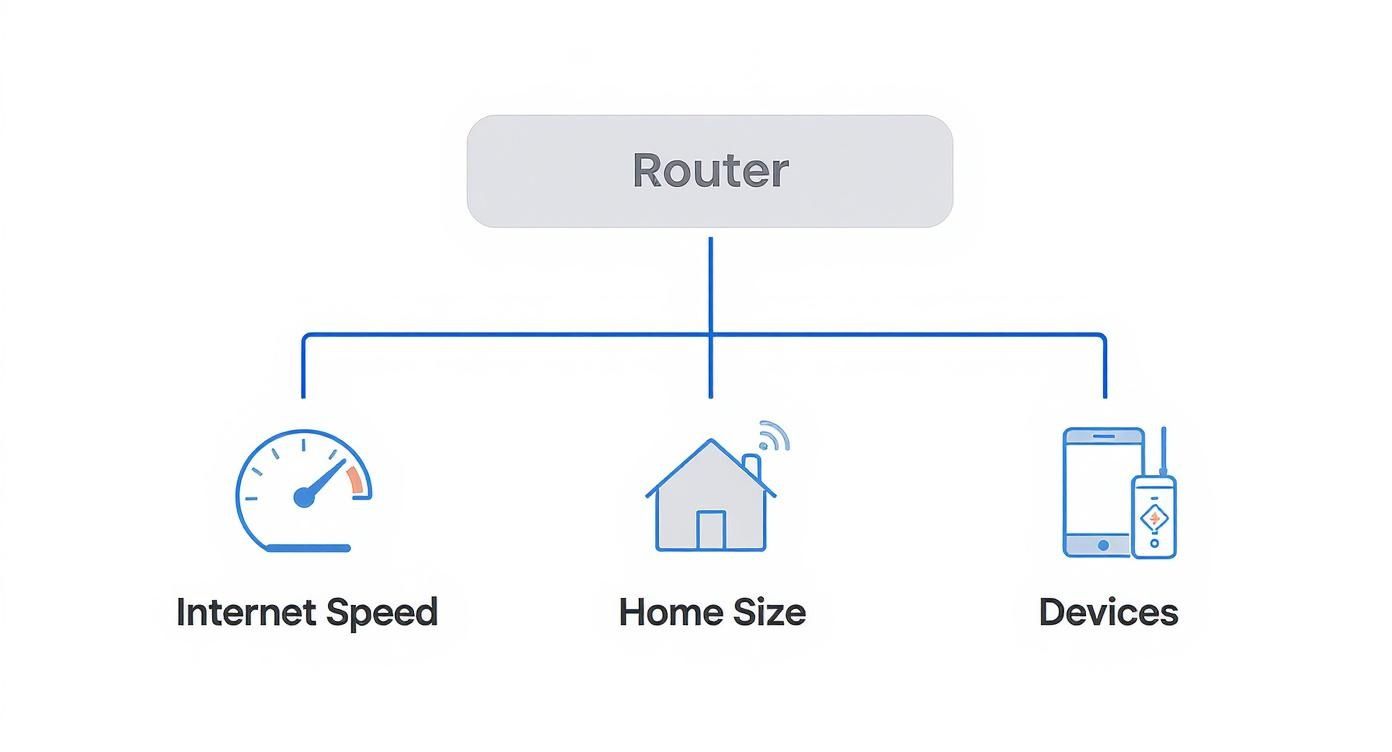
As you can see, higher speeds and bigger homes pretty clearly steer you toward a mesh system, while a good old standalone router is often perfect for smaller spaces with simpler needs.
What's Your Home's Layout?
Your home's physical space is a huge factor. A single, powerful router might cover a 1,200-square-foot, open-concept apartment like a champ. But in a multi-story house with thick walls or a long, spread-out floor plan, that same router's signal will struggle to reach every corner.
For those trickier layouts, a mesh Wi-Fi system is almost always the better bet. These systems use multiple satellite nodes to spread a strong, consistent signal throughout your entire home, killing dead zones. For particularly complex setups, you might even consider looking into a dedicated smart home wiring solution for rock-solid stability.
Your router really is the unsung hero of your digital life. It's no surprise the global router market is expected to hit $21.54 billion by 2025—these devices are essential. That massive growth is driving innovation, which is great news for us, as today's routers are more capable than ever.
To help you narrow down your options, here’s a quick-glance table.
Match Your Home to the Right Router Type
Use this table to quickly identify the best type of router based on your home size, device count, and primary internet activities.
| Your Situation | Recommended Router Type | Best For |
|---|---|---|
| Small Home/Apartment (<1,500 sq ft), <25 devices, standard streaming & browsing | Standalone Router | Budget-friendly simplicity and solid performance in a compact space. |
| Medium-Large Home (1,500-3,500 sq ft), 25-50+ devices, 4K streaming, online gaming | Mesh Wi-Fi System | Eliminating dead zones in multi-story homes or complex layouts. |
| Very Large Home (>3,500 sq ft), 50+ smart devices, heavy gaming & streaming | High-Performance Mesh System (Tri- or Quad-Band) | Maximum coverage and dedicated backhaul for no-compromise performance. |
| Tech Enthusiast/Gamer with gigabit internet and wired devices | Gaming Router | Advanced QoS, low latency features, and multiple Ethernet ports for competitive gaming. |
This should give you a solid starting point. Understanding the basics of common networking hardware devices can also provide a great foundation. With that knowledge in hand, you’re ready to get into the nitty-gritty technical details.
Decoding Router Specs for Real-World Speed
Shopping for a new router can feel like trying to read a foreign language. The box is covered in acronyms and technical jargon that, let's be honest, don't mean much to most of us.
So, let's cut through that noise. I’ll help you translate those specs into what actually matters: smooth 4K streaming, lag-free gaming, and a solid connection in every corner of your home.

Getting a handle on this stuff is more than just a tech-nerd exercise—it's about making a smart investment. The wireless router market is set to explode, growing by an estimated $9.26 billion between 2025 and 2029. That growth means technology is advancing fast, and newer features genuinely deliver a better experience. For a closer look at the data, you can explore trends in the home Wi-Fi router market.
What Do Wi-Fi Standards Like Wi-Fi 6 and 6E Really Mean?
You’ll see terms like Wi-Fi 5 (802.11ac), Wi-Fi 6 (802.11ax), and the newer Wi-Fi 6E. Just think of these as different generations of Wi-Fi tech, where each new version is smarter, faster, and more efficient than the last.
- Wi-Fi 5: This was the go-to standard for years. It’s still perfectly fine for basic browsing and a few devices, but it starts to buckle under the pressure of a modern, device-heavy smart home. Honestly, if you're buying a new router today, you should aim higher.
- Wi-Fi 6: This is the current sweet spot for most people. The real magic of Wi-Fi 6 isn't just about top speed; it's about efficiency. It was built from the ground up to juggle dozens of connected devices at once—from your work laptop to your smart lights—without breaking a sweat.
- Wi-Fi 6E: This is the premium option. It takes all the benefits of Wi-Fi 6 and adds an exclusive, brand-new 6 GHz frequency band. Think of it as a private, multi-lane superhighway for your newest gadgets, completely free from the traffic jams caused by older devices.
For any modern smart home, a Wi-Fi 6 router should be your baseline. If you're an early adopter with the latest flagship phone, a new laptop, or a next-gen gaming console, a Wi-Fi 6E router is a fantastic upgrade that moves those priority devices into their own uncongested lane.
Dual-Band vs. Tri-Band: Your Wi-Fi Traffic Lanes
This is one of the most critical choices you'll make. The "bands" are just the radio frequencies your router uses to send and receive data. The more bands you have, the less traffic congestion you'll experience.
A dual-band router gives you two separate networks to work with:
- The 2.4 GHz band: It’s slower, but its signal travels farther and is better at punching through walls. This is perfect for smart home gadgets or devices on the other side of the house.
- The 5 GHz band: This one is much faster but has a shorter range. It's the ideal choice for 4K streaming, online gaming, and video calls on devices that are relatively close to the router.
A tri-band router kicks things up a notch by adding a second 5 GHz band (or, with Wi-Fi 6E, the new 6 GHz band). This extra lane on your Wi-Fi highway makes a massive difference when you have a lot of high-demand devices all running at the same time.
Here’s how it plays out: Your teenager is battling it out in an online game on their PC (using 5 GHz), while you're trying to lead a critical Zoom meeting on your laptop (also 5 GHz), and your partner is streaming a 4K movie on the living room TV (yep, 5 GHz again). With a dual-band router, all three are stuck competing for bandwidth on the same congested highway. A tri-band router gives one of those devices its own dedicated lane, ensuring everyone's experience stays smooth and buffer-free.
The Tech That Delivers a Rock-Solid Connection
Beyond the big-ticket items like bands and standards, a few other features have a huge impact on how well your network performs when things get busy.
MU-MIMO (Multi-User, Multiple Input, Multiple Output): It sounds incredibly complex, but the idea is simple. Old routers could really only talk to one device at a time, just switching between them very, very quickly. MU-MIMO lets a router communicate with multiple devices at the exact same time. It’s the difference between a cashier serving one person at a time versus one who can check out four customers at once. This is a non-negotiable feature for any household with multiple users.
QoS (Quality of Service): Think of this as your network's bouncer or traffic cop. A good QoS system lets you tell the router which devices or activities are most important. For instance, you can prioritize your work laptop for video calls or your Xbox for gaming over a background file download. When your network traffic gets heavy, QoS makes sure the important stuff goes first, which is what prevents your Zoom call from freezing or your game from lagging into oblivion.
To make this even clearer, here's a table breaking down these essential technologies and what they mean for you.
Key Router Features Explained
| Feature | What It Does | Who Needs It? |
|---|---|---|
| Wi-Fi 6/6E | The latest Wi-Fi standards for speed and efficiency in crowded networks. | Everyone buying a new router today, especially homes with 20+ devices. |
| Tri-Band | Adds a third frequency band to reduce network congestion. | Households with multiple gamers, 4K streamers, or work-from-home professionals. |
| MU-MIMO | Allows the router to communicate with several devices at the same time. | Families where multiple people are simultaneously streaming, gaming, or browsing. |
| QoS | Lets you prioritize traffic for specific devices or applications. | Gamers, remote workers, and anyone who needs a stable connection for specific tasks. |
Once you can translate the jargon into these tangible benefits, you're in a much better position to look at any router on the shelf and know exactly how it will perform for your home and your needs.
Decide Between a Standalone Router and a Mesh System
https://www.youtube.com/embed/l6GB_yjmbqQ
Once you've wrapped your head around the technical specs, you’ll face the next big decision: what kind of router do you actually need? This choice is all about the physical hardware and how it delivers Wi-Fi throughout your home.
Your final call will really depend on your home's size, its layout, and frankly, your tolerance for annoying Wi-Fi dead zones. Let's walk through the main contenders so you can pick the right gear for your space.
The Classic Standalone Router
For years, this was pretty much your only choice. A traditional standalone router is a single box that plugs into your modem and shoots out a Wi-Fi signal from one central spot. It's a simple, effective, and often budget-friendly solution for smaller homes and apartments.
Think of it like a single, powerful lamp in the middle of a room. For a studio apartment or a modest single-story home under 1,500 square feet, that one light source can easily cover the whole area.
But just like a lamp, its reach has limits. The signal naturally weakens the farther it travels and really struggles to push through thick walls, plaster, or multiple floors. Physics is a stubborn thing.
The Modern Mesh Wi-Fi System
This is where mesh Wi-Fi systems completely change the game. Instead of relying on one central hub, a mesh system uses a main router connected to your modem plus several satellite units, often called "nodes," that you place around your home.
These nodes talk to each other, creating one big, seamless network. As you walk from the living room to the backyard, your phone or laptop automatically hops to the strongest node without you ever feeling a disconnect. It’s like having multiple, perfectly synced lights all over your house, wiping out any dark corners for good.
Mesh is almost always the right answer for:
- Larger Homes: If you're working with anything over 2,000 square feet, a mesh system will make a world of difference.
- Multi-Story Layouts: The nodes are fantastic at creating a strong vertical signal, solving the age-old problem of terrible Wi-Fi in the basement or upstairs bedrooms.
- Homes with Tricky Architecture: Got thick walls, a weird L-shaped layout, or known dead spots? A mesh system blankets these problem areas with a solid connection.
A powerful standalone router can push a signal far, but it can only do so much against physical barriers. A mesh system works with your home's layout instead of fighting it, which is why it’s become the go-to for true wall-to-wall coverage.
If your current router is decent but you still have a couple of problem spots, you might want to learn how to extend your Wi-Fi range with other methods before you invest in a whole new mesh setup.
The ISP Modem Router Combo
And then there's the gateway—that all-in-one box your Internet Service Provider (ISP) probably tried to rent to you. This modem/router combo unit packs both functions into a single piece of hardware.
The main selling point is simplicity. You only have one device to plug in, and when things go wrong, you only have one company to call.
But that convenience comes at a cost. ISP-provided gateways are usually pretty basic. They tend to lack the advanced features, top-tier performance, and robust security you'd find in a router you buy yourself. Plus, you’re stuck paying a rental fee—typically $10 to $15 per month—which can easily add up to more than the price of a far better router over a couple of years.
It’s also important not to confuse this consumer-grade gear with the heavy-duty equipment used by large companies. The enterprise router market, valued at $18.21 billion in 2025, is a completely different beast, designed for massive scale and security. Read more about the enterprise router market's growth to see just how different these technologies are.
Ultimately, buying your own router gives you control. You get to pick the features you actually need, enjoy better performance, and save money in the long run. For almost everyone, the choice really comes down to a great standalone router or a capable mesh system.
Don't Overlook Security and Software Features
It’s easy to get tunnel-vision on speed and coverage when you're router shopping. We've all been there. But the software running on that box—its firmware and management app—is just as crucial. Think of it as your network's brain and its digital bouncer, all in one. A router with flimsy security is the digital equivalent of leaving your front door unlocked.
This is more critical than ever with the explosion of smart home gadgets. Your smart plugs, security cameras, and even your connected fridge probably can't run their own antivirus software. That puts your router on the front lines, making it the single most important layer of defense for your entire digital life. A modern router with a solid security suite can be a lifesaver, actively blocking malicious sites and scanning for weak spots on everything connected to it.
Honestly, this kind of built-in protection is no longer just a "nice-to-have" feature; it's a must. It takes the headache out of securing dozens of different devices and puts you back in control.
Insist on Modern Encryption and Automatic Updates
At an absolute minimum, any router you're considering today needs to support WPA3. This is the latest Wi-Fi security standard, and it offers far stronger encryption than its predecessor, WPA2. In practical terms, it makes it incredibly difficult for anyone to snoop on your network or crack your password.
Just as important are automatic firmware updates. Manufacturers constantly find and patch security holes. A router that updates itself ensures you’re always protected from the latest threats without you having to lift a finger. You don't have to remember to log in and manually check for updates—it just happens.
Think of firmware updates like the system updates on your phone. They're essential for security and smooth operation. A router that isn't getting regular, automatic updates is basically a ticking time bomb.
Of course, the router is just one piece of the puzzle. For a complete strategy, take a look at these home network security best practices to see how you can create multiple layers of defense.
The App and User Experience Matter
A router can have all the power in the world, but if its interface is a clunky, confusing mess, you'll end up frustrated. The best brands have invested heavily in creating slick, user-friendly mobile apps that make setup and daily management a breeze.
From a good app, you should be able to:
- See every connected device: Quickly identify what's on your network, from laptops to smart speakers.
- Run a quick speed test: Make sure you're actually getting the internet speeds you pay for.
- Set up a guest network: Create a separate, secure network for visitors in seconds.
- Reboot the router remotely: Fix a glitchy connection without having to get up and unplug the box.
This kind of smartphone control turns what used to be a technical chore into a simple task, giving you a clear window into what’s happening on your network.
For Families, Parental Controls Are Non-Negotiable
If you have kids in the house, robust parental controls are an absolute deal-breaker. The quality of these features can vary wildly from one router to another, so you really need to look at the details. Some basic systems only let you block a few websites, which isn't enough anymore.
More advanced platforms offer a full suite of tools for managing your family's digital life. Here’s what I'd look for:
- User Profiles: The ability to create a profile for each child and link all their devices (phone, tablet, gaming console) to it.
- Content Filtering: Block entire categories of content, like social media or adult websites, based on age.
- Time Limits: Set daily screen time allowances or schedules that shut off Wi-Fi during homework time or after bedtime.
- The "Pause" Button: A lifesaver. One tap in the app to pause the internet for a specific kid or the whole house. It’s the easiest way to get everyone to the dinner table.
These software features are what truly elevate a router from a dumb box to the command center of your connected home. And while strong security is the top priority—you can find more tips on how to secure your WiFi network from other experts—don't forget to weigh the overall software experience just as heavily as you do the raw speed specs.
Set a Realistic Budget for Your New Router
Alright, you've waded through the technical jargon and have a good idea of what your home needs. Now for the big question: how much should you actually spend?
Figuring out a router budget isn’t about snagging the cheapest option or splurging on the most tricked-out model. The goal is to find that sweet spot where performance meets value for your specific situation. Let’s talk dollars and sense.
Router prices fall into a few general buckets. Knowing what you get for your money at each level is the key to avoiding buyer's remorse.
What Different Price Points Get You
Thinking about router costs in tiers helps you match your expectations with your wallet.
-
Budget-Friendly (Under $100): These are the no-frills workhorses. They’re perfect for smaller apartments or homes where internet use is pretty standard—think web browsing, HD streaming, and maybe a dozen connected devices. You'll likely get a solid Wi-Fi 5 or a very basic Wi-Fi 6 router that gets the job done without any fuss.
-
Mid-Range All-Rounders ($100 – $300): This is the sweet spot for most people. For this price, you're looking at powerful Wi-Fi 6 routers and entry-level mesh systems that can easily juggle 4K streaming, online gaming, and a house full of smart gadgets. You’ll also find better features like MU-MIMO, good QoS controls, and more robust security.
-
High-Performance Powerhouses ($300+): Welcome to the top shelf. This tier is built for enthusiasts, hardcore gamers, and people with gigabit-plus internet plans or sprawling homes. These are usually premium tri-band mesh systems or gaming routers, often boasting Wi-Fi 6E for the absolute fastest speeds and lowest latency.
Be honest with yourself about how you use the internet. For a family that mostly streams Netflix and does homework online, the real-world difference between a $250 router and a $500 one is often zero. This is the classic point of diminishing returns—where spending more doesn’t actually buy you a better experience.
How to Spot a Good Deal
Once you have a price range in mind, it's time to shop smart. Don't just grab the first router you see. Keep an eye out during major sales events like Black Friday or Amazon Prime Day, as networking gear often sees some deep discounts.
Another great option? Consider buying refurbished. Reputable manufacturers and retailers sell certified refurbished routers that have been tested, updated, and come with a warranty. This is a fantastic way to step up to a higher-performance model without paying the premium price. Just make sure you're buying from a trusted source that offers a solid return policy.
Before you hit that "buy" button, run through one final mental check.
- Does this router match my internet speed? No point in buying a router built for gigabit speeds if your plan only delivers 200 Mbps.
- Is it the right type for my home? A standalone unit for a small apartment, or a mesh system for that tricky multi-story house.
- Does it have the core features I actually need? Think Wi-Fi 6, WPA3 security, and maybe good parental controls if you have kids.
- Am I paying for bells and whistles I'll never use? If you're not a competitive gamer, you probably don't need a dedicated "gaming" router with flashy lights.
Answering these questions will help you land on a final choice you can feel confident about—one that perfectly fits your home and your budget.
Got a Few Lingering Router Questions?
Even with all the research, there are always a few final questions that can hold you back. When you're trying to figure out how to choose a router, these are the details that really matter. Let’s tackle some of the most common points of confusion so you can finally hit that "buy" button with confidence.
These are the questions I hear all the time—the ones that bridge the gap between technical specs on a box and how a router actually performs in your home.
Do I Really Need a Wi-Fi 7 Router Today?
Honestly, for almost everyone, the answer is a simple no. Wi-Fi 7 is the latest and greatest, but it’s a bit like buying a race car when all the racetracks are still under construction. Very few of your current devices—if any—can actually use its advanced features.
A top-tier Wi-Fi 6 or Wi-Fi 6E router is more than enough for today’s connected homes, delivering incredible speed and stability. Wi-Fi 6E, in particular, is the current sweet spot. It unlocks the wide-open 6 GHz band, which is a game-changer for reducing congestion and boosting speeds on newer devices like modern laptops and high-end smartphones.
Think of Wi-Fi 7 as extreme future-proofing. It only makes sense if you have a multi-gigabit internet plan and are a serious early adopter who wants to be ready for the next wave of tech years from now. For everyone else, your money is far better spent on a fantastic Wi-Fi 6E system.
How Often Should I Replace My Router?
A good rule of thumb is to look at upgrading your router every three to five years. Technology moves fast, but the biggest reason for this isn't just about chasing the fastest speeds—it's about security.
After a few years, manufacturers often stop releasing security updates for older models. This can leave your entire home network wide open to new threats. If your router isn't getting firmware patches anymore, it’s a major security risk.
Beyond security, your router will tell you when it’s time for a change. Watch for these signs:
- You’re constantly rebooting it to fix dropped connections.
- Your Wi-Fi speeds are way slower than what your internet plan is supposed to deliver.
- The network stutters and lags whenever all your new smart home gadgets are running.
If any of that sounds familiar, your router has become a bottleneck. It’s definitely time to upgrade.
Will a New Router Make My Internet Faster?
This is a classic question, and the answer is a bit of a "yes and no." A new router cannot increase the speed of the internet plan you buy from your provider. If you pay for a 300 Mbps plan, you’ll never magically get 500 Mbps.
What a new router can do is make your Wi-Fi feel massively faster and more reliable. If your current router is old, it's almost certainly preventing you from getting the full speed you already pay for. An upgrade can deliver that speed to every corner of your home, slash lag for gaming and video calls, and juggle traffic from dozens of devices without breaking a sweat.
So, while it won’t upgrade your internet plan, a new router will finally let you use the full speed you already have.
Should I Just Use the Router From My ISP?
For the vast majority of people, buying your own router is a much smarter move in the long run. The modem/router combo unit your ISP rents out is usually a basic, bare-bones model, and you're paying a monthly fee for it—typically $10 to $15.
Over a year or two, those rental fees can easily surpass the cost of a far superior router that you own outright. When you buy your own, you get:
- Better performance with stronger signals and wider coverage.
- More advanced features, like powerful parental controls or built-in security.
- Total control over your own network settings.
The upfront cost of buying your own router almost always pays for itself, not just in savings on rental fees but in a dramatically better online experience. It's one of the best upgrades you can make for your home network.
At Automated Home Guide, we're committed to helping you navigate the world of home technology. Our guides are designed to give you the clarity and confidence to build a smarter, more connected home. Find more expert tips and in-depth reviews on our website.










Leave a Reply