
Before you buy a single smart plug or even think about drilling holes, take a step back. The single biggest mistake I see people make is rushing out to buy the latest gadgets without a clear plan. A truly smart home isn’t a random collection of devices; it's a carefully orchestrated system designed to make your life easier, safer, or more efficient.
Without a blueprint, you’re just guessing. You risk ending up with a drawer full of tech that doesn't talk to each other, which is the fast track to frustration and wasted money.
Your Blueprint for a Truly Smart Home

This initial planning phase is your roadmap. It ensures every component you add has a job to do and works as part of a team. Putting in the effort now saves you a ton of headaches later.
Define Your Primary Goals
First things first: ask yourself why you're doing this. What's the main problem you want to solve or the primary benefit you're after? Your answer will shape every decision you make.
- Looking for better security? Your shopping list should start with smart locks, a video doorbell, outdoor cameras, and maybe some motion-activated floodlights.
- Craving more convenience? Think about automated lighting that adjusts to your schedule, smart plugs for your coffee maker, and voice assistants to control it all.
- Want to save on energy bills? A smart thermostat is a no-brainer. Add some automated blinds and smart plugs to kill phantom power draw from devices on standby, and you're on your way.
Nailing down one or two key goals helps you focus your budget where it will have the biggest impact right away. You can always expand the system later.
Perform a Thorough Home Audit
Now, grab a notepad (or your phone) and walk through your house. This audit is all about spotting opportunities and potential roadblocks before they become expensive problems.
Pay close attention to your home’s existing setup. Is your Wi-Fi signal strong in the garage where you want to put a smart opener? That smart water sensor in the basement won't do much good if it can't connect to your network. Take note of where your power outlets are—many devices need to be plugged in and can't just run on batteries.
A common mistake is underestimating the importance of your network. Your Wi-Fi router is the foundation of your smart home. If it's old or unreliable, your entire system will be too.
This is also the perfect time to think about the future. You might only be starting with a few lights, but what about next year? Could you see yourself adding smart speakers or a thermostat? Thinking ahead ensures you don't choose a system today that will be too limited for your ambitions tomorrow.
The home automation market is booming, and for good reason. It’s transforming how we live. Market research shows its value is skyrocketing, with some forecasts predicting it will hit USD 80.83 billion by 2032. This explosive growth is driven by our collective desire for smarter security and better energy efficiency. By installing a system now, you’re not just making your life better—you’re investing in your home’s future value. You can find more insights into this growing market from Data Bridge Market Research.
Choosing the Brains of Your Operation
Every smart home has a central command post—the piece of hardware that acts as the brain, translating your taps and voice commands into action. This is your hub, and it’s what turns a random collection of smart gadgets into a cohesive, automated home.
Frankly, picking the right hub is one of the most important decisions you'll make. It sets the stage for everything else, dictating which devices you can use, how dependable your system is, and how easily you can expand it down the road.
Ecosystems vs. Protocols: What's the Difference?
Your first thought might be about the big players: Amazon Alexa, Google Home, or Apple HomeKit. These are the user-facing ecosystems you'll interact with daily. Your choice here often boils down to what you already use. If your family is all-in on iPhones, HomeKit is a natural fit. If you're an Android household, Google Home will feel like second nature.
These platforms are great for voice control and simple routines, but they mostly rely on Wi-Fi and Bluetooth. For a truly bulletproof smart home, you need to go a layer deeper and think about the dedicated communication protocols that run behind the scenes.
The Real Workhorses: Z-Wave, Zigbee, and Thread
Beneath the big brand ecosystems are the specialized languages smart devices use to talk to each other. These are low-power mesh networks built from the ground up for home automation.
-
Z-Wave: This is my go-to for anything security-related. It operates on a low-frequency radio band, so it won’t get bogged down by your Wi-Fi network. That reliability makes it perfect for things that have to work every time, like smart locks, security sensors, and garage door openers.
-
Zigbee: Also a mesh network, you'll find Zigbee in a ton of smart lighting (Philips Hue is a classic example) and various sensors. It's fast and power-efficient, but it does operate on the busy 2.4 GHz frequency, which it shares with most Wi-Fi. In a home with a lot of wireless congestion, this can sometimes cause interference.
-
Wi-Fi: Wi-Fi is fantastic for devices that need to move a lot of data, like security cameras streaming video. The downside? Trying to run everything on Wi-Fi can absolutely crush your network. Every single smart plug and lightbulb eats up an IP address and adds to the congestion, which can slow down your laptops and phones.
A powerful, multi-protocol hub is the key. It acts as a universal translator, letting your Z-Wave door lock trigger your Zigbee lights without a hitch. This flexibility is what separates a basic setup from a truly smart one.
So, Which Hub Should You Choose?
Now that you understand the tech, you can pick a hub that fits your vision. The best ones are chameleons—they support multiple protocols and play nicely with all the major voice assistants.
I always tell people to think of their hub as the conductor of an orchestra. Its job is to make sure every device, no matter the brand, plays in perfect harmony. A hub that only knows one tune will seriously limit what your smart home can become.
This is why platforms like Hubitat, Home Assistant, and Samsung SmartThings are so popular. They embrace this multi-protocol philosophy, giving you the freedom to choose the best device for the job, regardless of whether it speaks Z-Wave or Zigbee.
To really dig into the specifics, take a look at our in-depth smart home hub comparison. We break down the pros and cons of the top models currently on the market.
For instance, you might find the Ring Alarm Pro is a perfect all-in-one solution since it combines a security system, a Z-Wave hub, and a top-tier eero Wi-Fi 6 router. On the other hand, if you love to tinker, setting up Home Assistant on a Raspberry Pi gives you almost infinite control. This decision is your foundation—build it wisely.
Getting Your Hands Dirty: A Device-by-Device Installation Guide
Alright, with your battle plan laid out and your central hub chosen, it's time for the fun part: bringing your smart home to life. This is where you'll start physically installing devices and see your vision take shape. Every device has its own quirks, but a little know-how goes a long way in avoiding common frustrations.
The core of a successful setup comes down to making sure your ecosystem, communication protocols, and hub all play nicely together.
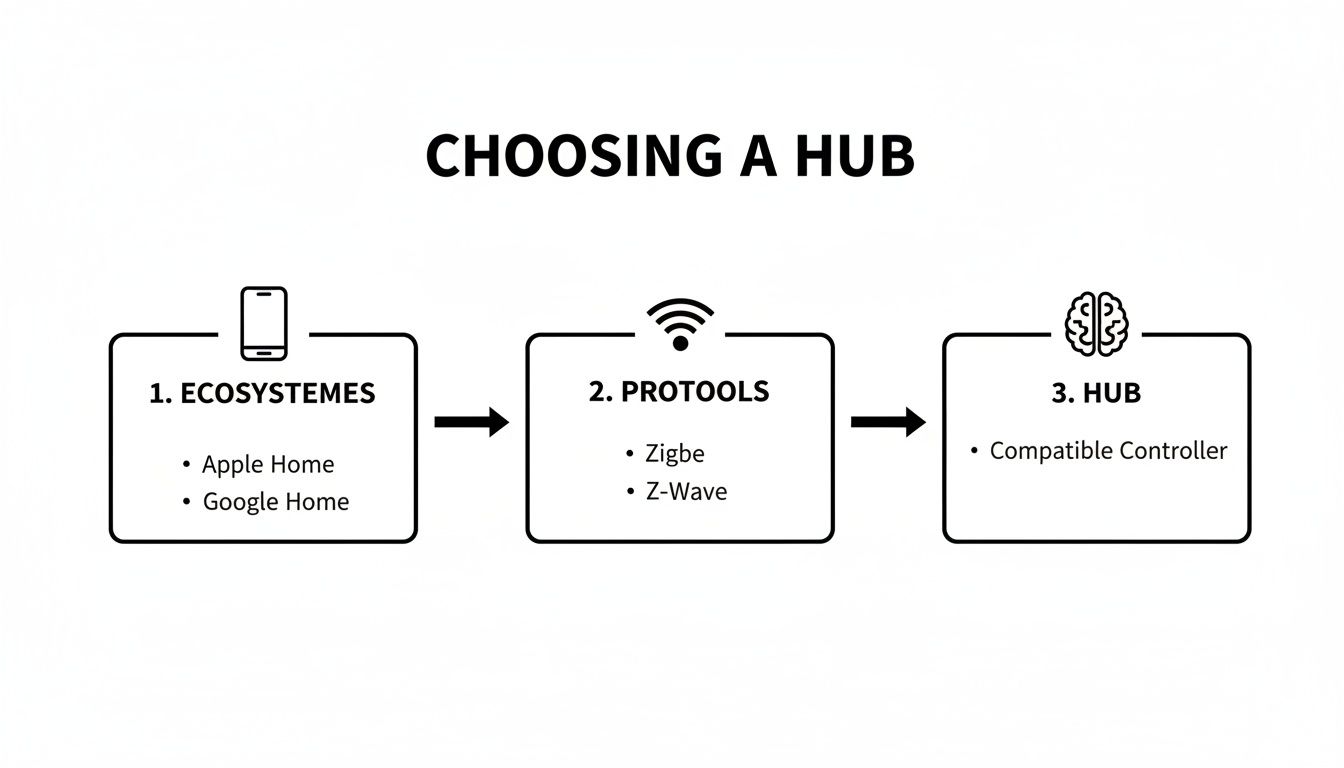
Think of these three elements as the foundation. If they're aligned with your goals from the start, everything else will fall into place much more smoothly.
Smart Lighting and Switches
For many people, smart lighting is the first step into home automation. And why not? Screwing in a smart bulb is as easy as it gets. But if you want more reliable, built-in control, swapping out a standard light switch for a smart one is a fantastic upgrade.
First thing's first: turn off the power at the circuit breaker. I can't stress this enough—it's absolutely non-negotiable.
Once you're certain the circuit is dead, you can pull out the old switch. You'll usually find a hot wire, a load wire, and a ground. Here's the kicker: many smart switches require a neutral wire to get the constant power they need to stay connected. Older homes sometimes don't have this wire in the switch box, so it's critical to check for it before you buy anything. If you're feeling a bit lost in the wires, our guide on wiring for home automation can shed more light on the subject.
Security Cameras and Sensors
A security camera or sensor is only as good as where you put it. Bad placement can make an expensive device nearly useless.
For outdoor cameras, focus on covering the main entry points—your front door, back door, and any accessible ground-floor windows. You want to eliminate blind spots.
- Get the Height Right: Mount cameras about 8-10 feet off the ground. This gives you a great vantage point and makes it harder for someone to tamper with, but it's still low enough to capture clear details.
- Watch the Angle: Try not to point cameras directly into the sun, as the glare can wash out the image. A slight downward angle is usually best.
- Think Strategically with Sensors: Place motion sensors in high-traffic areas like hallways or in the corner of a large room. One well-placed sensor can often cover multiple entryways, like a living room that opens up to a hall and the kitchen.
My Pro Tip: Before you start drilling, use a bit of painter's tape to temporarily stick the camera where you think you want it. Pull up the live feed on your phone and see if the view is what you expected. This simple check has saved me from drilling a lot of unnecessary holes.
Smart Locks
A smart lock might seem like a complex job, but you'd be surprised. Most are designed to fit right into the cutout for a standard deadbolt, and you can usually get the whole thing done in under an hour with just a screwdriver.
Start by removing your old deadbolt completely. As you install the new components, pay close attention to the alignment. The bolt needs to extend and retract smoothly without catching or rubbing against the door frame. Misalignment is the number one killer of batteries and can cause the motor to fail prematurely.
Before you even close the door, test the lock manually a few times. If you feel any resistance, you'll likely need to adjust the strike plate on the door frame. A perfectly installed lock is a quiet and happy lock.
The Smart Thermostat
Swapping out your old thermostat for a smart one is one of the highest-impact DIY projects you can do. It's a huge driver behind the explosive growth of the smart home market, which was valued at USD 147.52 billion and is projected to hit USD 633.20 billion by 2032. The promise of real energy savings is compelling.
This installation involves working with low-voltage HVAC wires. Again, kill the power to your furnace and air conditioner first. Then, take a picture of your old thermostat's wiring. That photo will be your most valuable tool for this job.
Most smart thermostat kits come with little stickers to label each wire before you disconnect it. Use them! Then, just match the wires to the corresponding terminals on the new thermostat's base plate. A typical setup involves R (power), W (heat), Y (cooling), and G (fan) wires. Some systems also need a C (common) wire, which provides continuous power so the thermostat doesn't have to steal it from the other circuits.
With your core devices up and running, you can start thinking bigger. For example, integrating the best smart appliances for a modern kitchen can take your home's IQ to the next level, creating a truly connected and efficient space.
Bringing Your Smart Home to Life with Automations

Okay, all your devices are installed and showing up in your app. The physical work is done, but the real fun is just beginning. Now it's time to teach all those individual gadgets to work together, transforming your house from a collection of remote-controlled devices into a home that actually anticipates what you need.
We do this by creating scenes and automations (sometimes called routines). Think of a scene as a one-tap shortcut that sets a mood. An automation, on the other hand, is a background rule that runs on its own when specific conditions are met—no button-pushing required.
Crafting Your First Scenes
Scenes are your go-to for those moments you repeat every day. Instead of fumbling with three different apps to get the lighting, music, and blinds just right, you hit a single button that does it all instantly.
Let's start with a classic: the "Movie Night" scene.
- Trigger: You tap the "Movie Night" button in your smart home app or say, "Hey Google, it's movie time."
- Actions:
- The living room lights dim to a cozy 15% brightness.
- Your smart blinds automatically roll down to kill the glare.
- The smart TV and soundbar fire up.
- A smart plug connected to a bright lamp in the corner clicks off.
Just like that, the room is perfect. Other scenes I always recommend are a "Good Morning" routine that gently fades your lights up and starts a news briefing, and a "Goodbye" scene that locks the doors, sets the thermostat back, and shuts everything off.
Building Intuitive Automations
Automations are where the real magic happens. These are the "set it and forget it" rules that make your home feel genuinely intelligent. At their core, every automation follows a simple "If This, Then That" logic. An event (the "if") triggers an action (the "that").
The secret to great automations is using sensors and other data points as your triggers. This is the heart of how you truly install home automation system intelligence.
A well-designed automation should feel invisible. It should happen so naturally that you eventually forget it’s even there, simplifying a small part of your day without you ever having to think about it.
Picture this: you're arriving home after dark, hands full of groceries. The automation logic would look something like this:
- IF: The smart lock on the front door is unlocked,
- AND IF: The time is after sunset,
- THEN: Turn on the porch light and the entryway light to 100% brightness.
With that simple rule, you never have to fumble for a light switch in the dark again. The house just takes care of it for you.
Adding Layers with Conditions and Sensors
To take your automations from cool to indispensable, you need to layer in more complex conditions. Time of day is a great start, but bringing in motion, contact, and other environmental sensors is a game-changer.
- Occupancy Sensors: Set up an automation to turn off all the lights, music, and the TV in the living room if a motion sensor detects no movement for 15 minutes. It’s an effortless way to save energy.
- Contact Sensors: I have a sensor on my patio door. If the door is open and the smart thermostat tries to kick on the A/C, I get a notification on my phone instead of trying to cool the entire neighborhood.
- Time-Based Logic: You can create a "Goodnight" automation that locks all the doors and turns off every light, but add a condition so it only runs if it's after 10:00 PM. This prevents it from triggering if you just run out to the garage at 9 PM.
By combining these triggers and conditions, you build a system that responds not just to your commands, but to the actual context of what's happening in your home. This is the final, most rewarding piece of the puzzle—making your smart home work for you.
Keeping Your Connected Home Safe and Secure
Bringing smart devices into your home means connecting your personal space to the internet. That convenience is fantastic, but it also opens a new digital door that needs to be secured. The good news is that locking it down isn’t about becoming a network engineer; it’s about building a few simple, solid habits right from the start.
Your first move with any new device—I don't care if it's a security camera or a coffee maker—is to immediately change the default username and password. You'd be shocked how many people skip this. Hackers run scripts that constantly search for devices using factory settings like "admin" and "password." Changing them is your single most effective defense.
Isolate Your Smart Devices on Their Own Network
Here’s a pro tip that makes a huge difference: put your smart home gadgets on their own network. Think of it this way—you wouldn't give a house guest the master key to your entire life, so why let your smart lightbulb have access to the computer where you do your banking?
Most modern routers make this easy by letting you create a guest Wi-Fi network. Connect every single one of your IoT (Internet of Things) devices to this guest network. It builds a digital wall between them and your primary network where your laptops, phones, and sensitive data live. If one of those gadgets ever gets compromised, the problem is contained and can't spread.
Stay on Top of Updates
The software that runs on your smart devices is called firmware, and manufacturers push out updates all the time. These aren't just for new features; they often contain critical patches for security holes that have been discovered. Ignoring these updates is the digital equivalent of leaving a window wide open.
- Turn on Automatic Updates: Go into each device's app and enable automatic updates if the option is there. Set it and forget it—this is the easiest way to stay protected.
- Do a Manual Check: For anything that doesn't update on its own, I recommend setting a calendar reminder to check for firmware updates once a month. It takes just a few minutes and is vital for your long-term security.
A secure smart home isn't a one-and-done project. It's an ongoing process. Being diligent with passwords and updates is what keeps your system a source of convenience, not a vulnerability.
Be Smart About Data and Privacy Settings
Every smart device app has a settings menu. Buried inside, you'll find privacy controls that determine what data the device collects and who it shares it with. Before you start using a new gadget, take five minutes to actually look through these settings.
You can often turn off things like location tracking, data sharing with third parties, or microphone access. Be ruthless. Does your smart plug really need to know your location? If a lightbulb app asks for permission to access your contacts, that's a massive red flag. Only grant the permissions that are absolutely necessary for the device to do its job.
Our detailed guide on smart home security systems can help you choose devices built with privacy in mind from the ground up.
For those looking to take things a step further, there are all kinds of integrated smart security solutions available. After all, enhanced security is one of the main reasons people get into home automation in the first place. The market reflects this, with projections showing it will hit USD 77.08 billion by 2025. Homeowners want that peace of mind, especially knowing that a well-integrated system can reduce the risk of burglaries by up to 300%. You can dig into more of these worldwide market trends on Statista.
Got Questions? We've Got Answers
Jumping into the world of smart homes always sparks a few questions. It’s completely normal to wonder about the "what ifs" before you start buying gear and wiring things up. Honestly, thinking through these common concerns is one of the smartest things you can do. It helps you build a system that’s not just cool, but genuinely reliable.
Let's tackle some of the most frequent questions I hear, from dealing with the dreaded internet outage to figuring out a realistic budget.
What Happens if My Internet Connection Dies?
This is, without a doubt, the number one concern for anyone new to home automation. If the internet goes down, does your entire smart home just… stop? The honest answer is, it depends entirely on how you set it up.
If your system is built around Wi-Fi devices that talk directly to the cloud, then yes, an internet outage will take them offline. Your voice assistant won't respond, you won't get notifications, and you can forget about controlling things from your phone.
This is exactly why so many of us experienced installers swear by hubs that use local control protocols like Z-Wave and Zigbee. When your hub is the brain, your house keeps running.
- Local routines are bulletproof: The motion sensor in your hallway will still trigger the light, no internet required.
- Schedules don't miss a beat: Your lights will still turn on at sunset, just like you programmed them to.
- The light switch still works: A smart switch can always be used as a regular, physical switch.
A solid Z-Wave or Zigbee foundation is your insurance policy. Cloud features are fantastic, but the core functions of your home shouldn't crumble just because your ISP has a bad day.
So, How Much Should I Actually Budget for This?
The cost of a smart home is all over the map, which can be both liberating and a little intimidating. The good news is you can start small and build it out over time. There's an entry point for pretty much everyone.
To give you a clearer picture, here’s what you can realistically expect at a few different levels:
| Budget Tier | Estimated Cost | What You Can Get |
|---|---|---|
| Starter Kit | $200 – $500 | This gets you a good hub, a few smart plugs, a handful of smart bulbs, and maybe a voice assistant speaker like an Echo Dot or Google Nest Mini. |
| Mid-Range System | $1,000 – $2,500 | You’re looking at everything above, plus a smart thermostat, video doorbell, smart lock, and more comprehensive lighting control. |
| Fully Automated | $3,000+ | This is where you get a fully integrated system with security cameras, multi-room audio, automated shades, and advanced sensors everywhere. |
The most important thing to remember is that you don't need to do it all in one go. Pick one area that will make the biggest impact on your daily life—like lighting or security—and expand from there as your budget and time allow.
Can I Use Devices from Different Brands Together?
Yes! And you absolutely should. The idea that you have to lock yourself into a single brand is one of the biggest myths in the smart home space. Mixing and matching is how you build a truly powerful, customized setup that fits your exact needs.
This is where your central hub proves its worth—it’s like a universal translator for your gadgets. A powerful multi-protocol hub can make a Philips Hue lightbulb (Zigbee), a Schlage door lock (Z-Wave), and a Wyze camera (Wi-Fi) all work together in perfect harmony.
The key is to check for compatibility before you buy. Look for logos on the box that say "Works with SmartThings" (or whatever your hub is) or confirm it supports the protocol you need. The new Matter standard is also simplifying this, creating a common language that helps all sorts of devices talk to each other right out of the box.
At Automated Home Guide, our goal is to give you the expert insights and real-world advice you need to build a smarter, more efficient home. We're here to help you turn your vision into a reality. Explore our resources to get started.










Leave a Reply