
Picking the best smart home security system really comes down to what you value most. Are you looking for the peace of mind that comes with professional monitoring, the freedom of a DIY setup, or a system that ties into your entire smart home? Brands like SimpliSafe, Ring, and ADT all have their strengths, but each one is built for a different kind of user—from renters to homeowners to the serious tech enthusiast.
Let's break down what matters so you can find the right fit.
Finding the Right Smart Home Security System
Today's security systems are a world away from the old-school alarms that just made a lot of noise. We’re now talking about smart, proactive protection that becomes a core part of your home. Think of it as a central nervous system for your safety, blending high-def cameras, intelligent sensors, and instant professional backup to stop problems before they even start.
It's no surprise that demand is exploding. The global smart home security market is on track to jump from $40.38 billion in 2025 to a massive $145.54 billion by 2034, according to projections from Precedence Research. This isn’t just about new gadgets; it shows a real shift in how we think about protecting our homes. We've moved from simply reacting to threats to actively managing our own environments.
Core Decision Factors
When you're weighing your options, everything boils down to a few key questions:
- Monitoring Style: Do you want the assurance of 24/7 professional monitoring where experts are always on standby? Or does the flexibility and lower cost of self-monitoring through your phone make more sense for you?
- Installation: Are you a hands-on person who's happy with a DIY project, or would you prefer to have a professional come in and guarantee a perfect setup?
- Ecosystem Integration: How well will this system communicate with the other smart devices you already own or plan to buy? This is a huge factor, especially if you're setting up a smart home from the ground up.
To give you a quick lay of the land, here’s a look at how the top contenders stack up.
Top Smart Home Security Systems at a Glance
This table gives you a snapshot of our top picks, designed to help you quickly see which system might align best with your priorities before we dive deeper into the details.
| System Name | Best For | Monitoring Type | Starting Price Range | Key Feature |
|---|---|---|---|---|
| SimpliSafe | Overall Value & DIY | Professional & Self | $250 – $500 | No-contract flexibility |
| Ring Alarm Pro | Camera Integration | Professional & Self | $300 – $600 | Built-in eero Wi-Fi router |
| ADT | Professional Service | Professional Only | $600 – $1,200+ | 145+ years of experience |
| Vivint | Premium Automation | Professional Only | $600 – $2,000+ | Seamless smart home control |
Each of these systems offers a fundamentally different approach to home security. Choosing the right one is less about which is "best" and more about which is best for you.
The most effective security system is one that you can set and forget, trusting it to work seamlessly in the background. The goal is peace of mind, not another complicated gadget to manage.
This guide is here to help you cut through the marketing jargon and make a confident choice. We'll give you clear, practical advice to find the perfect smart security system for your home and lifestyle.
The Nuts and Bolts: Comparing Core Security System Features
When you start shopping for a smart home security system, it's easy to get lost in the marketing jargon. But what really matters is the tech that’s actually keeping your home safe. Let’s break down the fundamentals—the cameras, sensors, and the central hub—because how a company handles these basics is what separates a truly effective system from a gadget that just looks the part.
At the center of it all, you have the cameras. The absolute baseline for resolution today is 1080p HD. This gives you enough detail to clearly identify faces or read a license plate that's relatively close. But if you want to zoom in on something happening across the yard without it turning into a pixelated mess, you'll want to look at systems offering 2K or even 4K resolution.
Beyond just sharpness, a camera's field of view makes a huge difference. A wide-angle lens, somewhere in the 130 to 160-degree range, can cover your entire backyard with a single camera, saving you money and installation headaches. And for after-hours protection, don’t just settle for standard infrared (IR) night vision. The newer color night vision technology, which uses ambient light to create a full-color picture in the dark, gives you vastly more useful information.
Sensors: The Invisible Front Line
Cameras are your eyes on the property, but sensors are the quiet guardians that detect trouble you can't see. Think of them as a digital tripwire around your home, with each type serving a very specific role. Knowing what they do helps you build a smarter, more complete security net.
Here are the workhorses of any good sensor setup:
- Entry Sensors: These are your first line of defense. They’re simple two-piece magnetic sensors for doors and windows that trigger an alarm the instant they're separated.
- Motion Sensors: Using passive infrared (PIR) tech, these gadgets detect body heat. If you have pets, make sure to get a model with adjustable sensitivity to avoid a flurry of false alarms every time your cat wanders through the living room.
- Glass Break Sensors: These are a fantastic addition for ground-floor windows. They use a tiny microphone tuned to the specific acoustic frequency of shattering glass, offering protection that a standard entry sensor would miss.
- Environmental Sensors: It's a mistake to overlook these. Smart smoke/CO detectors, flood sensors, and freeze sensors can save you from disasters like a fire or a burst pipe, which are often more common threats than a break-in.
When you're comparing systems, don't just think about high-tech threats. It's just as important to consider how a system helps with real-world weak points, which includes understanding physical vulnerabilities like lock snapping and how smart locks can offer a more robust solution.
Monitoring: Do You Want Professionals on Standby or Handle It Yourself?
Once a camera or sensor trips, what happens next? This is where you have to make one of your biggest decisions: professional or self-monitoring. It directly affects how fast help arrives and how much you can relax.
With professional monitoring, a team of real people is watching over your system 24/7. The moment an alarm goes off, they verify the emergency and dispatch the police or fire department for you. This is a lifesaver if you're on vacation, in a deep sleep, or can't get to your phone.
Self-monitoring puts you in the driver's seat. You get the alerts sent straight to your phone, and it’s up to you to call for help. It’s a great way to save on monthly fees, but it means you have to be ready to act on every single notification, day or night. Some companies are now offering a nice middle ground with flexible plans that let you turn on professional monitoring only when you need it.
The Brains of the Operation: Hubs and Smart Home Integration
The central hub, or base station, is where everything comes together. It’s the device that talks to all your sensors and cameras, keeping them connected to the internet and, if you have it, the monitoring service. The non-negotiable feature here is cellular and battery backup. If your power goes out or your internet gets cut, this backup system keeps your security online and working.
This hub is also your bridge to the rest of your smart home. The best security systems don't just work by themselves; they play nicely with platforms like Amazon Alexa, Google Assistant, and Apple HomeKit. This opens the door for some really useful automations, like having all your smart lights flash red when the alarm is triggered or automatically locking the doors when you arm the system on your way out.
Ultimately, choosing a system often comes down to how these core pieces connect and how reliable they are. Some people love the easy installation of wireless setups, while others want the rock-solid reliability of a hardwired connection. To dig deeper into that specific choice, check out our guide on wireless versus wired security systems.
An In-Depth Comparison of Leading Security Systems
Choosing the right smart home security system is about more than just comparing feature lists. You have to dig into how each system actually performs in the real world. A company's core philosophy—whether it's built around cameras, sensors, or professional monitoring—will shape your day-to-day experience with it. Let's put the top contenders side-by-side to see how they stack up.
We're going to evaluate four major players here: SimpliSafe, the champion of DIY flexibility; Ring, with its ever-expanding camera ecosystem; ADT, the old-guard professional security giant; and Vivint, a leader in the premium, fully-integrated smart home space. Each one has a distinct personality that clicks with different types of homeowners.
This comparison will break down how core components like cameras, sensors, and the central hub are handled by each brand.
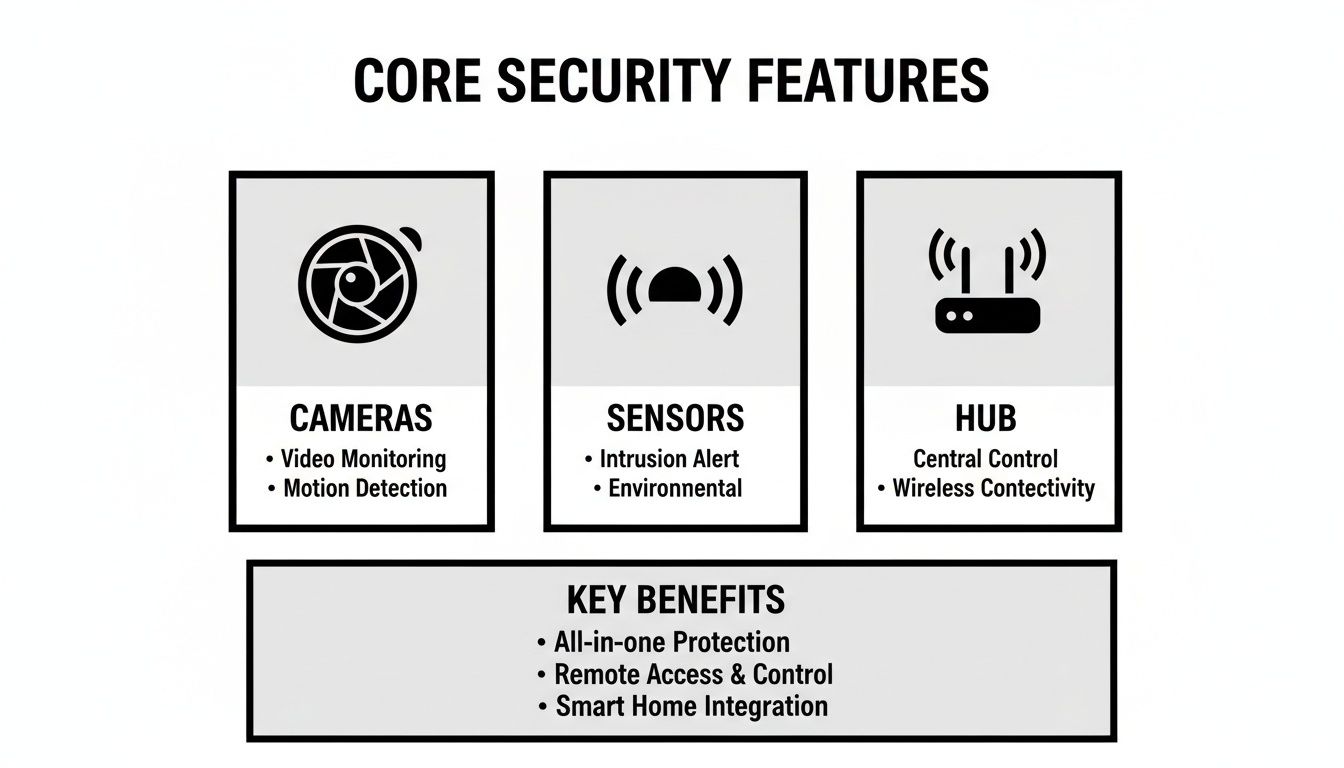
As you can see, cameras often get all the glory, but a truly solid system balances them with reliable sensors for perimeter defense and a stable hub that keeps everything connected.
Security Philosophy: Ring vs. SimpliSafe
For anyone going the DIY route, the decision often boils down to Ring versus SimpliSafe. Their approaches couldn't be more different, and understanding this is the key to picking the right one for your home and your peace of mind.
Ring’s entire world is camera-centric. Its ecosystem is built from the ground up on the idea of visual confirmation, from its iconic video doorbells to a huge lineup of indoor and outdoor cameras. If you’re a homeowner who wants to see what’s happening at all times, Ring is tough to beat. Imagine you live in a busy neighborhood; a Ring setup lets you watch for package deliveries, investigate a strange noise in the backyard, and even tap into the Neighbors app for community alerts. It creates a powerful visual net around your property.
SimpliSafe, on the other hand, builds its security from the inside out with a sensor-first strategy. Its real strength is in locking down every possible entry point. For a multi-story house with tons of windows and doors, this method is often far more practical and affordable than slapping a camera on every corner. You can secure every ground-floor window with a simple entry sensor for a fraction of what multiple outdoor cameras would cost, guaranteeing your perimeter is completely sealed.
Key Takeaway: If your top priority is visual evidence and neighborhood awareness, Ring is a fantastic choice. But if you're more concerned with securing every door and window with reliable, no-fuss sensors, SimpliSafe's approach is probably a better fit.
Installation and Service: Vivint vs. ADT
For those who’d rather leave it to the pros, the choice often comes down to Vivint and ADT. Both offer professional installation and monitoring, but their execution and who they're really for are quite different.
ADT brings over a century of security experience to the table. Their entire service is built on a foundation of trust and reliability, making them the default choice for homeowners who want a traditional, rock-solid security setup without getting tangled up in smart home automation. An ADT installation is meticulous and focuses purely on security—the technicians make sure every sensor is placed perfectly and the system has a flawless connection to their monitoring centers.
Vivint delivers a more modern, premium service that treats security as just one piece of a completely integrated smart home. A Vivint technician doesn't just install alarms; they act more like a smart home consultant. They'll set up your security system, smart locks, thermostat, and lighting to all work together seamlessly. This is for the homeowner who wants their system to automatically lock the doors and turn down the heat when they head out for work.
The market for these pro-installed systems is massive, especially in North America, which accounts for about 37% of the global smart home safety market. Systems from brands like Ring and ADT are already in over 94 million U.S. homes, showing just how common this tech has become. A lot of this growth is fueled by devices like video doorbells—you can learn more in our guide to the best video doorbell cameras—and other cameras that now drive 46% of security revenue worldwide.
User Experience and App Reliability
A security system is only as good as its app. This is what you'll use every single day to arm and disarm, check cameras, and get alerts. A clunky, unreliable app can make even the most expensive hardware a total pain.
Ring’s app is known for being packed with features, especially its timeline view that pulls events from all your cameras into one place. For new users, though, it can sometimes feel a bit overwhelming. It’s powerful, but there's a definite learning curve.
SimpliSafe lives up to its name by prioritizing simplicity. Its app is clean, intuitive, and laser-focused on the core functions: arming, disarming, and checking the system's status. It just works, without any unnecessary clutter.
Vivint’s app gets a lot of praise for its polished design and how smoothly it blends security with smart home controls. You can manage your locks, lights, thermostat, and cameras from a single elegant dashboard. It feels less like a security app and more like a command center for your entire home.
ADT’s app, usually delivered through its ADT Control platform, is robust and reliable but can feel a bit dated compared to the others. It gets the job done but lacks the fluid, modern feel you get from companies that were born as tech-first brands.
Comparing Costs and Contracts
Of course, your financial commitment is a huge factor. DIY systems can save you a bundle, while professional services come with higher upfront costs and long-term contracts. It's a classic trade-off.
- SimpliSafe & Ring: This is where these two really shine. You buy the hardware outright and then choose from affordable, contract-free monitoring plans. This is perfect for renters or anyone who doesn't want to be locked into a multi-year deal.
- ADT & Vivint: These systems typically require a long-term contract (often 3-5 years) which helps subsidize the initial cost of the professional installation and hardware. The monthly fees are higher, but they cover 24/7 professional monitoring, customer service, and sometimes even equipment upgrades. This model is built for people who see security as a long-term, managed service, not a one-time purchase.
At the end of the day, the best system is the one that aligns with your specific life. A renter in a small apartment has completely different needs than a family in a large suburban home, and your choice should absolutely reflect that reality.
Finding the Right Security System for Your Life
Here's the most important thing to know when you start shopping: there is no single "best" home security system. The right system for you is the one that fits so seamlessly into your daily life that you barely notice it's there—until you need it.
Your living situation is the biggest factor. A sprawling suburban home has completely different needs than a city apartment, and what's essential for a family with kids might be useless for someone living alone. Let's break down the practical choices for different lifestyles so you can find a system that feels like it was made for you.
Best Security Systems for Renters
Renting comes with its own rulebook. You need a security system that works without drilling holes, running wires, or locking you into a multi-year contract for a place you might leave in twelve months.
This is where DIY systems are a renter's best friend. Brands like SimpliSafe and Ring Alarm are built for this. Their components are completely wireless and stick on with adhesives, meaning you can secure your entire apartment in under an hour without leaving a single mark.
What really matters for renters:
- It has to be portable. When you move, you just peel off the sensors, pack up the base station, and take it all with you. The modular setup lets you easily adapt it to your next place.
- No contracts. You need the flexibility to pay for professional monitoring month-to-month and cancel whenever you want, no questions asked.
- Damage-free hardware. Stick-on sensors and standalone cameras ensure you won’t have any trouble getting your security deposit back.
Best Security Systems for Families with Children and Pets
For a family, a security system does more than just guard against intruders; it's a tool for managing a busy, and sometimes chaotic, household. It needs to be simple enough for everyone to use, smart enough not to send you a notification every time the dog walks by, and tailored to the realities of life with kids.
Pet-immune motion sensors are a must. They’re smart enough to tell the difference between your 50-pound golden retriever and a person, which dramatically reduces false alarms. I also highly recommend systems that let you create unique PIN codes for your kids, a dog walker, or a babysitter. You get a clear log of who’s coming and going, and you can even limit what they have access to.
For families, the real magic is in the specific, contextual alerts. Think about getting a silent notification on your phone if the medicine cabinet or liquor cabinet is opened. That's a layer of safety that goes way beyond just protecting the front door.
This is where a system like Vivint really comes into its own, thanks to its tight integration of cameras and smart locks. Imagine getting a video clip sent to your phone the second your child uses their code to unlock the door after school. That's peace of mind that a basic alarm just can't offer.
Best Security Systems for Budget-Conscious Homeowners
You don't have to spend a fortune to feel secure. If you're watching your budget, the game is about balancing a low upfront hardware cost with affordable—or even free—monitoring options. Unsurprisingly, DIY systems win here, too.
Companies like Ring and Wyze have made a name for themselves by offering surprisingly good hardware for very little money. You can often get a starter kit with a base station, keypad, and a handful of sensors for less than $200. The long-term savings, though, come from the monitoring plans.
You can absolutely self-monitor your system to avoid monthly fees altogether. You'll get the exact same alerts pushed to your phone as a paid user; you just have to be the one to call 911 if something happens. If you decide you want professional backup, the plans from these brands are much more reasonable, usually starting around $10 to $20 per month with no long-term commitment required.
Understanding the True Cost of Home Security
When you’re shopping for a security system, the price tag on the box is just the first chapter of the story. Think of it as a long-term investment. To really get a handle on the finances, you have to look past the shiny new hardware and figure out the total cost of ownership over a few years. That means adding up the equipment, any installation fees, and the monthly subscriptions that are the lifeblood of the system.
The financial models for the best smart home security systems couldn't be more different. On one side, you have the DIY-friendly players like Ring and SimpliSafe. Their whole game is a lower upfront cost for the gear, which lets you decide later if you want to tack on an affordable, no-contract monitoring plan. Then you have the pros like ADT and Vivint. They often bake the hardware cost right into a long-term contract, which means a higher monthly bill but less of a hit to your bank account on day one.
Deconstructing the Costs: Hardware and Installation
The first bill you’ll see is for the hardware. A basic starter kit usually gets you a base station, a keypad, and a handful of sensors for doors and windows, and that will set you back anywhere from $200 to $600. Start adding a few cameras, a smart lock, or maybe a smoke detector, and that cost can easily sail past $1,000.
Next up is installation. If you go the DIY route, your only cost is an afternoon of your time. These systems are genuinely designed for the average person, using simple adhesive strips and guiding you through the whole process on an app. Professional installation, on the other hand, will typically add $100 to $500 to your initial total, depending on how big and complex your system is. It's an extra cost, for sure, but you're paying for the peace of mind that comes with knowing a pro installed and tested every single component correctly.
The real financial gut-check isn't just about the upfront price. To see the whole picture, you need to calculate the total cost over three years by combining hardware, installation, and all those monthly fees. A system that advertises "free" equipment can easily end up costing you way more over time.
Recurring Fees: Monitoring and Cloud Storage
The monthly subscription is almost always the biggest long-term expense. These fees usually cover two critical services: professional monitoring and cloud storage for your video footage.
- Professional Monitoring: This is what connects your alarm to a 24/7 monitoring center. For $20 to $60 per month, you get a team of people ready to dispatch emergency services. It's the core of a serious security setup, giving you a safety net even when you're away or can't reach your phone.
- Cloud Storage: If you have cameras, you'll need a place to save the recordings. Cloud plans typically run between $3 and $15 per camera each month, although some companies bundle this into their premium monitoring packages.
It’s also worth remembering that a good security system can sometimes pay for itself in other ways. Many insurance companies offer a discount for homes with professionally monitored alarms. Beyond the system itself, it's smart to learn about common Home Insurance Factors that can influence your premiums.
Let's look at how the numbers shake out over three years with two common scenarios.
| Cost Component | DIY System (e.g., SimpliSafe) | Pro-Installed System (e.g., Vivint) |
|---|---|---|
| Upfront Hardware | $400 | $0 (rolled into contract) |
| Installation Fee | $0 | $199 |
| Monthly Fee | $28/month | $55/month |
| 3-Year Total Cost | $1,408 | $2,179 |
As you can see, the system with zero upfront hardware cost ends up being significantly more expensive by the end of a typical contract. The right choice really comes down to your personal finances: would you rather pay more now to save money in the long run, or spread the cost out with a higher monthly payment for a fully managed service?
Your Smart Home Security Questions, Answered
Jumping into the world of smart home security can feel overwhelming. The tech is cool, but what about the real-world stuff? What happens if the power goes out? Who's watching my camera footage? These are the questions that really matter.
Getting clear, straightforward answers is the only way to feel truly confident in your choice. Below, I’ll tackle the most common questions I hear from homeowners, breaking down what you actually need to know.
Do I Really Need Professional Monitoring?
This is probably the biggest decision you'll make, and it boils down to one thing: who responds when an alarm goes off?
Professional monitoring is the classic, set-it-and-forget-it approach. You pay a monthly fee, and in return, a team of professionals is on standby 24/7. If your alarm triggers, they verify the emergency—weeding out false alarms—and dispatch the police or fire department on your behalf. It’s invaluable peace of mind, especially if you're on vacation, in a deep sleep, or just away from your phone.
On the flip side, self-monitoring puts you in the driver's seat. Alerts go straight to your phone, and it's up to you to check your cameras and call 911 if needed. This is a fantastic way to save money, but it requires you to be available and ready to act. There's no right or wrong answer here; it's all about your lifestyle and what lets you sleep best at night.
How Do These Systems Protect My Privacy?
Let's be blunt: putting cameras and microphones in your home requires a massive amount of trust. Reputable security companies understand this and have built their systems with privacy at the forefront.
The technical backbone of this is end-to-end encryption. This scrambles your video feeds and data from the moment they leave your device until you view them, making them unreadable to anyone else. You should also demand two-factor authentication (2FA), which protects your account from being accessed even if someone steals your password. It's a simple but powerful defense.
A feature I've come to really appreciate on indoor cameras is the physical privacy shutter. With a tap in the app, a small cover slides over the lens. It's a simple, visual guarantee that nobody is watching.
Before buying, take five minutes to read the company's privacy policy. If they aren't crystal clear about how they handle your data, walk away.
What Happens If My Power or Wi-Fi Goes Out?
This question gets right to the heart of a system's reliability. A security system that dies during an outage is nothing more than a plastic decoration.
Thankfully, any system worth its salt has redundancies built in. The first is a backup battery, usually located in the main hub. This keeps your sensors and alarms running for hours—often up to 24 hours—after the power cuts out. Consider this a non-negotiable feature.
The second, equally important backup is for your internet connection. Cellular backup allows the system to switch over to a mobile network if your Wi-Fi drops. This ensures it can still communicate with the professional monitoring center and send alerts to your phone. A system without both of these is a system with a critical weakness.
Can I Connect It to My Other Smart Devices?
Absolutely. In fact, this is where a good security system becomes a great smart home hub. The ability to connect your security system with other devices is what unlocks next-level convenience and safety.
Most top brands play nicely with the big ecosystems like Amazon Alexa, Google Assistant, and Apple HomeKit. This lets you create powerful routines. For example, you could set up a "Leaving Home" scene that arms your system, locks the doors, turns off the lights, and lowers the thermostat with a single voice command.
When you're comparing systems, check for specific integrations with the gear you already have, like Philips Hue lights or an August smart lock. If you’re a real tinkerer, look for support for platforms like IFTTT (If This Then That), which lets you create just about any custom automation you can dream up.
At Automated Home Guide, we're committed to helping you navigate the complexities of modern home technology. Explore our expert reviews and in-depth guides to build a safer, more connected home. Find more resources at https://automatedhomeguide.com.












Leave a Reply