
Finding the right router isn't about buying the most expensive box on the shelf. It's about a smart match between the technology you choose and the home you live in. A small apartment with just a laptop and phone can get by with a simple, no-frills router. But a large, multi-story house packed with smart devices needs something far more robust, like a mesh Wi-Fi system. Your internet plan is the final piece of the puzzle.
Your Quick Guide to Choosing the Right Router
Let's cut through the jargon. Think of your router as the traffic cop for your home's internet. In a tiny apartment with only a couple of devices, you've got a quiet, two-lane road. A basic traffic cop can handle that with no problem.
Now, imagine a sprawling smart home with laptops, gaming consoles, security cameras, smart speakers, and a dozen other gadgets all demanding a connection. That's a ten-lane superhighway during rush hour. You're going to need a sophisticated traffic management system to keep everything moving smoothly without constant buffering and dropped connections.
Your decision really boils down to three core things:
- Home Size: How much ground does your Wi-Fi signal need to cover? We're talking square footage, but also walls and floors.
- Device Density: How many devices are fighting for bandwidth at the same time? Be honest—it's probably more than you think.
- Internet Plan: There's no point in paying for gigabit internet if your router can't deliver those speeds.
Find Your Perfect Router Match
To make this dead simple, follow this decision tree. It walks you through the process based on your space, your stuff, and your internet speed.
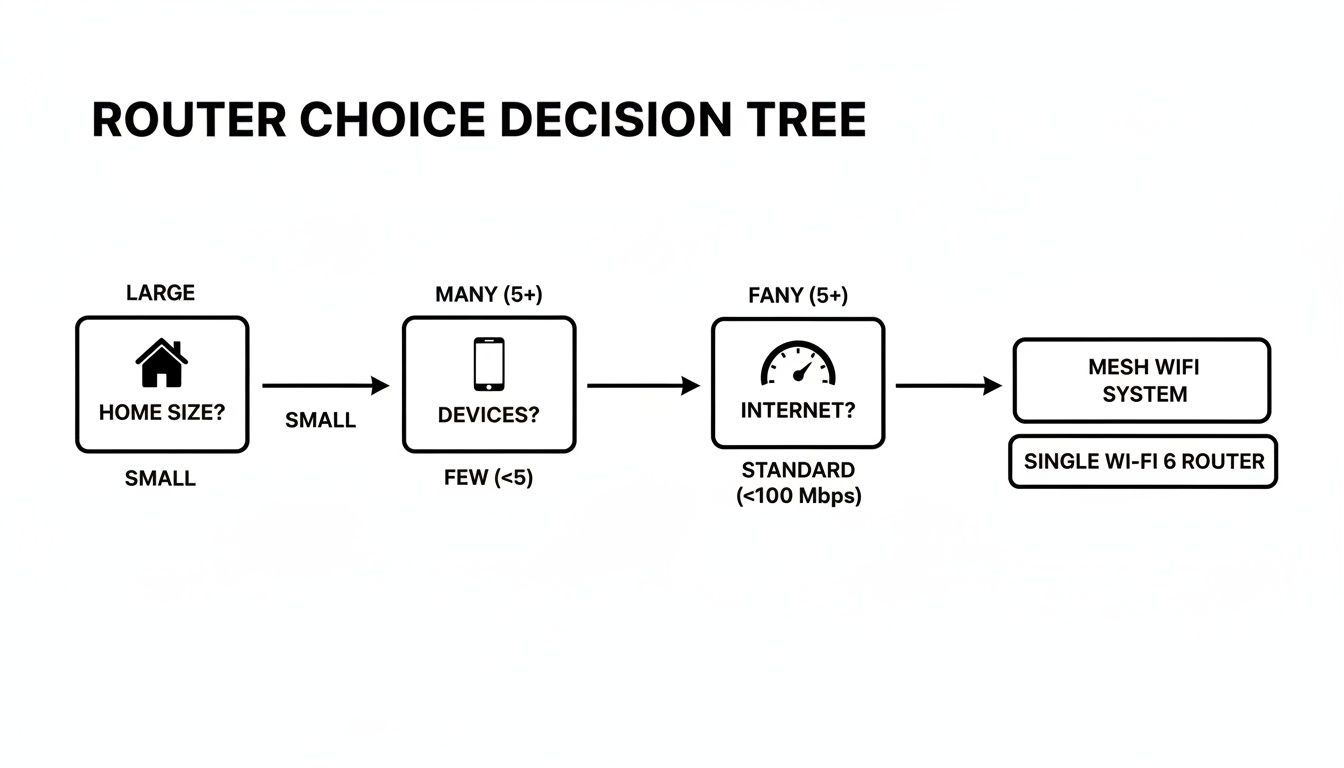
As you can see, the path is pretty clear. The bigger your home, the more devices you have, and the faster your internet, the more you need to lean toward newer technologies like Wi-Fi 6 or a full-blown mesh system.
Key Takeaway: The goal is to find the sweet spot. A $400 mesh system is complete overkill for a 600-square-foot apartment. At the same time, a $60 basic router will be a constant source of frustration in a 3,000-square-foot smart home. Matching the hardware to your actual needs is everything.
To help you pinpoint the right gear, I’ve put together this quick-glance table. It lines up common situations with the router technology that makes the most sense, so you can find your fit in seconds.
Router Recommendations at a Glance
This table quickly matches common household scenarios with the recommended router technology, helping you identify your needs instantly.
| Your Situation | Recommended Router Type | Best For |
|---|---|---|
| Small apartment (under 1,200 sq. ft.), 1-10 devices, basic internet (under 300 Mbps) | Wi-Fi 5 (802.11ac) Dual-Band | Budget-friendly browsing, streaming, and light use. |
| Medium home (1,200 – 2,500 sq. ft.), 10-30 devices, fast internet (300-900 Mbps) | Wi-Fi 6 (802.11ax) Dual-Band | 4K streaming, online gaming, and multiple smart home devices. |
| Large home (over 2,500 sq. ft.), 30+ devices, gigabit internet (1 Gbps+) | Wi-Fi 6/6E Mesh System | Eliminating dead zones in multi-story homes and managing heavy traffic. |
| Tech-heavy user, future-proofing, cutting-edge devices | Wi-Fi 6E Tri-Band | Maximum performance for the latest gadgets, VR, and AR applications. |
This should give you a solid starting point. As you dig deeper, you might also find that specialized devices like portable wireless routers are perfect for travel or setting up a temporary network on the go.
Decoding Wi-Fi Standards and Radio Bands
When you're trying to figure out what type of router you need, the tech specs on the box can feel like you're reading another language. You see terms like "Wi-Fi 6" and "tri-band" everywhere, but what do they actually mean for your Netflix binge or your kid's online gaming? Let's untangle this with a simple analogy.
Imagine your home's Wi-Fi network is a highway system. The different Wi-Fi standards—like Wi-Fi 5, Wi-Fi 6, and Wi-Fi 6E—are like different generations of highway design. Each new version is built to handle more traffic, move it faster, and do it all more efficiently.
Understanding Wi-Fi Generations
Think of each new standard as a major upgrade to our data highway, designed to clear up the congestion that slows everyone down.
Wi-Fi 5 (802.11ac): This is the reliable two-lane highway that’s served us well for years. It’s perfectly fine for a few cars, but it gets jammed during rush hour—like when everyone in the house is streaming, gaming, and video calling at the same time. Everything grinds to a halt.
Wi-Fi 6 (802.11ax): Now we're talking about a modern superhighway. It has more lanes, smarter traffic-management tech, and a much higher speed limit. This means a whole lot more "cars" (your devices) can travel at top speed without causing a massive traffic jam.
Wi-Fi 6E: This is Wi-Fi 6, but with a brand-new, exclusive express lane. This freshly paved lane, known as the 6 GHz band, is reserved for the newest compatible devices. They get to bypass all the regular traffic for an incredibly fast and interference-free ride. You can take a closer look at these technologies in our guide on the different types of Wi-Fi for your home.
These upgrades aren't just for show; they're becoming essential. The market for Ethernet switches and routers is expected to jump from $22.32 billion in 2025 to $37.52 billion by 2032, largely because of the explosion in smart home devices. Your average router starts to buckle under the strain of just 10-20 devices, but many smart homes will soon have 25+ connected gadgets, making older Wi-Fi standards a serious bottleneck.
Single, Dual, and Tri-Band Routers Explained
So, if Wi-Fi standards are the design of the highway, then frequency bands are the actual roads your data travels on. A router can have one, two, or even three of these roads running at the same time.
The two main roads are the 2.4 GHz and 5 GHz bands.
Think of the 2.4 GHz band as a scenic country road. It has fantastic range, easily passing through walls to cover your whole house, but the speed limit is pretty low. It’s perfect for devices that just need a connection, not blistering speed, like smart plugs or your thermostat.
The 5 GHz band is the high-speed expressway. It delivers significantly faster speeds with less interference, making it the go-to for demanding tasks like 4K streaming and competitive online gaming. The catch? Its range is shorter, and the signal struggles more with walls and other obstacles.
A router's "band" count tells you how many separate networks it can create at once. This is crucial for reducing congestion and ensuring every device gets the performance it needs without slowing down others.
This brings us to the different types of routers based on these bands:
- Single-Band Router: This is like a one-lane road. It only operates on the 2.4 GHz band, forcing all your devices to share a single, slow lane. This technology is pretty outdated and best avoided if you can.
- Dual-Band Router: The standard for most homes today. It gives you two roads: one 2.4 GHz country road and one 5 GHz expressway. This lets you put your high-performance devices on the fast lane while your other gadgets cruise along on the other.
- Tri-Band Router: This is the ultimate setup, offering three separate roads: one 2.4 GHz band and two separate 5 GHz bands. It's like having a dedicated HOV lane on your expressway, which is a lifesaver for homes packed with dozens of devices all fighting for bandwidth.
Choosing Your Ideal Router Setup
Now that we've covered the different Wi‑Fi standards, let's talk about the hardware itself. You essentially have three main choices: a traditional single router, a modern mesh Wi‑Fi system, or a simple modem-router combo. Each one is built for a different job, and picking the right one is the key to a happy, buffer-free home network.
The Traditional Single Router
Think of a traditional router like a big, powerful lighthouse. It sits in one spot and beams a strong signal outward. If you're close to it, the light is bright and clear, giving you fantastic speed. But the farther you get, the dimmer that light becomes, until you end up in "dead zones"—those frustrating spots in the back bedroom or basement where the Wi‑Fi just disappears.
This setup works just fine for smaller, single-story homes and apartments. A good traditional router can deliver incredible speeds and a ton of advanced features without the higher price tag of a mesh system, making it a great pick if you just need to cover a concentrated area.
Mesh Wi‑Fi for Whole-Home Coverage
Now, imagine a mesh system. Instead of one big lighthouse, it’s like having a series of smart, interconnected light bulbs placed all around your house. Each of these "nodes" talks to the others, creating a seamless blanket of strong Wi‑Fi that completely eliminates those dark corners.
You can walk from your office to the garage on a video call, and your phone will automatically and seamlessly switch to the strongest node without you ever noticing a hiccup. This makes mesh the undisputed champion for larger homes, multi-story houses, or any place with a tricky layout where a single router just can’t cut it.
The real magic of a mesh system is that it creates a single, unified network name (SSID) for your entire home. Your devices just see one network and intelligently connect to the best signal source, giving you a truly seamless experience as you move around.
It's this kind of wall-to-wall coverage that leads so many people to look into a proper wireless mesh network setup to finally kill their Wi‑Fi dead zones.
Modem-Router Combos: The All-in-One Option
Finally, there’s the modem-router combo, which is often the box your Internet Service Provider (ISP) gives you. This is the all-in-one appliance of the networking world—it’s both the modem that brings the internet into your home and the router that turns it into Wi‑Fi, all packed into a single device.
The main appeal here is simplicity. Fewer boxes, fewer cables, and a straightforward setup. But that convenience comes at a cost. Combo units are almost always a compromise, lacking the powerful features, top-tier performance, and customization you get with a dedicated, standalone router.
Worse yet, you’re stuck. When a new, faster Wi‑Fi standard comes out, you can't just upgrade your router; you have to replace the whole thing. That lack of flexibility makes combo units a poor long-term choice, especially if you're building a smart home or need a high-performance network for gaming or streaming.
When Your Home Network Scales Up
This choice becomes even more critical as our homes get smarter. We’re not just connecting a couple of laptops anymore. What we’re seeing is that personal tech is starting to look more like a small office setup. A standard consumer router often starts to buckle under the strain of more than 10-20 connected devices, a number that's easy to hit with smart speakers, lights, and cameras.
For homes over 2,000 sq. ft., a tri-band Wi-Fi 6 router with MU-MIMO is the way to go. It’s built to juggle up to 50 devices at once, delivering speeds of 4.8 Gbps and cutting latency by as much as 75%. It's the kind of power that keeps everything running smoothly, from 4K streaming to your security cameras. To dig deeper, you can explore insights on enterprise routers and their market trends.
Essential Router Features That Matter
Once you look past the Wi-Fi standard and the physical design, a router's spec sheet is where the real magic happens. These are the features that determine how a router actually performs in the chaos of a busy home. They're the secret sauce that manages traffic, prioritizes what’s important, and keeps your network locked down.
Getting to know these features is the key to choosing a great router, not just a good one. They directly impact how your network juggles dozens of devices and demanding tasks. Without them, even a router that boasts incredible speeds can feel sluggish when everyone is online at once.
To make sense of the technical jargon, here’s a quick-glance table breaking down the most important features.
Key Router Feature Breakdown
| Feature | What It Does (Simple Analogy) | Why You Need It |
|---|---|---|
| MU-MIMO | A smart delivery truck that serves multiple houses (devices) at once, instead of one at a time. | Prevents slowdowns and lag in homes with lots of connected devices all vying for bandwidth. |
| OFDMA | A delivery truck that carries packages for different houses and drops them all off in one efficient trip. | Drastically improves efficiency for smart home gadgets and other small-data devices, freeing up the network. |
| QoS | A VIP express lane on your internet highway, letting you choose which traffic gets to go first. | Ensures your video calls or gaming sessions stay smooth, even when others are streaming or downloading. |
| WPA3 Security | The latest, toughest digital lock for your network's front door. | Provides critical protection against modern hacking threats, keeping your personal data and smart devices safe. |
| Ethernet Ports | The physical plug-in points for a faster, more stable wired internet connection. | Gives stationary devices like gaming consoles, PCs, and smart TVs the most reliable performance possible. |
Understanding these core technologies helps you see beyond the marketing and focus on what will actually improve your day-to-day experience.
How Your Router Manages Heavy Traffic
One of the biggest leaps forward in modern Wi-Fi is MU-MIMO, which stands for "Multi-User, Multiple Input, Multiple Output." It's a lifesaver for any home where multiple people are streaming, gaming, and working online simultaneously.
Think of an old router like a delivery driver who can only carry one package to one house at a time. It’s a slow, one-by-one process that creates a frustrating traffic jam for everyone else waiting for their data.
MU-MIMO upgrades that driver to a modern delivery truck. It can serve multiple houses—or devices—on the same run. This means your router can talk to your laptop, smart TV, and phone all at once, which dramatically cuts down on lag and keeps the network feeling fast for everyone.
Another crucial tool for taming a busy network is Quality of Service (QoS). It’s basically an express lane for your internet traffic. QoS lets you tell your router what’s most important.
Want to make sure your work video call doesn't freeze when your kids start streaming 4K movies? That's what QoS is for. It gives priority to the applications you choose, guaranteeing they get the bandwidth they need.
Together, these features create a smarter, more resilient network that won’t buckle under pressure.
Physical Ports and Connectivity
While we all love the freedom of wireless, don't overlook a router's physical ports. For certain devices, a hardwired connection is still the undisputed king of speed and stability.
The most important connections are Ethernet ports. Plugging a device directly into your router provides a rock-solid link that Wi-Fi can't always match. Here's what to look for:
- Gigabit Ethernet Ports: This is the modern standard, delivering speeds up to 1,000 Mbps. They're essential for anything that needs a fast, reliable connection and doesn't move, like a gaming console, desktop PC, or a 4K streaming box.
- Multi-Gig Ports (2.5G or 10G): Found on more premium routers, these ultra-fast ports are for power users. They’re perfect if you have an internet plan faster than 1 Gbps or for connecting a high-speed Network Attached Storage (NAS) device for quick file transfers.
Many routers also come with USB ports, which can be surprisingly handy. You can plug in an external hard drive to create a simple media server or connect a printer to make it accessible to everyone on the network.
Security Protocols That Protect Your Home
In a world full of connected gadgets, your router's security is your first line of defense. The protocol it uses to encrypt your traffic is absolutely critical.
Today's gold standard is WPA3. It's a massive security upgrade over the older WPA2 protocol, offering far stronger encryption and better protection against hacking attempts. When shopping for a new router, make sure it supports WPA3—it’s a non-negotiable feature for keeping your smart home and personal data safe.
If you want to dive deeper into securing your network, check out our complete guide on how to protect Wi-Fi from hackers.
Matching a Router to Your Real-World Needs
Tech specs and feature lists are great, but they don't tell the whole story. The real test is how a router performs in your house, with your devices, and for the things you actually do online. To help you answer the question, "what type of router do I need?", let's walk through a few common scenarios.
Think of these as profiles. You'll probably see a bit of your own situation in one of them, giving you a much clearer starting point for what to look for.
Scenario 1: The Apartment Dweller
Let's start with Alex. Alex lives in a 750 sq. ft. one-bedroom apartment. The internet is mostly for kicking back with shows on a smart TV, working from home on a laptop, and scrolling on a phone. All told, there are about 10 devices connected to the Wi-Fi, and the internet plan is a solid 300 Mbps.
- Biggest Challenge: Getting a reliable connection without paying for a bunch of high-end features that will never get used.
- Best Router Match: A good dual-band Wi-Fi 6 router.
- Why It Works: A Wi-Fi 6 router is more than capable of handling that 300 Mbps speed and has plenty of breathing room for all 10 devices. The dual-band setup is perfect here—the smart TV and work laptop can jump on the faster 5 GHz band, leaving the 2.4 GHz band for the phone and other less critical gadgets. A mesh system would be total overkill.
This is the sweet spot between modern performance and affordability. It delivers smooth 4K streaming and stable video calls without costing a fortune.
Scenario 2: The Suburban Family
Now, let's head over to the Miller family's place. They're in a two-story, 2,500 sq. ft. house with three kids. Their digital life is pure chaos. Dad works from home, Mom manages an army of smart home devices (lights, thermostat, security cams), and the kids are always gaming, streaming, or on a school video call. They have a gigabit internet plan and north of 40 devices all fighting for a signal.
- Biggest Challenge: Wiping out those dreaded Wi-Fi dead zones upstairs and in the basement, all while trying to keep the network from grinding to a halt.
- Best Router Match: A tri-band Wi-Fi 6E mesh system.
- Why It Works: A single router, no matter how beefy, just can't punch a signal through that much space. A mesh system with at least three nodes will blanket the entire home, from the front door to the back patio, with strong, consistent Wi-Fi.
The tri-band feature is the real game-changer. One of the 5 GHz bands can serve as a dedicated, private highway for the mesh nodes to talk to each other, which keeps everything running at top speed. Then, the new 6 GHz band on Wi-Fi 6E acts as a clean, interference-free express lane for their newest, most powerful gear, like a new gaming PC or VR headset.
As homes get smarter, this kind of robust network is becoming less of a luxury and more of a necessity. Some projections show the average smart home could have over 50 connected devices by 2025, but a standard router can really only juggle 10 to 20 at a time. For a family this connected, a mesh system isn't just a good idea—it's the only way to keep things running smoothly now and in the future.
Scenario 3: The Hardcore Gamer and Streamer
Finally, meet Chloe. She's a competitive gamer who streams her gameplay live. She lives in a medium-sized townhouse and has an ultra-fast fiber internet plan. For Chloe, every single millisecond of latency—or lag—matters. While her roommate might be streaming movies and her smart plugs are doing their thing, Chloe's gaming PC needs to be the undisputed king of the network.
- Biggest Challenge: Getting the absolute lowest latency and a rock-solid connection, even when the rest of the network is busy. A stable internet connection for streaming is non-negotiable, which makes the router choice critical.
- Best Router Match: A high-performance gaming router with advanced Quality of Service (QoS) controls.
- Why It Works: This is exactly what gaming routers were built for. They typically have more powerful processors, extra RAM, and specialized software designed to crush lag.
The killer feature for Chloe is the advanced QoS engine. It gives her incredible control over her network traffic:
- By Device: She can literally drag and drop her gaming PC to the top of the priority list, telling the router to serve it first, no matter what.
- By Application: She can also tell the router that gaming traffic itself, or data from a specific streaming platform, gets to cut to the front of the line.
This level of control means her game won't stutter, even if her roommate decides to download a massive file in the other room. Many gaming routers even have dedicated "gaming" Ethernet ports that automatically prioritize anything plugged into them, adding yet another layer of performance.
Frequently Asked Questions About Choosing a Router
Even after digging into all the technical specs, you might still have a few questions floating around. That’s completely normal. Picking the right router means navigating some practical hurdles and common points of confusion. Let's clear up the most frequent questions so you can feel confident in your choice.
We'll tackle everything from whether your internet provider will play nice with a new router to how often you should upgrade and what the setup process actually looks like these days.
Can I Use Any Router with My Internet Provider?
This is easily one of the most common questions, and for good reason. The short answer is yes, but there’s a small catch. You can use just about any router you want, but you must use a modem that's compatible with your provider's network. People often mix these two up, but they do completely different jobs.
- The Modem: Think of the modem as a translator. It takes the signal from your internet provider—whether it's cable, fiber, or DSL—and converts it into a digital signal your network can use. Your Internet Service Provider (ISP) gets to decide which modems work on their system.
- The Router: The router takes that single internet connection from the modem and creates your home Wi-Fi network. It’s what lets all your devices—laptops, phones, smart TVs—get online at the same time.
So, while the ISP dictates the modem, the router is all your choice. You just connect your new router to their approved modem with a standard Ethernet cable. This is precisely why most experts recommend avoiding the modem/router combo units that ISPs love to rent out. They lock you into their hardware and make it impossible to upgrade your Wi-Fi without their permission.
Pro Tip: Before buying anything, check your ISP's website for their list of approved modems. Once you have a compatible modem, you're free to buy a high-performance router that actually meets your needs, instead of just settling for the basic box they give you.
How Often Should I Upgrade My Router?
There's no hard-and-fast rule here, but a good guideline is to think about an upgrade every three to five years. Network technology evolves quickly, and what was top-of-the-line a few years ago can become a bottleneck today.
Instead of just marking your calendar, pay attention to these tell-tale signs that it's time for a new router:
- You're not getting the speeds you pay for. Did you upgrade to a gigabit internet plan but your Wi-Fi still feels sluggish? Your old router is almost certainly the culprit.
- You're dealing with constant buffering and dropped connections. An aging router just can't keep up with the demands of a house full of smart devices, leading to frustrating lag during movie night or dropped video calls.
- A new Wi-Fi standard has gone mainstream. When a major update like Wi-Fi 6 or Wi-Fi 7 becomes common, upgrading lets you tap into massive improvements in speed, efficiency, and the ability to handle more devices.
- Your router's security is outdated. If your router doesn't support modern security protocols like WPA3, it's leaving your entire home network vulnerable.
Upgrading isn’t about chasing shiny new tech; it's about making sure the foundation of your connected home is solid, stable, and secure.
Is Setting Up a New Router Difficult?
A decade ago, setting up a router felt like you needed an IT degree. It usually involved a clunky web interface filled with confusing jargon and a lot of trial and error. Thankfully, those days are long gone.
Modern routers are designed to be incredibly simple to set up, and most people can get online in just a few minutes. The secret? Smartphone apps.
Nearly every major router brand now has a sleek, intuitive app that walks you through the entire process. It typically goes like this:
- Plug everything in. Connect the new router to your modem with an Ethernet cable and plug it into a power outlet.
- Download the app. A quick scan of a QR code on the box usually takes you right to the app store.
- Follow the on-screen steps. The app finds your new router automatically and guides you through the fun part: naming your Wi-Fi network and setting a strong password.
All the complicated configuration happens in the background. It's designed so that anyone can do it, no matter their technical skill level. If the fear of a frustrating setup has been holding you back, you can rest easy knowing that it's now a refreshingly painless experience.
At Automated Home Guide, we are dedicated to helping you make sense of the technology that powers a smarter, more connected home. Explore our guides and articles to find the solutions that best fit your lifestyle. Visit us at https://automatedhomeguide.com.












Leave a Reply