

Ready to finally ditch the old-fashioned light switch? When you automate house lights, you're combining smart hardware—like bulbs or switches—with a central brain to create schedules, scenes, and reactions that fit your life. I'll walk you through the whole process, from picking the right gear to programming your first "movie night" scene.
Your First Step Into Smart Home Lighting
Moving from a simple flip switch to an automated system completely changes the feel of your home, making it a more responsive and intuitive space. Picture this: lights that gently fade in to wake you up, automatically dim when you start a movie, or pop on to welcome you home as you pull into the driveway. This is about more than just a cool gadget; it's about making your home work for you.
Automating your lighting brings real, tangible benefits that go way beyond just telling Alexa to turn off the kitchen light. It’s a practical upgrade that pays off in a few key ways.
The Growing Appeal of Smart Lighting
You're definitely not alone in thinking about this upgrade. The global smart lighting market is projected to explode from USD 34,430.6 million in 2025 to an incredible USD 127,455.2 million by 2032. It's becoming a standard feature in modern homes, with over 40% of new builds in the U.S. now including IoT lighting systems. Some estimates even show it can boost a home's property value by 5-10%.
Here’s a quick look at the core advantages you can expect when you automate your home's lights.
Key Benefits of Automated Home Lighting
| Benefit Category | Key Advantage | Real-World Example |
|---|---|---|
| Enhanced Security | Creates the illusion of an occupied home. | While you're on vacation, lights in the living room and bedroom turn on and off on a randomized schedule. |
| Increased Comfort | Effortlessly sets the perfect mood for any activity. | Your lights automatically shift to a warm, soft glow at 8 PM to help you wind down for the evening. |
| Energy Savings | Ensures lights are only on when they need to be. | A motion sensor in the pantry turns the light on when you enter and off 60 seconds after you leave. |
| Greater Accessibility | Provides easy control for everyone. | Someone with limited mobility can turn off all the downstairs lights from their bed using a simple voice command. |
These are just a few examples, but they show how smart lighting quickly becomes an indispensable part of daily life.
Key Takeaway: Automating your lights is one of the most rewarding entry points into the smart home world. It’s a project with a relatively low barrier to entry that delivers immediate, noticeable improvements to your daily routine, security, and energy bills.
This journey starts with understanding the basic building blocks. For a wider view of what's possible, our guide on setting up a smart home is a great place to get your bearings.
It's also natural to think beyond just the bulbs. This fantastic guide to modern ceiling fans with smart home integration shows how you can loop other fixtures into your ecosystem for a truly connected home. Let's get started.
Choosing Your Gear: Smart Bulbs vs. Smart Switches
So, you're ready to automate your home's lighting. The very first decision you'll make is also one of the most important: are you going with smart bulbs or smart switches? This choice really sets the stage for your entire setup, impacting everything from the initial installation to how you and your family interact with the lights every single day.
Both get you to a smarter home, but they take very different routes.
Smart bulbs are the fastest and easiest way to get started. You literally just unscrew your old, "dumb" bulb and screw in the new smart one. It's a fantastic option for renters who can't touch the wiring, or for anyone who just wants to experiment with smart lighting in a single lamp or room without a big commitment.
Smart switches, on the other hand, are a more permanent, baked-in solution. They completely replace your existing wall switches, giving you smart control over the entire fixture while keeping that familiar physical switch on the wall. This is a game-changer for keeping things simple for guests or family members who aren't always going to pull out their phone to turn on a light.
The Core Differences in Daily Use
The real difference comes down to one simple thing: the wall switch.
With a smart bulb, the light switch on the wall has to stay in the "on" position at all times. If someone flips it off out of habit, the bulb loses power and all its smarts go with it. It's offline. For some households, this is a minor hiccup; for others, it's a constant source of frustration.
Smart switches completely sidestep this problem. Because the switch itself is the smart device, it always has power and is ready to go. You can flick the switch on the wall, use a voice command, or tap a button in an app—it all works, and everything stays in sync. It just feels… natural.
This quick flowchart can help you visualize which path makes more sense for what you're trying to achieve.
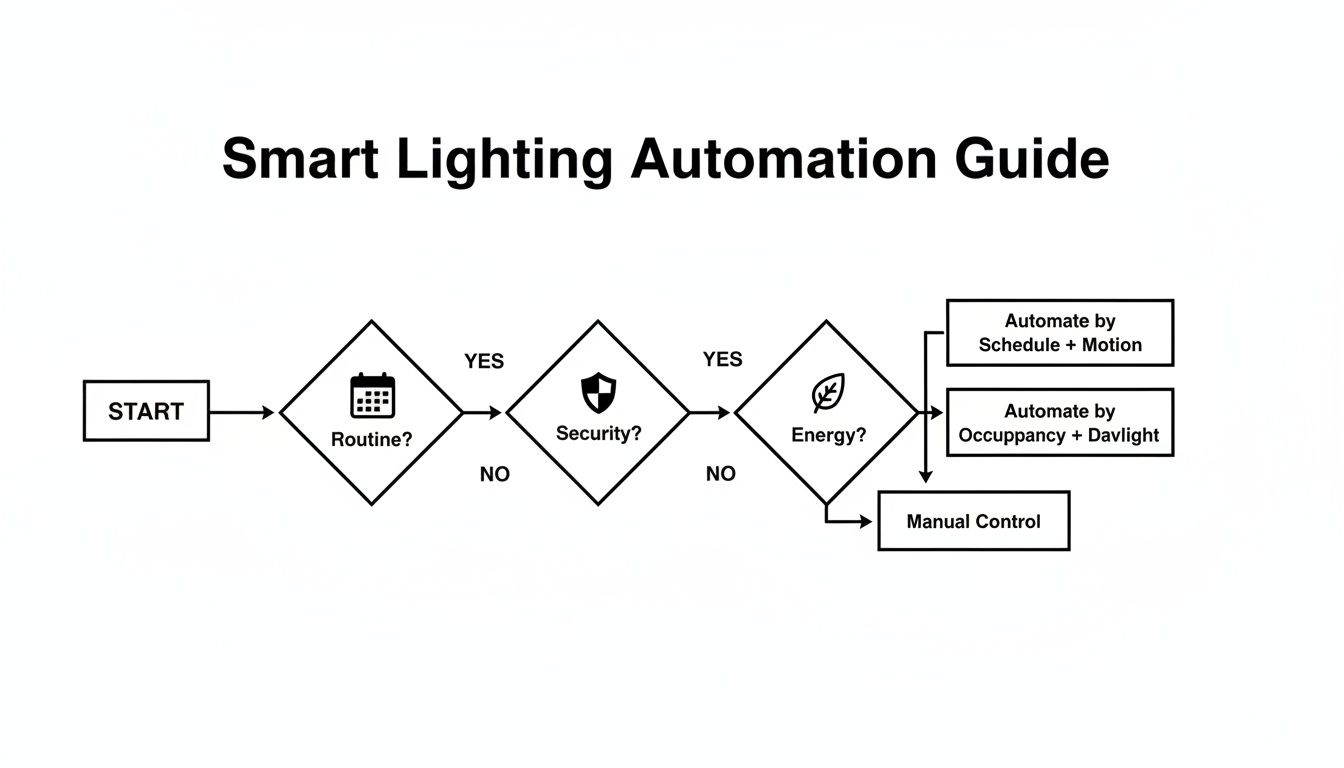
As you can see, if you can't live without a physical switch that always works, smart switches are your answer. But if you're all about adding vibrant color or just want the simplest installation possible, smart bulbs are tough to beat.
Installation and Fixture Compatibility
Let's talk about getting this stuff installed. As I mentioned, smart bulbs are truly plug-and-play. If you can change a lightbulb, you can install a smart bulb. It takes less than a minute.
Smart switches demand a bit more respect. You'll need to kill the power at the circuit breaker and get comfortable with some basic wiring. It's a very doable weekend project for a confident DIYer, but it does require you to know what you're doing.
A Quick Word on Safety: Seriously, always turn the power off at the breaker before you touch any electrical wiring. If you feel even a little bit hesitant, call a professional electrician. It’s a small price for your safety and peace of mind.
You also need to think about your light fixtures. Smart bulbs are perfect for a table lamp or a single-bulb pendant light. But what about your kitchen ceiling with eight recessed lights? Buying eight smart bulbs gets expensive fast. In that situation, a single smart switch controlling the whole circuit is a much smarter—and more economical—move.
Cost and Scalability Considerations
The upfront cost can swing dramatically based on which route you take. Imagine you want to automate a living room with one floor lamp and a ceiling fixture that has four bulbs.
- The Smart Bulb Plan: You'd need five separate smart bulbs. The upside is you can start small, maybe with just the lamp, and buy the others later.
- The Smart Switch Plan: You'd buy one smart switch to control the four ceiling lights. For the lamp, you'd still need a smart bulb or a smart plug.
To help you decide, I've put together a simple head-to-head comparison.
Smart Bulbs vs. Smart Switches: A Head-to-Head Comparison
Choosing between bulbs and switches depends heavily on your specific home and habits. This table breaks down the key differences to help you find the perfect fit.
| Feature | Smart Bulbs | Smart Switches |
|---|---|---|
| Best For | Renters, adding color, single-light fixtures (like lamps), easy setup. | Homeowners, multi-bulb fixtures (e.g., recessed lighting), keeping wall control. |
| Installation | Super easy. Just screw it in like a normal bulb. | Requires basic electrical wiring. A professional is recommended if you're unsure. |
| Cost | Low entry cost per bulb, but gets pricey for rooms with many lights. | Higher upfront cost per switch, but often cheaper for fixtures with multiple bulbs. |
| Usability | Can be confusing for guests; the physical switch must always be left on. | Works just like a normal switch, providing both smart and manual control. |
| Features | The main source for color-changing and tunable white light options. | Can control any dimmable bulb connected to it, but doesn't add color. |
In the end, there's no single right answer here. Smart bulbs give you incredible flexibility and fun features like millions of colors, making them ideal for setting a mood. Smart switches offer a rock-solid, integrated solution that blends into your home's wiring for a seamless and intuitive experience.
Honestly, many of the best smart homes I've seen use a hybrid approach—smart switches for overhead lighting and smart bulbs in lamps for accent and color. It's all about using the right tool for the job.
Understanding Your System's Brain: Hubs and Protocols
So, you've decided between smart bulbs and smart switches. Now for the next layer: how will all these devices actually talk to each other? This is where hubs and protocols come in. They’re the central nervous system of your smart lighting, the invisible language that makes sure when you tap a button on your phone, a light across the house actually turns on.
Think of it as the behind-the-scenes traffic controller for every command you issue. Getting this part right determines how reliable your lights are, how far your network can reach, and whether your automations still work when the internet goes down. It’s a crucial piece of the puzzle.
Wi-Fi: The Simplest Starting Point
The most common on-ramp to smart lighting is your home's Wi-Fi network. A ton of smart bulbs and switches are built to connect directly to your router, which makes getting started incredibly simple. You just screw in the bulb, connect it to Wi-Fi using the manufacturer's app, and you're good to go.
This approach is perfect if you're just dipping your toes in or automating a single room. No extra hardware means you keep costs down and setup is a breeze. But there’s a catch.
As you start adding more and more devices—not just lights, but thermostats, cameras, and smart speakers—you can quickly overwhelm your router. Every single device is fighting for bandwidth, which can lead to laggy responses or, even worse, devices randomly dropping offline. This is exactly why specialized languages were created just for smart home gear.
Zigbee and Z-Wave: Dedicated Smart Home Networks
This brings us to Zigbee and Z-Wave. These are low-power wireless protocols engineered specifically for home automation. Instead of piggybacking on your already-crowded Wi-Fi, they create their own independent mesh network.
This is a game-changer for a few reasons:
- Rock-Solid Reliability: Because they operate on a separate network, your smart lights aren't competing with your Netflix stream. Commands are faster and far more consistent.
- Massive Range: In a mesh network, every powered device (like a smart switch or plug) acts as a signal repeater. This extends the network's reach, easily covering large homes where Wi-Fi might have dead spots.
- Works Without Internet: Since many of your rules and schedules are stored locally on the hub, they'll keep working even if your internet connection drops. A motion sensor can still trigger a hallway light instantly, no internet required.
To use Zigbee or Z-Wave devices, you will need a central smart home hub. This is a small device that acts as a translator, bridging their dedicated network to your Wi-Fi so you can control everything from your phone.
Expert Insight: I like to think of a hub as an air traffic controller for the smart home. It manages all the signals from your devices, ensuring commands are executed instantly and reliably without causing a logjam on your main Wi-Fi network.
Choosing Your Ecosystem Controller
The final piece of the puzzle is the platform you'll use to run the show—the app on your phone or the voice assistant you speak to. The big three players here are Amazon Alexa, Google Home, and Apple HomeKit.
These platforms are like universal remotes, letting you group devices from totally different brands into a single, cohesive system. For instance, you can create a "Movie Night" scene that dims your Philips Hue bulbs and turns on a lamp connected to a Lutron smart switch, all with one command.
Many of today's smart hubs, like those built into newer Amazon Echo devices or offered by Samsung SmartThings, come with Zigbee and Z-Wave radios already inside, making setup that much easier.
As you shop for gear, just make sure to check for compatibility with your chosen ecosystem. For a deeper dive, you can learn more about the critical differences between each smart home protocol and figure out which is best for you.
Ultimately, understanding these core technologies helps you build a system that works together seamlessly, not just a random collection of gadgets. If you're starting small, Wi-Fi is fine. But if you want a powerful, whole-home system that you can expand over time, a hub-based setup with Zigbee or Z-Wave is the way to go.
Bringing Your Smart Home to Life with Scenes and Routines
Alright, the hardware is in, everything’s connected, and you’ve moved past the technical grunt work. Now for the fun part. This is where you get to be creative and turn that collection of smart gadgets into a home that actually feels smart—a responsive, intuitive environment that works for you.
We're talking about designing scenes and routines. These are the tools that make your daily life smoother, more comfortable, and, let's be honest, a little bit magical.
This is the payoff for all your effort. You’re about to craft a home that anticipates what you need instead of just waiting for a command. Let's dig into how to make these automations happen.
The Power of Scenes: One Command, Multiple Actions
Think of a scene as a lighting "snapshot" for a specific activity or mood. It's a preset configuration for multiple lights that you can fire up with a single tap or voice command.
Instead of barking a series of commands at your voice assistant—"dim the living room to 20%," "turn off the kitchen," "set the hallway to 10%"—you can bundle all those actions into a single scene called "Movie Night." One command, and the whole room changes.
Here are a few practical ideas to get you started:
- Focus Mode: Your office light snaps to a bright, cool white to help you concentrate.
- Dinner Time: The overhead dining room lights dim to 50%, and a nearby lamp shifts to a warm, inviting glow.
- Good Night: This one command turns off all the main floor lights, dims the bedroom lights to a soft 5%, and maybe switches on a dim hallway nightlight.
You'll build these scenes right inside your smart home app, whether that's Alexa, Google Home, or Apple HomeKit. You just pick the lights you want, tweak their brightness and color until they're perfect, and give the scene a name you'll remember.
A well-designed scene isn't just a shortcut; it's about crafting an atmosphere. The goal is to set the perfect mood for any moment, instantly and effortlessly.
The real impact here is huge. A good setup can automate up to 90% of your daily lighting adjustments. When you tie this into security, homes with automated dusk-to-dawn lighting are 300% less likely to be targeted by burglars. Even your well-being gets a boost; systems that mimic natural daylight can cut fatigue by 20-30%. You can explore more data on the smart lighting market to see the full picture.
From Manual Triggers to True Automation with Routines
If scenes are the "what," then routines are the "when" and "why." A routine takes one of your awesome scenes and triggers it automatically based on a specific condition. You don't have to lift a finger. This is where you truly automate your house lights.
Think of a routine as a simple recipe: "If this happens, then do that." The "if" is your trigger, and the "then" is the action, which is often just activating one of the scenes you already created.
Triggers That Power Your Routines
The possibilities for triggers are nearly endless, but they mostly fall into a few key categories.
1. Time and Day Schedules
This is the most straightforward kind of automation. You're simply telling your lights what to do and when to do it.
- Sunrise Wake-Up: On weekdays at 6:30 AM, your bedroom lights slowly brighten over 15 minutes, easing you awake like a natural sunrise. No more jarring alarms.
- Evening Wind-Down: Every night at 9:00 PM, the living room lights automatically shift to a warmer, softer tone. It’s a subtle cue to your brain that it’s time to relax.
- Porch Light Duty: Your front porch light clicks on at sunset and off at sunrise. Every single day. You never have to think about it again.
2. Location-Based Triggers (Geofencing)
Your smartphone's location is a surprisingly powerful trigger for making your home feel responsive.
- Welcome Home: When your phone senses you're a couple of blocks away, the entryway and kitchen lights turn on. You'll never walk into a dark house again.
- Goodbye Automation: The moment the last person's phone leaves the designated home area, all the lights automatically switch off to save energy.
3. Sensor-Based Triggers
This is where your home starts to feel genuinely intelligent. Motion detectors, contact sensors, and other gadgets let your lights react to what's happening in the physical world, in real-time.
- Nighttime Pathway: A motion sensor in the hallway detects movement between 11 PM and 6 AM. It doesn't blast you with light; instead, it brings the hallway lights up to a very dim 10%—just enough to see your way to the bathroom without blinding you.
- Pantry and Closet Convenience: This is one of my personal favorites for its sheer simplicity. A small contact sensor on the pantry door turns the light on the instant you open it and off the moment you close it.
4. Voice Commands
While not fully "automated" in the hands-off sense, a simple voice command is often the quickest way to kick off a complex routine.
- "Hey Google, I'm home" can be your trigger for a routine that not only turns on the lights but also adjusts the thermostat and starts playing your favorite Spotify playlist.
The real magic happens when you start combining these triggers. My advice? Start simple. Create one or two basic routines, like a morning wake-up or an evening wind-down. Live with them for a bit, see what you like, and then build from there as you discover new ways to make your home work for you.
Boosting Security and Saving on Energy Bills
Automating your home's lighting is about so much more than the "cool factor." It's one of the most practical upgrades you can make, turning your house into a smarter, safer, and more energy-efficient space. With just a few well-planned automations, you can make a real dent in your electricity bills and gain some serious peace of mind. We're not just talking about basic timers here; this is about creating a dynamic system that truly responds to you and your environment.
The numbers behind this shift are huge. The smart lighting industry is projected to hit USD 88.4 billion by 2034, and for good reason. Modern smart LEDs can last up to 25 times longer than the old incandescent bulbs they replace. From a practical standpoint, something as simple as using motion sensors to shut off lights in empty rooms can save an average household between $150 and $200 every single year. For a deeper dive into market trends, check out this comprehensive market analysis.
Lower Your Energy Consumption Automatically
One of the first things you'll notice after setting up smart lighting is how quickly it cuts down on energy waste. We've all done it—left the hallway or laundry room light on for hours. Automation puts a stop to that for good.
A brilliant first step is to use motion sensors in those high-traffic, short-use areas. Think hallways, pantries, closets, and laundry rooms. Set a simple rule: when motion is detected, the lights turn on. After a minute or two of no activity, they turn off. It's a completely "set it and forget it" solution that ensures you're never paying for light nobody is using.
Another powerful technique is daylight harvesting. Many smart systems can talk to ambient light sensors. This lets you create a rule where your indoor lights will automatically dim or even turn off completely when there's enough natural sunlight flooding the room. It keeps the space perfectly lit while maximizing efficiency. To take it a step further, energy-efficient window coverings can enhance your smart home by helping you manage that natural light and improve insulation.
Pro Tip: Dimming your lights isn't just for setting the mood. Lowering a bulb's brightness to 75% is almost imperceptible, but it can reduce its energy consumption by around 20%. Try setting up an evening routine that automatically dims your living room lights for a cozier vibe that also saves you money.
For more on picking the right gear, take a look at our guide to energy-efficient lighting options.
A Smarter Approach to Home Security
When it comes to home security, automated lighting is one of the best tools in your arsenal. It’s far more convincing than a single porch light on a predictable timer. A dark house, or one with a lighting pattern that never changes, can unfortunately look like an easy target.
The goal is to create a believable illusion that someone is home, even when you're on vacation halfway across the world.
Creating a Convincing Vacation Mode
Forget the old mechanical timers that switched on at 7 PM and off at 11 PM like clockwork. Any decent smart home app will let you create much more natural, randomized patterns. These features are often called "Vacation Mode" or "Away Mode."
Here’s an example of a more believable scene:
- 7:00 PM: The living room and kitchen lights fade on to 80% brightness.
- 8:30 PM: The kitchen light turns off.
- 9:45 PM: The living room light turns off, and a bedroom light turns on to a soft 40%.
- 11:15 PM: All interior lights turn off for the night.
The real magic is that the best systems will add a bit of randomness, shifting these times by 15-30 minutes each day. This perfectly mimics the natural unpredictability of a person's daily routine, making it a much more effective deterrent.
Integrating Lights with Your Security System
The ultimate power move is linking your smart lights directly to your security devices. This is where your home stops being passive and starts actively responding to potential threats.
For instance, you can create a rule that says if your video doorbell or outdoor camera detects motion after 10 PM, it doesn't just send an alert to your phone. It instantly blasts the front porch and entryway lights to 100% brightness. That sudden, bright illumination is often enough to startle away a potential intruder.
You can do the same with contact sensors. If a window or door is opened unexpectedly, have every light in that area turn on. This makes your whole system proactive, turning a simple notification into a powerful deterrent.
Your Top Questions About Smart Lighting, Answered
Getting started with automated lighting is exciting, but it's natural to have a few questions. I hear the same ones all the time, so let's clear up some of the common concerns right now. Getting these answers straight will save you a lot of headaches down the road.
"What Happens When My Internet Goes Out?"
This is hands-down the number one worry, and it's a completely valid one. The good news is, you have options, and the answer depends on the gear you choose.
If you’ve built your system around Wi-Fi-only bulbs, then yes, they'll lose their "smarts" when the internet connection drops. They effectively become regular old light bulbs. You can still flip them on and off at the wall switch, but your schedules, app control, and voice commands will be dead in the water until you're back online.
This is exactly where systems built around a local hub with Zigbee or Z-Wave prove their worth. These devices create their own little network inside your house, independent of the internet.
- Schedules? Your lights will still turn on at 7 AM for your wake-up routine.
- Sensors? That motion sensor in the hallway will still trigger the light instantly.
- Physical Controls? Your smart switches and remotes will work just fine.
The only feature you temporarily lose is the ability to control things from your phone when you're not on your home Wi-Fi. For many people, that reliability is more than enough reason to invest in a hub.
"Can I Use Smart Lights from Different Brands?"
You bet. In fact, that's how most of the best smart homes are built. You'd be hard-pressed to find someone who exclusively uses a single brand for everything.
The trick is to have a central "brain" that speaks everyone's language. This is what platforms like Amazon Alexa, Google Home, and Apple HomeKit are for. They act as the universal remote for your home, letting you create scenes that mix and match devices. You could create a "Movie Night" routine that dims your Philips Hue bulbs and turns off a floor lamp plugged into a Lutron smart switch, all with one command.
A Quick Word on Matter: You'll start seeing a logo for Matter on more and more smart home packaging. Think of it as a new universal language designed to make devices from different companies work together perfectly, right out of the box. It’s a big step toward making all this even easier.
So, go ahead and pick the best bulb or switch for the job, regardless of the brand. Your main smart home platform will bring them all together.
"Is It Hard to Install a Smart Switch Myself?"
This really boils down to your own comfort level with basic electrical work. If you've ever changed a light switch or a wall outlet before, you've probably got what it takes.
It's a pretty standard process:
- Kill the power. Find the right breaker in your fuse box and flip it off. This isn't optional; it's the most important safety step.
- Unscrew the old switch and pull it out of the wall box.
- Figure out your wires. You'll typically see a hot, load, neutral, and ground wire.
- Connect the new switch by matching its wires to the ones in the wall, following the included instructions.
- Tuck it all back in, screw the new switch into place, and turn the power back on.
The biggest snag people hit is the neutral wire. Most smart switches need one to stay powered, but they aren't always present in the switch boxes of older homes. If you open up the box and feel even a little bit unsure about what you're looking at, just stop. Calling a qualified electrician is a small price to pay for peace of mind and knowing the job was done safely.
At Automated Home Guide, we're committed to helping you build a smarter, safer, and more efficient home. Explore our in-depth articles and practical guides to make informed decisions on your home automation journey. Visit us to learn more at https://automatedhomeguide.com.










Leave a Reply