
When you start looking for the best video doorbell cameras, you'll quickly notice a few names pop up again and again: Ring, Arlo, and Google Nest. These brands dominate the market for a good reason. They've nailed the combination of sharp video quality, smart motion alerts, and deep smart home integration that most of us are looking for to secure our front doors.
Welcome to a Smarter and Safer Front Door
A video doorbell today is so much more than a fancy camera. Think of it as the command center for your entire front porch. It’s your digital doorman, watching over packages, letting you greet guests from anywhere, and actively warning off anyone who shouldn't be there. The technology has evolved past simply showing you a live feed; modern doorbells are now proactive security tools that genuinely make you feel safer at home.
This guide is here to help you cut through the marketing fluff and find the right doorbell for your home. We'll get into the features that actually make a difference and compare the top models based on how they perform in the real world.
Core Features That Define Excellence
Before we jump into specific models, it’s crucial to know what separates a basic gadget from a serious security device. These are the benchmarks we use to judge every doorbell we review:
- Video Resolution and Field of View: Clear video is absolutely essential. We look at everything from standard HD to crisp 2K resolutions. But just as important is the field of view—you need that "head-to-toe" perspective to actually see if a package was delivered or just swiped from your doorstep.
- Intelligent Detection Capabilities: This is where the magic happens. The best doorbells use AI to tell the difference between people, packages, cars, and even animals. This smart detection drastically cuts down on annoying false alarms, so you only get alerts that truly matter.
- Power and Installation: Your choice between a wired or battery-powered doorbell will impact everything from the installation process to which features are always available. We'll break down the real pros and cons of each setup.
- Smart Home Integration: A great video doorbell plays well with others. It should connect effortlessly with your existing smart home setup, whether that's Amazon Alexa or Google Assistant, becoming a natural part of your home's ecosystem. To see how these fit into a larger setup, you can learn more about complete smart home security systems.
The biggest leap forward in video doorbells isn't just better cameras—it's the intelligence behind them. A device that can instantly recognize a package being dropped off while ignoring a car driving by is what delivers real convenience, not just constant surveillance.
Our Top Contenders at a Glance
To get started, here’s a quick snapshot of the leading models we’ll be digging into. Each one brings something different to the table, designed for different kinds of homes and needs.
| Feature | Ring Video Doorbell Pro 2 | Arlo Essential Video Doorbell | Google Nest Doorbell (Battery) |
|---|---|---|---|
| Resolution | 1536p HD+ | 1536×1536 | 960×1280 HD |
| Field of View | 150° Horizontal, 150° Vertical | 180° Diagonal | 145° Diagonal |
| Power Source | Hardwired | Wired or Battery | Battery or Wired |
| Key Feature | 3D Motion Detection | Direct-to-SIP Video Calling | On-Device Person/Package AI |
This table gives you the basics, but the specs don't tell the whole story. In the next sections, we'll dive into what these numbers and features actually mean for your day-to-day security.
How We Test and Rate Video Doorbells
To find the best video doorbells, we go way beyond the spec sheet. We install them, live with them, and put them through the wringer in real-world situations. Marketing jargon is one thing, but how a doorbell actually performs on a rainy Tuesday when a package gets delivered is what really matters.
Our whole approach is built on a consistent set of criteria. This way, you can see exactly how we reached our conclusions and understand why one model might be perfect for your quiet apartment while another is better suited for a busy suburban home. We want you to make an informed choice, not just a quick one.
Let's face it, the video doorbell market has blown up. What was once a niche gadget is now a home security cornerstone. Projections show the market could hit anywhere from $6.8 billion to $9.1 billion by the early 2030s, driven by our demand for smarter, more connected homes. That explosive growth means a ton of options, but also a lot of noise. You can dig into the numbers yourself by checking out the video doorbell market growth report from futuremarketinsights.com. This makes a clear, no-nonsense testing process more critical than ever.
Here’s a look at what we focus on.
Video and Audio Performance
At its core, a video doorbell has one job: show you who’s at your door, clearly. If the video is a pixelated mess or the audio is a garbled echo, the device is failing.
We start our testing with the absolute basics of visual and sound quality:
- Resolution and HDR: Can the camera actually capture useful details? We check if we can read the text on a shipping label or make out a face from across the yard. High Dynamic Range (HDR) is just as important, so we see how well it handles the tricky lighting on a front porch—balancing deep shadows with bright, direct sunlight.
- Night Vision Clarity: Your doorbell can't clock out after sunset. We compare color night vision to the classic black-and-white infrared to see which gives you more actionable information. Knowing the color of a visitor's coat can be a crucial detail.
- Two-Way Audio Quality: Talking through your doorbell shouldn't be a frustrating experience. We test for crisp, clear conversations without annoying delays or echoes, making sure you can actually understand and be understood by whoever is at your door.
Power Source and Installation Ease
How you power your doorbell dictates everything from its features to how hard it is to install. There's no single "best" choice here—it all comes down to your home's setup and how comfortable you are with a little DIY.
We break down our testing based on how each model gets its juice:
- Wired Doorbells: These are for homes with existing doorbell wiring. We look at how straightforward the setup is, what transformer you might need, and what you get in return for a constant power supply—which often includes advanced perks like 24/7 video recording.
- Battery-Powered Doorbells: The perfect solution for renters or anyone without the right wiring. Here, we're focused on real-world battery life, how long it takes to recharge, and whether the performance is throttled to save power.
One of the first things we look for in a battery model is hybrid flexibility. Does it offer a "wired mode"? This is a huge plus, giving you an easy upgrade path if you decide you want a more permanent, powered-up solution later on without having to buy a whole new device.
Smart Features and AI Accuracy
What really separates modern doorbells from simple cameras is their intelligence. A great doorbell knows the difference between a person dropping off a package and a car driving down the street. It’s a proactive guard, not just a passive observer.
We put these smarts to the test, focusing on what’s genuinely useful:
- Detection Accuracy: How good is the AI at telling people, packages, animals, and vehicles apart? We log every notification to see how many false alarms we get from swaying trees or passing cars.
- Customizable Activity Zones: We test how easy it is to draw motion zones to block out a busy sidewalk or your neighbor’s driveway. Getting alerts you actually care about is the whole point.
- Response Times: The lag between an event happening and the notification hitting your phone is critical. We measure this delay because a few seconds can make all the difference in catching something important.
A Head-to-Head Look at the Top Video Doorbells
Choosing the right video doorbell is about digging into the details. While most top models look great on paper, how they actually perform in the real world is what truly matters. One camera might have a stunning resolution, but if it can't handle the afternoon sun's glare, it's not much good. Another might excel at night but have a clunky app.
This is where we go beyond the spec sheet. I'll break down how the leading contenders stack up against each other in practical, everyday situations. We’ll look at everything from video clarity in tricky lighting to whether their "smart" features are genuinely useful or just marketing fluff. The goal is to help you find the perfect match for your home.
To get started, let's lay out the core specs in a simple table. This is a great way to get a quick overview, but the real story is in the analysis that follows.
Feature Comparison of Leading Video Doorbells
Here’s a detailed breakdown of the key specifications and features for the top video doorbell cameras on the market, giving you a quick reference point before we dive deeper into what these numbers mean for you.
| Model | Video Resolution | Field of View | Power Source | Storage Options | Subscription Cost (Starting) | Key AI Feature |
|---|---|---|---|---|---|---|
| Ring Video Doorbell Pro 2 | 1536p HD+ | 150° x 150° | Hardwired Only | Cloud Only | $4.99/month | 3D Motion Detection with Bird's Eye View |
| Arlo Essential Video Doorbell | 1536 x 1536 | 180° Diagonal | Wired or Battery | Cloud & Local (with Base Station) | $7.99/month | Direct-to-Phone SIP Video Calling |
| Google Nest Doorbell (Battery) | 960 x 1280 HD | 145° Diagonal | Battery or Wired | Cloud & Limited On-Device | $8.00/month | On-Device Processing for Faster Alerts |
| Eufy Video Doorbell 2K (Battery) | 2K (2560 x 1920) | 160° Diagonal | Battery or Wired | Local Only (on HomeBase) | $0 (No Subscription Required) | Human Detection with Facial Snapshot |
With that baseline established, let's get into what it's really like to live with each of these doorbells.
Ring Video Doorbell Pro 2: The Hardwired Powerhouse
The Ring Video Doorbell Pro 2 is all about precision. Its killer feature is the 3D Motion Detection, which uses radar to map the exact path someone takes on your property. This feeds into the Bird's Eye View, an aerial map that shows you their route to your door.
This isn't a gimmick. It’s incredibly useful for knowing if a delivery driver walked straight to your door or snooped around the side of your house first. No other doorbell provides that kind of context.
Of course, the Pro 2's biggest strength is also its biggest catch: it requires existing doorbell wiring. There's no battery option, which immediately disqualifies it for many renters or homes without the right setup. The 1536p HD+ video gives you a fantastic head-to-toe view, perfect for spotting packages left right against the door.
Arlo Essential Video Doorbell: The Flexible Contender
Arlo’s philosophy is built around flexibility. The Arlo Essential Video Doorbell nails this by offering both wired and battery-powered options in the same device, making it a fit for just about any home. Its huge 180-degree diagonal field of view captures an incredibly wide scene, so you’ll see everything happening on your porch.
The 1536 x 1536 resolution produces a crisp, square image that’s great for seeing packages. But Arlo’s true game-changer is its direct-to-phone SIP calling. When someone rings the bell, it places a video call right to your phone—no fumbling to open an app. It's faster and more reliable than a simple push notification.
The downside? Arlo really wants you to subscribe. Key features like cloud storage and smart alerts are locked behind a monthly fee. While you can buy a separate SmartHub for local storage, the best experience comes from paying up.
The real decision between a hardwired-only model like the Ring Pro 2 and a flexible one like the Arlo Essential comes down to power reliability versus installation freedom. Constant power enables more advanced features like radar, but the ability to install a doorbell anywhere in under 15 minutes is a huge advantage for many.
Google Nest Doorbell (Battery): The Smart and Simple Choice
The Google Nest Doorbell (Battery) stands out because of its on-device intelligence. Unlike competitors that send video to the cloud for analysis, the Nest Doorbell identifies people, packages, and even animals right on the device itself. This means you get faster alerts and it can still record events if your Wi-Fi goes out.
It also gives you three hours of free event video history without a subscription, a nice touch that provides basic security right out of the box. The video resolution is lower than others, but Google's excellent image processing and HDR produce surprisingly clear footage in most lighting.
Its main weakness is a narrower vertical view, which can sometimes chop off packages left directly below it. For anyone deep in the Google Home ecosystem, the integration is seamless and a massive perk. If you're an Alexa user, however, it won't feel nearly as connected.
Eufy Video Doorbell 2K: The Privacy Champion
If you're allergic to monthly fees and worried about your data, the Eufy Video Doorbell 2K is your answer. Eufy's entire system is built around privacy and local storage. Your video clips are saved on a HomeBase that sits inside your house, meaning you control your data. There are zero mandatory monthly costs.
That "2K" isn't just marketing jargon—the 2560 x 1920 resolution is noticeably sharper than the competition, capturing fine details that others miss. Eufy’s AI is also solid, reliably distinguishing humans from passing cars to cut down on annoying false alerts.
The trade-off is that the doorbell relies on that HomeBase. It needs to be plugged into your router and stay within wireless range of the doorbell. And while it works with Alexa and Google Assistant, the integration isn't as deep as what you get from Ring or Nest in their own ecosystems. Eufy is the top pick for anyone who puts video quality and data privacy first.
How to Choose the Right Doorbell for Your Home
Picking the perfect video doorbell isn't about finding the one with the most megapixels. It’s about matching the tech to your life. The best doorbell for a homeowner with a fully-wired smart home is probably the worst choice for someone renting a small apartment.
Honestly, the whole decision often boils down to one simple question: do you have existing doorbell wiring? That single detail will point you in the right direction more than anything else.
This flowchart maps out that initial decision, helping you see whether a wired or battery-powered model makes the most sense.
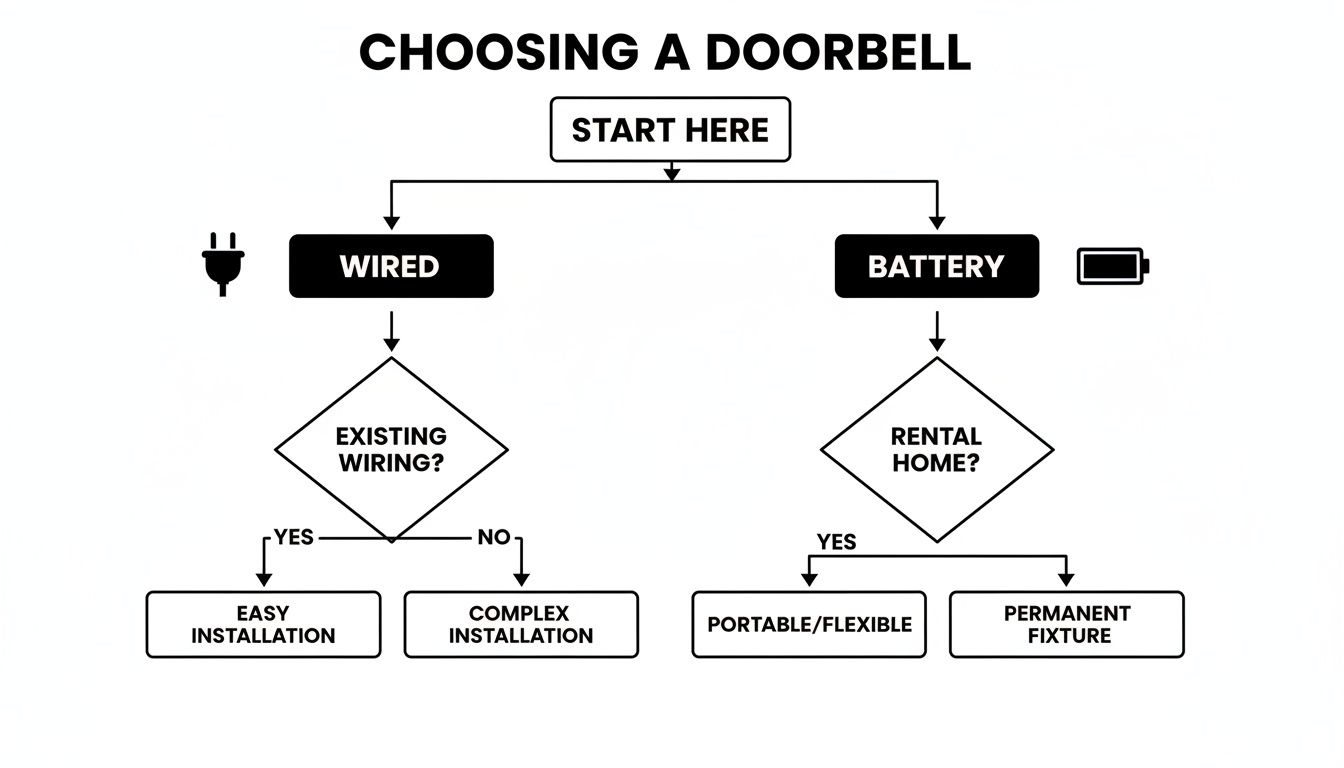
As you can see, your power source is the first major fork in the road. It guides you toward options that either fit your home's existing setup or give you the freedom to place it anywhere. Let's dig into the best options for a few common situations.
Best for Renters and Apartment Dwellers
When you're renting, drilling holes or rewiring anything is usually a big no. That means you need a battery-powered model that you can install without leaving a mark. Look for doorbells that come with strong adhesive mounting options or special no-drill brackets that clamp right onto your door.
- Top Pick: The Google Nest Doorbell (Battery) is a fantastic, straightforward choice. Its setup is a breeze, and its built-in intelligence gives you smart alerts right out of the box—no mandatory subscription just to see who was at your door an hour ago.
- Why it Works: It runs perfectly fine on its battery and has a sleek design that doesn't look out of place on most doorframes. Getting person and package alerts without forking over more cash every month is a huge win, especially if you're on a budget.
Best for Smart Home Enthusiasts
If you've already decked out your home with smart speakers, lights, and locks, your doorbell needs to play nice with the team. You’re looking for seamless integration that unlocks cool automations, like having your porch lights pop on the moment motion is detected, or instantly streaming the video feed to your smart display.
- Top Pick: The Ring Video Doorbell Pro 2 is the king for anyone all-in on Amazon Alexa. For Google Home users, the Google Nest Doorbell is the no-brainer pick.
- Why it Works: When your doorbell and smart hub speak the same language, everything just works better. For a deeper look at how these systems connect, our smart home hub comparison shows how different ecosystems talk to each other. This kind of tight integration leads to faster alerts and automations you can actually rely on.
A truly integrated doorbell does more than just show you a video feed. It becomes a trigger for your entire home's security protocol. When the doorbell detects a person, it can simultaneously lock your smart lock, announce the visitor on all your smart speakers, and turn on the entryway lights.
Best for Total Privacy and No Monthly Fees
Let's be real—not everyone is comfortable sending video from their front door to a corporate cloud server. If you put a premium on privacy and hate the idea of another monthly subscription, a doorbell with local storage is what you need. These devices save recordings on a physical device inside your house, giving you full ownership of your data.
- Top Pick: The Eufy Video Doorbell 2K is the champion in this category. It comes with a HomeBase that stores all your encrypted video clips locally, meaning you never have to pay a monthly fee to access your own footage.
- Why it Works: You get sharp video quality and smart AI detection without a single subscription payment. It's a one-and-done purchase, perfect for anyone who wants a private, set-it-and-forget-it security solution.
Ultimately, choosing the right video doorbell means looking past the flashy marketing and thinking about how you'll actually use it day-to-day. If you're planning to build a more complete security system around your new doorbell, you might also want to check out a comprehensive guide to video surveillance camera systems for a wider view of your options.
Installation Tips and Long-Term Maintenance
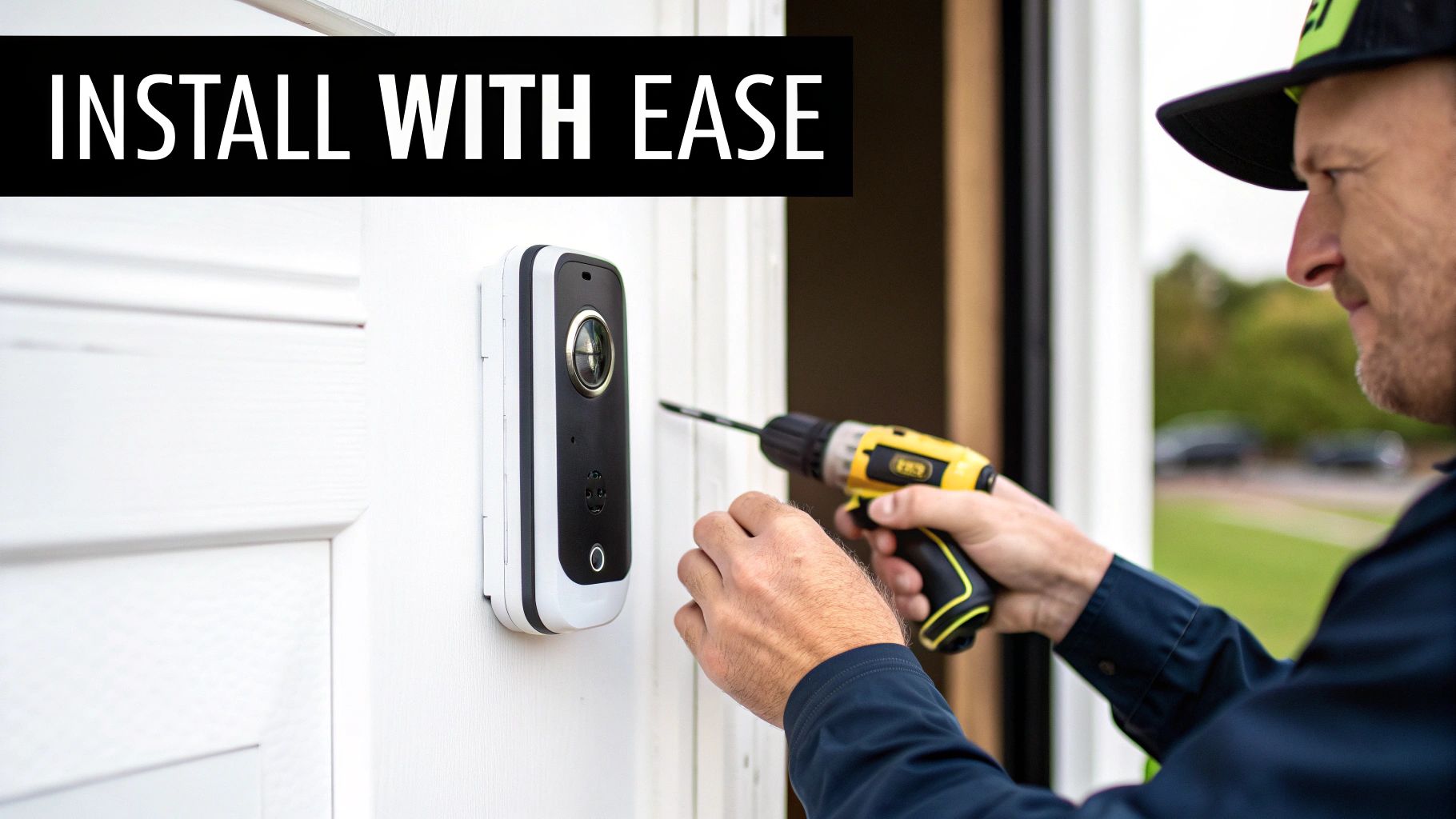
Picking out the perfect video doorbell is just the beginning. To get years of reliable service from it, you need a solid setup and a bit of routine care. Think of it this way: a proper installation ensures your new digital doorman starts its job on the right foot, protecting your home long after that new-gadget smell fades.
Whether you've gone with a hardwired doorbell or a battery-powered one, getting the initial setup right prevents a ton of future headaches. Little things during installation can make the difference between instant, clear alerts and frustratingly laggy video feeds.
Setting Up Your Video Doorbell Correctly
The physical install is usually pretty straightforward, but a few details are make-or-break. The first, and most important, decision is placement. For any model, you'll want to mount it around 48 inches (or 1.2 meters) off the ground. This hits the sweet spot for clearly capturing visitors' faces without cutting off packages left on your doorstep.
If you're installing a wired model, your main job is making sure it plays nice with your existing doorbell wiring. First things first: always kill the power at the circuit breaker before you touch a single wire. Next, you have to check your transformer's voltage. Most new video doorbells require 16-24V AC to run properly. If your home is older, there's a good chance you'll need to upgrade your transformer—it’s a common and necessary step.
Wireless models, on the other hand, give you a lot more freedom. Here, the focus shifts from electrical wiring to Wi-Fi signal.
- Check Your Wi-Fi Signal: Your front door can easily be a Wi-Fi dead zone. Before you drill any holes, stand where you plan to install the doorbell and check the signal on your phone. A weak signal is a recipe for delayed notifications and stuttering video. If it's spotty, try moving your router or grabbing a Wi-Fi extender.
- Pick the Right Mounting: Most battery doorbells come with everything you need for wood or siding. But if you're mounting on brick or stucco, you'll need a masonry drill bit. Renting and can't drill? No-drill adhesive mounts are a great alternative and stick surprisingly well.
You can find more in-depth advice in our guide to wireless security camera installation, as many of the same principles apply here.
Long-Term Care for Lasting Performance
Once your doorbell is up and running, a little upkeep goes a long way. These devices are built to handle the weather, but they aren't completely maintenance-free. Your two main jobs are keeping the lens clean and the battery healthy.
Your video doorbell's lens is its eye on the world. A lens covered in dust, pollen, or water spots can degrade a 2K video feed into a blurry, unusable mess. A simple monthly wipe-down is the single most effective maintenance task you can perform.
A quick wipe with a microfiber cloth is all it takes to clean the camera lens and motion sensors. Steer clear of harsh chemical cleaners or anything abrasive, as they can easily scratch the lens coating for good. If you've got some stubborn grime, just a little water on the cloth will do the trick.
Maintaining Battery and Connectivity Health
For those with battery-powered doorbells, the goal is to stretch the time between charges as long as possible. Extreme temperatures, especially the cold, are a battery's worst enemy. If you live somewhere with harsh winters, expect to charge your doorbell more often.
You can also tweak the settings to conserve power. Try dialing back the motion sensitivity or drawing more specific activity zones in the app. This cuts down on unnecessary recordings and can save a ton of battery life. Following general strategies to preserve battery health will also make a noticeable difference in your device's lifespan.
Finally, do a quick connection check every so often. If you start noticing your doorbell is offline or the live view is slow to load, a simple reboot of both the doorbell and your router can work wonders. Wi-Fi channels get congested, and a fresh start often clears things right up, keeping your front door security sharp and responsive.
Your Top Questions About Video Doorbells, Answered
Alright, even after breaking down all the top models, you probably still have a few questions rolling around in your head. That's a good thing. Choosing the right video doorbell is a key part of your home security puzzle, and you want to be sure you're making the right call.
Let's tackle some of the most common questions we get from people just like you. I'll give you straight answers to help you lock in your decision with confidence.
What Happens If My Wi-Fi Goes Down?
This is the big one, and for good reason. The honest answer is: it really depends on the model. Most video doorbells are completely dependent on Wi-Fi to send you alerts, show you a live video stream, and save recordings to the cloud. When your internet cuts out, they essentially go offline.
But some of the smarter doorbells have a plan B.
- Models with Local Storage: A brand like Eufy, which saves video to a HomeBase inside your house, keeps recording motion events even if the internet is down. You just won't be able to see those clips on your phone until your Wi-Fi comes back online.
- On-Device Intelligence: The Google Nest Doorbell is a real standout here. It has enough internal memory to store about an hour's worth of important event clips. If your internet connection drops, it keeps recording and then uploads all that footage as soon as it reconnects.
The best way to think about it is this: a standard, cloud-only doorbell is blind during an outage. But a model with local or on-device storage can still see what’s happening; it just can't tell you about it until the connection is restored.
Do Video Doorbells Work With Existing Chimes?
Yes, most of the time they do! The majority of hardwired video doorbells are designed to integrate with your home’s existing mechanical or digital chime. During setup, you'll usually connect a small power kit or adapter inside your chime box. This little gadget is crucial—it makes sure both your new smart doorbell and your old chime get the right amount of power to work together properly.
Before you buy, though, you absolutely have to check the compatibility list. Some fancy digital chimes that play complex melodies or are part of an intercom system might not play nice. Every manufacturer has a compatibility list on their website, and a quick 30-second check can save you from a massive installation headache. For battery-powered models, you'll almost always need to buy a separate wireless plug-in chime if you want to hear a ring inside the house.
How Long Do Video Doorbells Last?
A well-made video doorbell should serve you well for years, but its actual lifespan depends on a few things. The physical hardware is built tough, with most models rated to handle extreme heat, cold, rain, and snow. You can realistically expect the device itself to last anywhere from 5 to 10 years under normal circumstances.
The real wild card, especially for wireless models, is the internal battery. Just like the battery in your smartphone, it's a lithium-ion unit that degrades over time. After a few hundred charge cycles, you’ll start to notice it doesn't hold its charge for as long. For a lot of these doorbells, the battery isn't user-replaceable, which means the whole device is a goner once the battery gives up.
Can Someone Steal My Video Doorbell?
It’s a totally fair question—it's a pricey gadget just sitting on your front porch. And while a determined thief could physically rip it off the wall, it's an incredibly stupid and pointless crime for them to commit.
Here's why they rarely bother:
- They'll Be Recorded: The thief’s face will be perfectly captured throughout the entire act. That footage is instantly sent to the cloud or your local storage, creating a nice piece of evidence.
- Theft Protection Policies: Most of the big names, including Ring and Google, have your back. If your doorbell gets stolen, they'll often replace it for free as long as you file a police report.
- The Device Is Bricked: Once a doorbell is tied to your account, it can't be reset and registered to someone else. For the thief, it becomes a completely useless paperweight.
This trifecta of deterrents makes video doorbells a very unappealing target.
At Automated Home Guide, we're committed to helping you find the perfect smart security solutions. Explore our detailed guides and reviews to build a safer, more connected home. Find out more at https://automatedhomeguide.com.












Leave a Reply