
When you get right down to it, the Amazon Echo vs Google Home debate boils down to one key difference. Amazon's Echo, powered by Alexa, is a master of smart home control and a seamless shopping companion. Google Home, running on the Google Assistant, taps into the world's biggest search engine to deliver incredibly smart, conversational answers.
Your choice really depends on what you value more: a massive ecosystem of compatible gadgets or a genuinely intelligent assistant that understands context.
Choosing Your Smart Home Hub
Picking between an Amazon Echo and a Google Home device (now sold under the Nest brand) isn't just about buying a speaker. You’re really choosing the brain for your entire smart home, a decision that will shape your daily routines, entertainment, and how you interact with all your connected tech.
Both platforms offer a solid lineup of speakers and smart displays, but they come at it from different angles. Amazon got here first, and that head start gave them a huge advantage in building out their ecosystem.
Amazon’s market leadership is undeniable. As of March 2024, a staggering 65% of smart speaker owners in the U.S. had an Amazon Echo device in their home. This really highlights how deeply they've penetrated the market. You can dig into more smart speaker statistics to see the full picture.
That widespread adoption means Alexa often works with more third-party devices and has a much larger library of "Skills" (think of them as apps for your speaker).
Google, on the other hand, plays to its own strengths: its world-class search and AI technology. This makes the Google Assistant feel more natural and intuitive. It’s fantastic at handling complex, two-part questions and remembering the context of a conversation in a way that just feels more human.
To give you a quick sense of where each platform stands, here's a high-level look at their core strengths.
Quick Look At Amazon Echo Vs Google Home
This table breaks down the main advantages of each ecosystem to help you make a fast initial decision.
| Feature | Amazon Echo (Alexa) | Google Home (Google Assistant) |
|---|---|---|
| Best For | Smart Home Control & Routines | Answering Questions & Conversation |
| Ecosystem Strength | Massive third-party device support | Seamless integration with Google services |
| Voice Assistant | Great for specific commands and shopping | Superior natural language understanding |
| Unique Feature | Extensive library of "Alexa Skills" | Direct access to Google's Knowledge Graph |
Ultimately, this comparison shows that Amazon wins on quantity and compatibility, while Google wins on intelligence and conversational quality. We'll dive deeper into what this means for you in the following sections.
Comparing The Voice Assistants: Alexa vs. Google Assistant
Sure, the speakers themselves are what you see on your counter, but the real battle between Amazon Echo and Google Home is fought in the cloud. The voice assistants—Alexa for Amazon and Google Assistant for Google—are the brains of the operation, and they have fundamentally different ways of thinking. Getting a handle on these differences is the secret to picking the right ecosystem for your life.
Amazon’s Alexa acts like a ridiculously efficient assistant who’s great at following orders. Its biggest advantage is a massive library of over 100,000 "Skills." Think of these as voice-activated apps from third parties. This makes Alexa incredibly versatile for getting specific things done.
You can tell Alexa to order a pizza from Domino's, call an Uber, or fire up a meditation session from Headspace. This skill-based system makes it a beast for creating routines and integrating services, letting it execute precise commands without skipping a beat.
Alexa: The Task Master
Imagine Alexa as a highly organized personal assistant who shines when given direct instructions. If you're someone who wants to build complex smart home routines—like a "good morning" sequence that flicks on the lights, starts the coffee maker, and reads your calendar—Alexa's structured nature is brilliant.
Its deep roots in Amazon’s shopping empire also make it the undisputed champ for managing shopping lists and reordering household supplies. Saying, "Alexa, add paper towels to my shopping list," is effortless. Later, you can follow up with, "Alexa, order paper towels," and it will use your Amazon Prime account to get the job done. That’s a level of e-commerce integration Google just can't touch.
The core difference is simple: Alexa is built for doing, while Google Assistant is built for knowing. If your main goal is controlling a huge range of smart devices or managing your Amazon shopping, Alexa’s direct, task-focused approach is a clear winner.
This command-and-response system is especially helpful for people who thrive on straightforward, reliable automation. For instance, individuals managing executive functioning challenges, like those with ADHD, often find Alexa’s explicit commands perfect for setting reminders and offloading mental tasks.
Google Assistant: The Conversationalist
On the other hand, Google Assistant taps into the colossal power of Google's search engine and Knowledge Graph. This gives it a serious leg up in understanding natural language, holding context, and answering complex questions. Using it feels less like barking orders and more like having a real conversation.
You can throw multi-part or follow-up questions at Google Assistant, and it usually remembers what you were just talking about.
- You: "Who directed Inception?"
- Google Assistant: "Inception was directed by Christopher Nolan."
- You: "What other movies did he direct?"
- Google Assistant: "Christopher Nolan also directed The Dark Knight, Interstellar, and Dunkirk."
Alexa would probably stumble on that second question, forcing you to say "Christopher Nolan" again to provide the missing context. This conversational flow makes Google Assistant feel far more intuitive for general knowledge, fact-checking, and settling those friendly dinner table debates. Our detailed comparison of the top voice assistants dives deeper into these conversational nuances.
This superior natural language processing is a huge reason Google remains a tough competitor in the smart speaker market. While Amazon has the lead, Google holds a solid 25% share by some metrics, largely thanks to Google Assistant's conversational AI and multilingual skills, which are a big draw for diverse households. You can find more on this in recent research on global smart speaker trends.
Ultimately, the echo amazon vs google home decision comes down to what you really need your assistant to do. Do you want a powerful tool to execute tasks and manage your smart home with military precision? Or would you rather have a knowledgeable sidekick that can answer nearly any question with conversational grace? Your answer points you directly to either Alexa or Google Assistant.
Smart Home Integration And Ecosystem Compatibility
This is where the real battle is won or lost. Beyond just playing music or telling you the weather, a smart speaker is the conductor of your entire connected home orchestra. How well it unifies everything—from lights and locks to cameras and vacuums—is what truly defines its value in the echo amazon vs google home debate. The choice you make here will shape your home automation experience for a long time.
Amazon’s Echo platform has a massive head start. Being first to market gave Alexa years to build out its "Works with Alexa" program, resulting in a staggering number of compatible devices. The practical benefit? That obscure smart plug or niche brand of motorized blinds you're eyeing is far more likely to work with Alexa right out of the box.
This sprawling compatibility gives you incredible freedom. You aren’t forced into a single brand's ecosystem, so you can mix and match the best products for your home and budget.
Amazon Echo: The Universal Remote
Some Echo models, like the Echo Plus and the 4th-gen Echo, have a secret weapon: a built-in Zigbee hub. This little piece of hardware lets the speaker talk directly to a huge range of low-power gadgets like Philips Hue bulbs or certain smart locks. You don't need to buy and set up a separate hub for each brand, which cuts down on both cost and clutter.
This direct control is what makes Alexa a true powerhouse for creating custom routines. Imagine saying, "Alexa, start movie night." That one phrase can trigger a whole sequence of events across different device brands:
- Your Zigbee-connected Philips Hue lights dim to 15% brightness and shift to a cool blue.
- Your Wi-Fi thermostat kicks up the heat to a cozy 70 degrees.
- The smart TV powers on and flips to the right HDMI input.
It's this ability to orchestrate gadgets from countless different makers that makes Echo a fantastic smart home controller. The sheer volume of supported devices makes it a safe bet for pretty much everyone.
It really boils down to breadth versus depth. Amazon gives you unparalleled breadth, with support for tens of thousands of devices. If your top priority is making sure almost any smart product you buy will work with your system, the Echo ecosystem is the undisputed champion right now.
This wide support network is a huge deal. When you're in a store and see that "Works with Alexa" sticker, you can buy with confidence. To get a better handle on how all these devices talk to each other, our guide on smart home hub comparisons breaks down the underlying technologies.
Google Home: The Curated Ecosystem
Google Home (now part of the Nest family) has traditionally supported fewer devices than Amazon, but it's catching up fast. Google’s approach has always been more about quality over quantity, focusing on deep, seamless integration with its own Nest products—like the Nest Thermostat, Nest Cams, and Nest Protect smoke alarms. If your home is already full of Google hardware, a Nest Hub or Nest Audio speaker will feel like a natural, cohesive extension of that.
The Google Home app itself often feels more polished when controlling these first-party devices. Changing the temperature on your Nest Thermostat or pulling up a Nest Cam feed on a Nest Hub display is an incredibly smooth and intuitive experience.
More importantly, Google has been a key driver behind Matter, the new universal smart home standard. The goal of Matter is to make all smart devices play nicely together, no matter who made them. While Amazon also supports it, Google has been particularly aggressive in its rollout. This commitment is quickly closing the compatibility gap, and as more Matter-certified products appear, Amazon's numbers advantage will mean less.
Think about setting up a new Matter-enabled light bulb. With Google Home, the app can spot the new device on your network automatically. A few quick taps and it's connected and ready for voice commands—no need to download another company's app or wrestle with clumsy setup procedures.
Ultimately, your choice depends on your approach. If you want the biggest possible sandbox with the most toys to choose from, Amazon Echo is the way to go. But if you prefer a more streamlined, curated experience (especially if you love Nest gear) and are betting on the future-proof promise of Matter, Google Home is a compelling and rapidly improving alternative.
How They Stack Up On Audio And Entertainment
Sure, smart speakers are great for controlling lights and asking about the weather, but let's be honest—for a lot of us, they're the main way we listen to music at home. This is where the echo amazon vs google home rivalry gets really interesting, as both have poured tons of effort into improving sound. Your best choice really boils down to what kind of listener you are.
Both Amazon and Google have a clear "good, better, best" strategy. The small fry, like the Echo Dot and Nest Mini, are fantastic for background tunes in the kitchen or catching up on podcasts in the bedroom. They’re not going to blow you away with bass, but they get the job done for casual listening and clear assistant responses.
Moving up to the main event, the standard Amazon Echo (4th Gen) and the Google Nest Audio deliver a much more satisfying experience. These speakers are designed to be the daily drivers, capable of filling a living room or bedroom with surprisingly rich, balanced sound. They're the sweet spot for most people.
The Audiophile Arena: Echo Studio vs. Nest Audio
If you're serious about sound quality, the flagship models are where the action is. Amazon's Echo Studio is an absolute powerhouse, built from the ground up for high-resolution, immersive audio. It's packed with drivers, including an upward-firing speaker that helps create a huge soundstage.
The real party trick for the Echo Studio is its support for spatial audio formats like Dolby Atmos and Sony 360 Reality Audio. Fire up a track from Amazon Music HD, and the sound feels like it’s coming from all around you. It's a bass-heavy, powerful speaker that can easily double as a soundbar for your TV.
Google’s main contender, the Nest Audio, takes a more traditional hi-fi approach. Its goal is clarity, balance, and natural-sounding music. While it lacks Dolby Atmos for music, it delivers a really clean, pleasing sound that many people prefer for its tonal accuracy, especially with vocals and acoustic tracks.
The bottom line: Go with the Echo Studio if you want a cinematic, room-shaking audio experience with deep bass—perfect for movies, hip-hop, or electronic music. Choose the Nest Audio if you prioritize musical fidelity and a more balanced, natural sound for genres like classical, acoustic, or pop.
Music Streaming and Multi-Room Audio
Creating a whole-home audio system is a breeze with either platform. You can group multiple Echo or Nest speakers to play the same music perfectly synchronized, which is a game-changer for parties or just doing chores around the house.
Both ecosystems support the big names like Spotify, Apple Music, and Pandora. But the integrations have some nuances:
- Google Home: Unsurprisingly, it plays best with YouTube Music. The built-in Chromecast also makes "casting" audio from your phone to a speaker incredibly simple and reliable.
- Amazon Echo: Has flawless integration with Amazon Music. If you're a Prime member, you get a decent library for free, and an Unlimited subscription unlocks the high-res audio that makes the Echo Studio truly sing.
Often, the right choice just comes down to your preferred music service. For a deeper dive into how these models perform in the real world, check out our guide on the best smart speakers for your home. Ultimately, you can't go wrong with either, but knowing what you value most as a listener will point you to the perfect device.
A Closer Look at Privacy and Security
Let’s be honest: putting a device that’s always listening in your home feels like a big step. It’s probably the biggest hurdle for most people, so understanding how both Amazon and Google handle your privacy is crucial. They've both been under the microscope for how they manage data, but that scrutiny has led to some pretty solid, user-friendly privacy tools.
At their core, both Echo and Google devices are designed to start listening only when they hear their "wake word"—either "Alexa" or "Hey Google." Of course, mistakes happen. Your TV might say something that sounds like the wake word, and the device might activate by accident. The good news is that both companies give you a clear window into when and why this happens.
How to Manage Your Voice History
With an Amazon Echo, your main control panel is the Alexa app or the web-based Alexa Privacy Hub. This is where you can go to see and hear everything your device has recorded. You can delete recordings one by one, or wipe the whole history. Even better, you can set it to automatically delete recordings after 3, 18, or 36 months. It’s a great "set it and forget it" feature for peace of mind.
Google offers a nearly identical experience through its Google My Activity portal. You get the same fine-toothed control over your Google Assistant history and the exact same auto-delete options for 3, 18, or 36 months. On this front, it's a dead heat; you aren't sacrificing core privacy features by choosing one over the other.
One of the best features, in my opinion, is that you can manage privacy just by talking to the device. Saying, "Alexa, delete everything I said today," or asking, "Hey Google, how do you keep my information private?" gives you instant control and transparency right where you are.
Hardware Controls: The Mute Button and Camera Shutters
Software settings are great, but sometimes you just want to know for sure that nobody is listening. That's what the physical mute button is for. Every Echo and Google/Nest speaker has one. When you press it, a red or orange light turns on, and the microphone is electronically disconnected. It’s not just muted in the software; it's physically cut off from power. It's the most reliable way to guarantee privacy.
Where things get a little different is with smart displays that have cameras, like the Echo Show and Nest Hub.
- Amazon Echo Show devices almost always have a physical shutter you can slide over the camera lens. It’s a simple, foolproof way to block the camera's view, regardless of what any software says.
- Google Nest Hub devices, on the other hand, mostly don't have a camera at all (the Nest Hub Max is the exception). For many, this is the preferred approach for a device in a bedroom or other private space. The Nest Hub Max has a switch that kills both the mic and the camera.
In the end, both companies have come a long way in giving you the tools to feel comfortable. Your choice might come down to a small preference. Amazon's physical camera shutter gives a tangible sense of security for those who want a display with a camera. Google’s camera-free approach on its standard Nest Hub offers a simpler kind of assurance for anyone who’d rather not have a lens in the room at all.
Making The Right Choice For Your Home
Choosing between Amazon Echo and Google Home isn't about picking a universal winner. It’s really about figuring out which ecosystem fits your life, your habits, and what you want your connected home to look like. We’ve explored all the nuances, so you can make a decision that feels right for you.
At the end of the day, the best smart speaker is simply the one that does what you need it to do.
For The Smart Home Beginner
If you're just dipping your toes into the world of smart homes, the Amazon Echo is your best entry point. Why? Its compatibility is massive. Nearly any smart plug, light bulb, or random gadget you pick up will likely work with Alexa, which takes a lot of the guesswork out of the equation.
Echo’s ecosystem has been around longer, so there’s a huge community and a ton of tutorials out there to help you along. It's the biggest sandbox to play in while you figure out what home automation can really do for you.
For The Google Power User
Are you already living in Google’s world? If you rely on Google Calendar, Gmail, and Google Photos, then the Google Home (Nest) ecosystem is a no-brainer. The integration is just incredibly smooth. Asking your Nest Hub to pull up photos from a specific trip or to add a calendar event it found in a Gmail confirmation feels seamless.
Plus, Google Assistant's conversational smarts are top-notch, making it feel like you're just talking to the Google search you already know and trust. For anyone who values deep integration with their digital life, this is the way to go.
The decision often comes down to a simple trade-off: Echo offers unparalleled device compatibility, while Google Home provides superior software and service integration. Pick the one that solves your biggest daily friction points.
For The Audiophile
For anyone who puts sound quality first, the Amazon Echo Studio is the clear winner. It’s built for powerful, immersive audio, with support for Dolby Atmos and high-resolution spatial audio that fills the room. The Nest Audio just can't compete on that cinematic scale.
That said, if you’re more interested in tonal balance and vocal clarity for genres like acoustic or classical, the Google Nest Audio is a fantastic choice. It delivers a wonderfully natural listening experience and is easier on the wallet.
For The Privacy-Focused User
Both Amazon and Google have stepped up their game with privacy controls, offering physical mute switches and online dashboards to review and delete your voice data. The right choice here really boils down to your specific concerns. This decision tree can help you navigate which platform’s approach aligns with your comfort level.
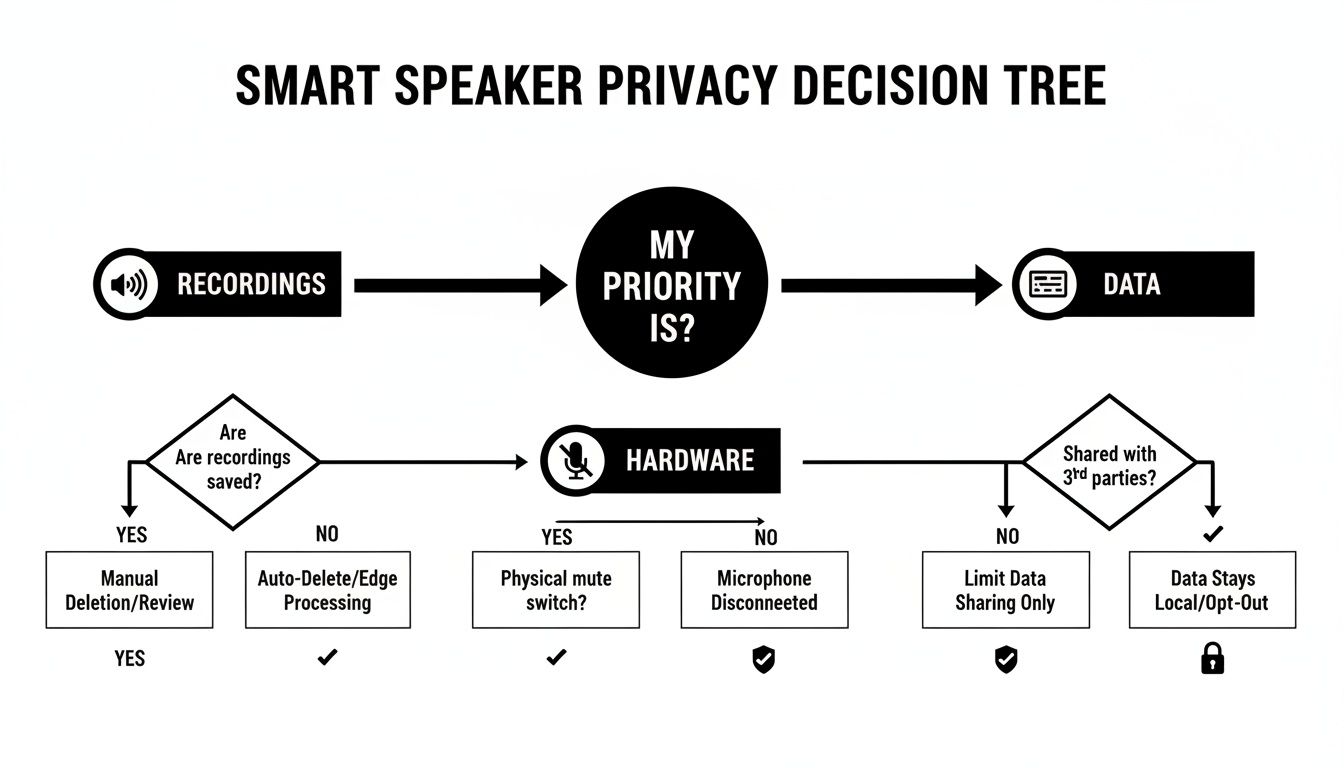
Ultimately, both ecosystems give you strong, granular control. Your decision might come down to a preference for a physical camera shutter (a feature on some Amazon devices) versus a completely camera-free design (like the standard Google Nest Hub). By matching your needs to these profiles, you can confidently invest in the smart speaker that will truly enhance your home.
Frequently Asked Questions
Got a few nagging questions before you decide? You're not alone. Here are some of the most common things people ask when weighing Amazon Echo against Google Home.
Can I Use Amazon Echo And Google Home Devices Together?
You absolutely can, but it's not a seamless experience. Think of them as two different smart home systems living under the same roof. They won't talk to each other—you can't ask your Google Nest to play a song on your Echo Dot, for example.
You'll end up managing your smart gadgets in two separate apps (the Alexa app and the Google Home app), which can get confusing fast. If you're just starting out and want to keep things simple, picking one ecosystem and sticking with it is definitely the way to go.
Which Platform Is Better For Controlling Devices From Different Brands?
This used to be an easy win for Amazon Echo. Thanks to its "Works with Alexa" program and built-in Zigbee hubs in certain models, it had a huge head start in compatibility. But the game has changed.
The rise of the Matter smart home standard has leveled the playing field significantly. Now, both platforms work great with a massive and ever-growing list of devices. The choice is less about which one supports more brands and more about which app and voice assistant you actually prefer using every day.
Do I Need A Subscription To Use All Features?
Nope. All the core features of both Amazon Echo and Google Home are free right out of the box. You won't pay a dime to ask questions, set kitchen timers, control your smart lights, or stream music from ad-supported services.
Where subscriptions come in is for premium content from other companies. For instance, if you want to listen to music without ads, you'll need a subscription to a service like Spotify Premium or Amazon Music Unlimited. That fee goes to the music service, not to Amazon or Google for the use of the speaker itself.
At Automated Home Guide, we're committed to helping you build a smarter, more connected home. Explore our expert reviews and in-depth guides to find the perfect technology for your lifestyle at https://automatedhomeguide.com.










Leave a Reply