

Ever get that sinking feeling when you open your power bill and see a number way higher than you expected? You're not alone. Most of the time, the culprits behind that bill shock are hiding in plain sight—humming away in your kitchen, glowing in your living room, and tumbling in your laundry room.
Figuring out your home appliances' electricity consumption is the key to finally getting a handle on your energy costs.
Why Your Electricity Bill Is So High

That surprisingly steep bill isn’t just a random number. It’s a direct summary of your home's daily energy habits. Every single device, from the refrigerator that runs 24/7 to the TV you binge-watch on weekends, adds up. If you're looking for the common reasons your electric bill is suddenly high, inefficient or older appliances are usually at the top of the list.
The real challenge is that most of us don't really know how our power company measures our usage. Let's clear that up by looking at the two terms that matter most.
Watts vs. Kilowatt-Hours
Let's use a simple analogy: think of your home's electricity like water flowing through a pipe.
- Watts (W) are like the flow rate or pressure. A high-wattage appliance, like a 1,500-watt space heater, pulls a ton of power all at once. The pipe is wide open.
- Kilowatt-hours (kWh) are the total amount of water that has flowed through the pipe over a period of time. This is what you actually pay for on your bill.
This difference is everything. A powerful 1,500-watt hair dryer that you only use for 10 minutes a day consumes far less total energy (fewer kWh) than a tiny 15-watt security camera that runs nonstop all month long. One is a huge gush for a short time, while the other is a steady trickle that really adds up.
The big takeaway is this: An appliance's impact on your bill is a combination of its power draw (wattage) and how long you use it. You can't just look at one or the other.
The Bigger Picture of Household Energy Use
It’s no secret that our homes are packed with more electronics than ever before. Smart speakers, gaming consoles, multiple TVs, and countless chargers all contribute to a baseline of energy use that keeps creeping up.
In fact, the average American household now uses around 10,332 kilowatt-hours (kWh) per year, which breaks down to about 861 kWh a month.
Knowing this helps put your own bill into perspective. The first step to cutting costs is figuring out where all that energy is actually going in your house. A great way to start is by doing a simple walkthrough of your own home; our home energy audit checklist is perfect for guiding you through that process. Once you start thinking in terms of kWh, you can pinpoint the real energy hogs and make changes that will actually show up on your next bill.
How to Calculate Your Appliance Energy Costs
Alright, let's put on our energy detective hats. We've talked about what watts and kilowatt-hours are, but the real magic happens when you connect those numbers to your wallet. This is where you find out exactly which appliances are quietly adding to your monthly bill.
Calculating how much any single device costs to run is surprisingly simple. You don't need to be a math whiz—just follow three straightforward steps. You can use this for everything from a massive TV to a tiny phone charger.
Step 1: Find the Appliance Wattage
First things first, you need to find out how much power your appliance actually uses. This figure is its wattage (W), and it's almost always printed right on the device.
Flip the appliance over or check the back, usually near where the power cord connects. You're looking for a small label or sticker with technical specs. Buried in that text, you'll find the wattage. If you can't find the label or the number has worn off, a quick Google search for the model number usually does the trick.
Step 2: Calculate Daily Kilowatt-Hours (kWh)
Now that you have the wattage, the next step is to convert it into the unit your utility company actually bills you for: kilowatt-hours (kWh). This calculation combines the raw power draw with how much time you actually spend using the device.
Here’s the simple formula to get you there:
(Appliance Wattage × Hours Used Per Day) ÷ 1000 = Daily kWh
Let's walk through it with a real-world example. Say you have a 1,200-watt microwave that your family uses for about 30 minutes (0.5 hours) total each day.
- Multiply the wattage by the hours used: 1,200 W × 0.5 hours = 600 watt-hours.
- Divide by 1,000 to convert to kWh: 600 ÷ 1,000 = 0.6 kWh per day.
That single number—0.6 kWh—is the total energy your microwave consumes on a typical day. You can repeat this quick calculation for any device in your home.
Step 3: Determine the Final Cost
This is the final step where it all comes together. To connect your appliance's energy use to your bank account, you need one last piece of the puzzle: your electricity rate. You can find this on your latest utility bill, often listed as "cents per kWh" or something similar.
The national average rate is always changing, but for our example, let's go with $0.17 per kWh.
To figure out the daily cost, you just multiply the daily kWh by your electricity rate.
- Daily Cost: 0.6 kWh × $0.17/kWh = $0.10 per day
That doesn't sound like much, but let's see how it adds up over a month.
- Monthly Cost: $0.10 × 30 days = $3.00 per month
And there you have it. You've just figured out that your microwave costs about $3.00 a month to run. This simple process pulls back the curtain on your energy bill and gives you the power to make smarter decisions. If you want to get even more precise, you can learn how to read your smart meter to see your entire home's consumption in real time.
The Biggest Energy Hogs in Your Home
Now that you know how to calculate the cost of running any single appliance, let's get strategic. The real secret to making a dent in your electricity bill is to focus on the biggest offenders first.
Not every plug in your house is pulling the same weight. A few key appliances are responsible for the lion's share of your monthly energy costs, and identifying them is the first step to wrestling your bill back under control.
The Undisputed Champion of Consumption: HVAC
If you're looking for the single biggest energy user in your home, look no further than your heating and cooling system. Your HVAC (Heating, Ventilation, and Air Conditioning) system works tirelessly behind the scenes, but its impact on your wallet is front and center.
Think about it: changing the temperature of an entire house takes a staggering amount of power. Whether it's the furnace firing up on a frigid winter night or the air conditioner humming for hours during a summer heatwave, the high-wattage compressors and fans add up fast.
Just how much are we talking about? The HVAC system is responsible for roughly 45-50% of the average home's total power consumption. For comparison, all your TVs, gaming consoles, and entertainment gadgets combined only account for about 3.5%. Dig into some appliance energy use statistics and you'll see just how dominant climate control really is.
This means that for every dollar you spend on electricity, nearly half of it is just going toward keeping you comfortable. That's why even small tweaks to your heating and cooling habits can lead to some seriously big savings.
The Major Supporting Players
While your HVAC system is the main event, a few other appliances are right there with it, consuming a major chunk of your electricity. They're the devices we rely on every single day, and they usually fall into one of two camps: things that heat something up (especially water) or things that are always on.
Here are the other primary culprits to keep an eye on:
- Water Heater: Often the runner-up for the biggest energy hog, your water heater can be responsible for 15-20% of your bill. It takes a lot of juice to heat all that water for showers, laundry, and dishes.
- Refrigerator & Freezer: These appliances are in a league of their own because they never get a day off. While they don't draw as much power at any one moment as an oven, their 24/7 operation makes them a constant drain, typically accounting for 8-13% of your total use.
- Clothes Dryer: Tumbling wet clothes with high heat is an energy-intensive job. Each load uses a significant amount of electricity, putting the dryer firmly in the top tier of power-hungry appliances.
Key Insight: At the end of the day, heating and cooling are the most energy-demanding jobs in a house. Any appliance that heats or cools air, water, or food is almost guaranteed to be one of your biggest energy hogs.
Uncovering the Hidden Energy Vampires
Beyond the big, obvious machines, another category of devices is quietly sipping power around the clock. We're talking about "phantom loads," or what many call "vampire power"—the electricity your electronics use even when they're turned off.
Take a look around. Do you see a small glowing light on your TV, a digital clock on your microwave, or a coffee maker that's ready to brew at a moment's notice? That's vampire power. Game consoles, printers, and phone chargers are all guilty of drawing a small but steady stream of electricity 24/7.
While a single device might only pull a few watts, it adds up. Across an entire household, phantom loads can account for a shocking 5-10% of your total electricity bill. You're essentially paying for power you aren't even actively using.
By shining a light on both the major energy hogs and these sneaky vampires, you can finally get the full picture of your home's energy use and start making changes that count.
A Quick Guide to Appliance Energy Use
https://www.youtube.com/embed/VYb3olvb0mQ
To get a real handle on your home's electricity consumption, you first need a solid baseline. It's one thing to know your bill is high; it's another to know exactly why. Understanding how your coffee maker's energy use stacks up against your central air conditioner is the key to making smarter decisions that actually lower your costs.
Think of this as your quick-reference guide to the energy footprints of the most common devices in your house. Below, we'll break down which appliances are the biggest offenders so you can see where your money is really going. Just remember, the estimated costs are a starting point—your personal habits and local electricity rates will shape the final numbers.
Decoding an Appliance's Power Draw
Every appliance has its own personality when it comes to power. A toaster, for instance, is a sprinter—it uses a massive amount of wattage for just a few minutes. Your refrigerator, on the other hand, is a marathon runner. It sips a more modest amount of power but does so constantly, making it one of your home's biggest long-term energy users.
This chart really puts things into perspective, showing the typical breakdown of a home's annual energy costs. The big three culprits are almost always the same: your HVAC system, water heater, and refrigerator.
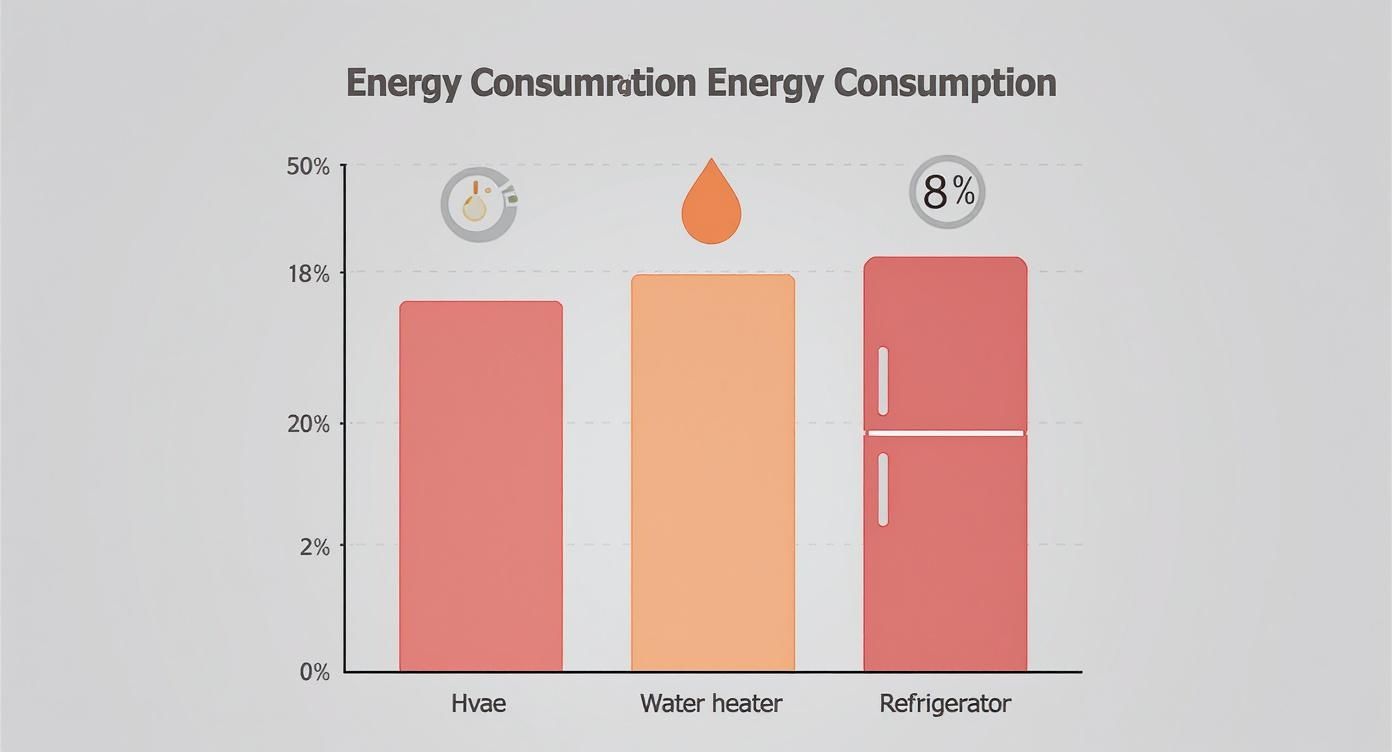
As you can see, heating and cooling absolutely dominate the average home's energy budget. That makes them the most critical areas to focus on if you're serious about saving money.
Typical Electricity Consumption of Common Home Appliances
So, how much does it really cost to run your dishwasher or watch TV? This table gives you a much clearer picture. We've laid out the typical wattage, estimated monthly use, and a sample monthly cost for various household appliances, all based on a national average electricity rate of $0.17 per kWh.
| Appliance | Typical Wattage Range (Watts) | Estimated Monthly Usage (Hours) | Estimated Monthly Cost |
|---|---|---|---|
| Central Air Conditioner | 3,000 – 5,000 W | 120 Hours | $61.20 – $102.00 |
| Clothes Dryer (Electric) | 1,800 – 5,000 W | 15 Hours | $4.60 – $12.75 |
| Refrigerator | 150 – 400 W | 240 Hours (runs 1/3 of the time) | $6.12 – $16.32 |
| Dishwasher (Heated Dry) | 1,200 – 2,400 W | 30 Hours | $6.12 – $12.24 |
| Oven (Electric) | 2,000 – 5,000 W | 10 Hours | $3.40 – $8.50 |
| Television (LED) | 50 – 100 W | 120 Hours | $1.02 – $2.04 |
| Washing Machine | 400 – 1,400 W | 10 Hours | $0.68 – $2.38 |
| Microwave Oven | 600 – 1,200 W | 5 Hours | $0.51 – $1.02 |
| LED Light Bulb (60W equiv.) | 10 W | 120 Hours | $0.20 |
Keep in mind that these numbers are just estimates. The specific model, age, and efficiency of your appliances can make a huge difference in what you actually pay each month.
Pro Tip: Don't underestimate the impact of age. An older, less efficient refrigerator might cost double what's listed here, while a new ENERGY STAR model could cost even less. It pays to check those ratings
Proven Strategies to Lower Your Energy Bill
Alright, you've done the detective work and figured out how your appliances drain electricity. That was the diagnosis. Now, it's time for the cure. Armed with real data on which gadgets are hiking up your costs, you can start making smart, practical changes to take back control of your energy bill.
These moves range from simple, free adjustments to your daily routine all the way to smart home upgrades that put your savings on autopilot. The real goal here isn't just to spend less money—it's to use energy smarter. A few targeted changes can make a huge dent in your consumption without you having to sacrifice comfort.
Simple Changes With Big Impact
Often, the most powerful energy-saving tactics are the simplest ones, especially when they target your biggest energy hogs. You don't need a big budget to see a difference on your next bill. It really just comes down to being a little more mindful.
Here are a few things you can start doing today:
- Wash Clothes in Cold Water: It's a surprising fact, but about 90% of a washing machine's energy usage goes into just heating the water. Switching to the cold cycle still gets your clothes perfectly clean but slashes the electricity needed.
- Run Full Loads: This goes for both the dishwasher and the clothes dryer. These machines use roughly the same amount of energy whether they're half-empty or stuffed to the brim, so always wait for a full load.
- Air-Dry When Possible: Give that heated dry cycle on your dishwasher a rest. Just crack the door open after the wash cycle and let your dishes air-dry. The same logic applies to laundry—a clothesline is the most energy-efficient dryer on the planet.
These little shifts directly combat the high-wattage cycles of your most power-hungry appliances. For a deeper dive, check out these 10 tips for saving energy with your appliances.
Embrace Smarter Home Technology
While changing habits is a great first step, smart home technology can act like a personal energy manager, working around the clock to find savings for you. These tools often pay for themselves over time and take the guesswork out of being efficient.
A smart thermostat, for instance, is one of the single most impactful upgrades you can make. It learns your schedule and automatically dials back the temperature when you're at work or asleep. This ensures your HVAC system—by far the biggest energy guzzler in most homes—only runs when it absolutely needs to.
Smart plugs are another fantastic, low-cost tool. You can group electronics like your TV, gaming console, and sound system onto a single smart plug. Then, with a simple schedule or voice command, you can cut power to all of them completely, eliminating the "phantom load" they secretly draw even when turned off.
If you're ready to explore even more powerful tools, our guide covers the best devices to reduce your electricity bill, from smart plugs to whole-home energy monitors.
The Long-Term Wisdom of Upgrading
Sometimes, the biggest savings come from a long-term investment. It might feel strange to spend money to save money, but replacing old, inefficient appliances is genuinely one of the smartest financial moves a homeowner can make.
Appliance technology has come a long way. A refrigerator built today, for example, is around 75% more efficient than a model from the 1970s. This incredible progress is usually marked by the ENERGY STAR label, the government-backed symbol for top-tier energy efficiency.
When you're shopping for something new, that little blue label is your best friend.
- ENERGY STAR Certified Appliances: These products are guaranteed to save energy without compromising on performance.
- Significant Savings: On average, a certified appliance uses 10-50% less energy and water than a standard, non-certified model.
- Return on Investment: The monthly savings on your utility bill really add up, often allowing the new appliance to pay for itself over its lifespan.
Think of it this way: if your fridge or washing machine is over a decade old, it's silently wasting energy every single month. Upgrading not only lowers your home appliances' electricity consumption but also brings modern features and performance into your home.
A Few Lingering Questions
Even with the math down, you probably still have a few practical questions about how all this works in the real world. Let's tackle some of the most common ones that pop up when people start getting serious about managing their home's electricity use.
How Can I Find Out Exactly What an Appliance is Using?
Our formula gives you a solid estimate, but if you want to know the exact power draw of a specific gadget, you need a plug-in electricity usage monitor. You might hear it called a "watt meter," and it's a game-changer.
These handy little devices are cheap and incredibly easy to use. Just plug the meter into the wall, then plug your appliance into the meter. That's it. The screen will instantly show you a real-time reading of how many watts your device is pulling. It's the perfect tool for discovering which devices are the secret "energy vampires" in your home or figuring out the precise cost of running your home office all day.
Does Unplugging Stuff Actually Do Anything?
Yes, it absolutely does. It can make a much bigger difference than you might think, thanks to something called "phantom power."
Many of your electronics—even when they're turned "off"—are still quietly sipping a little bit of electricity to stay in standby mode. A single device might not draw much, but think about all the TVs, gaming consoles, chargers, and coffee makers in your house. All that standby power adds up, and it can be responsible for 5-10% of your entire electricity bill. A smart power strip that cuts power completely to your entertainment center or desk setup is an easy win here.
It comes down to this: you're paying for electricity that you're not even using. Getting rid of phantom loads is one of the simplest ways to cut your monthly energy bill without changing your habits one bit.
Should I Fix My Old Appliance or Just Buy a New One?
This is the classic debate. The right call usually comes down to three things: how old the appliance is, how much the repair will cost, and how much you could save on energy with a new one. When you're talking about major appliances that are over ten years old, replacing them is often the smartest financial move in the long run.
Here's a simple guideline I always recommend:
- The 50% Rule: If a repair is going to cost more than 50% of what you'd pay for a new, energy-efficient model, it's time to upgrade.
- Think Long-Term: A new ENERGY STAR appliance can be so much more efficient that the monthly savings on your electric bill will eventually pay for the machine itself.
That old, rattling refrigerator or noisy washing machine isn't just a hassle waiting to break down again; it's actively inflating your energy bill every single month. Upgrading to a modern, efficient model is really an investment in lower bills for years to come.
At Automated Home Guide, our goal is to help you make smarter choices about the tech in your home. Whether it's energy management or home security, we've got expert resources to help. You can find more guides and articles at https://automatedhomeguide.com.












Leave a Reply