

Before you even think about shopping for a new Wi-Fi router, you need a clear picture of what your home actually needs. It's easy to get wowed by specs and marketing jargon, but the best router is the one that fits your specific situation. This means taking a moment to figure out how many devices you have, what kind of internet speed you're really getting, and the layout of your home.
Getting this right from the start saves you from overspending on a router with features you'll never touch or, worse, buying one that can't keep up with your family's demands.
Take Stock of Your Home's Real-World Wi-Fi Needs
Let’s be honest: a router that works perfectly in a small apartment is going to fail miserably in a sprawling multi-story house. Likewise, what a single person needs for casual browsing is worlds apart from the network a family of five with gamers and smart home gadgets requires. This initial reality check is the single most important step in making a smart purchase.
Count Every Single Connected Device
Time for a quick inventory. Walk around your house and make a list of every single thing that connects to your Wi-Fi. You’ll probably be surprised by how quickly it adds up. Don't just count the obvious stuff like laptops and phones.
Think about everything:
- For Entertainment: Smart TVs, gaming consoles like PlayStation or Xbox, streaming devices (Apple TV, Roku), and smart speakers like Alexa or Google Home.
- For the Smart Home: Security cameras, video doorbells, smart thermostats, connected light bulbs, and those handy smart plugs.
- All Your Personal Gear: Laptops, tablets, smartphones, smartwatches, and even e-readers.
Each one of these devices is competing for a slice of your Wi-Fi bandwidth. If your household is pushing past 25 connected devices, a basic router just won't cut it. You'll need something much more robust to prevent everything from slowing to a crawl.
Check Your Internet Plan vs. Your Actual Speeds
Next up, what are you actually paying for? Dig up your internet bill and see if you have a 500 Mbps plan or a full gigabit (1,000 Mbps) connection. This number is your performance ceiling.
Now, run a speed test. If you're paying for gigabit speeds but only clocking 200 Mbps, your current router is almost certainly the bottleneck holding you back.
I see this all the time: people sign up for a lightning-fast internet plan but keep their ancient, underpowered router. It's like owning a Ferrari but being forced to drive it exclusively in school zones. You're paying for speed you can't even use.
Knowing the gap between what you pay for and what you get is a powerful motivator for an upgrade. Once you have a handle on this, you can look into other ways for how to improve internet speed, but it almost always starts with the router.
Map Out Your Home's Layout and Wi-Fi Killers
Finally, think about your physical space. A single, high-powered router might be perfect for a 1,200-square-foot apartment. But for a 3,000-square-foot house with a basement, a second floor, and a patio you want to use, you're going to have dead zones. It’s practically a guarantee.
The materials used to build your home are just as important. Wi-Fi signals have a tough time getting through dense materials, such as:
- Brick and stone
- Concrete floors and ceilings
- Older plaster and lath walls
- Large metal appliances (like your fridge) and ductwork
If your home is full of these Wi-Fi killers, the signal can drop off a cliff just one room over. For larger homes with tricky layouts, a wired foundation can make a world of difference. It's worth learning about the benefits of proper home smart wiring if you're serious about performance. This assessment will tell you if a powerful single router will do the job or if you really need to be looking at a mesh system for wall-to-wall coverage.
Your Personal WiFi Needs Checklist
Not sure where you fall? Use this simple table to get a gut check on your household's Wi-Fi demands before you start browsing for routers.
| Factor to Consider | Low Demand (1-2 People, Light Streaming) | Medium Demand (Family, Multiple 4K Streams, Smart Devices) | High Demand (Heavy Gaming, Many Smart Devices, Large Home) |
|---|---|---|---|
| Connected Devices | Under 15 | 15-30 devices | 30+ devices |
| Internet Speed | Up to 300 Mbps | 300 Mbps to 1 Gbps | 1 Gbps and above |
| Primary Activities | Web browsing, email, HD streaming on 1-2 screens. | 4K streaming, online gaming, video calls, 5-15 smart devices. | Competitive gaming, multiple 4K streams, 20+ smart devices, large file transfers. |
| Home Size/Layout | < 1,500 sq ft, open layout, 1 floor. | 1,500 – 3,000 sq ft, 2 floors, some tricky walls. | > 3,000 sq ft, multiple floors, brick/concrete walls, outdoor coverage needed. |
By checking off which column best describes your home, you'll have a much clearer idea of what level of router you should be aiming for.
From Wi-Fi 6 to Wi-Fi 7: What Do All These Numbers Mean?
Trying to make sense of Wi-Fi standards can feel like decoding a secret language. You see terms like 802.11ac, Wi-Fi 6, and now Wi-Fi 7, and it's easy to get lost in the alphabet soup. But here’s the thing: understanding the basics is your biggest advantage when picking a router because these standards dictate your network's speed, stability, and whether it will keep up with your needs next year.
Think of each new Wi-Fi generation as more than just a speed bump. It's really about building a smarter, more efficient system for managing the chaos of a modern connected home. It’s less about one laptop hitting a crazy speed and more about how everything—your phone, TV, smart plugs, and doorbell—can all work together without grinding to a halt.
The Old Faithful: Wi-Fi 5 (802.11ac)
For a long time, Wi-Fi 5 was the king of the hill, and honestly, a lot of homes still run on it just fine. It was a huge leap forward, primarily using the cleaner 5 GHz band to deliver speeds that felt revolutionary at the time. If you live in a small apartment with just a few devices, a Wi-Fi 5 router is a perfectly reasonable, budget-friendly option.
But its age starts to show in a busy smart home. Wi-Fi 5 wasn't built for a world where dozens of devices are all shouting for attention at once. That's why your 4K movie might start buffering when your kids fire up their gaming consoles in the other room.
The Current Champion: Wi-Fi 6 (802.11ax)
This is where things get interesting. Wi-Fi 6 is the modern standard, and its real superpower isn't just raw speed—it's efficiency. If your home is crawling with 20+ connected devices, from laptops to light bulbs, this is the standard for you. Wi-Fi 6 is designed to handle network congestion, reducing latency by up to 75% compared to Wi-Fi 5. That's a game-changer for lag-free Zoom calls and smooth 4K streaming. You can see this shift happening in real-time by checking out the latest trends in the Wi-Fi router market.
How does it pull this off? With a couple of clever new tricks:
- OFDMA (Orthogonal Frequency Division Multiple Access): This is a big one. It lets the router talk to multiple devices in the same breath, instead of serving them one by one. Imagine a delivery truck that can drop off packages to several different houses on the same block in one go. That's OFDMA.
- MU-MIMO (Multi-User, Multiple Input, Multiple Output): This lets the router use its antennas to communicate with several devices at the same time. Wi-Fi 6 makes this even better by letting it work for both uploads and downloads.
The real win with Wi-Fi 6 isn't about bragging rights from a speed test. It's about a consistently stable, responsive connection for everything in your home, all at once. It's the new baseline for a good experience.
For the vast majority of people right now, a Wi-Fi 6 router hits that perfect sweet spot of performance, future-proofing, and price.
The Private Superhighway: Wi-Fi 6E
Wi-Fi 6E takes all the great technology from Wi-Fi 6 and adds something special: an entirely new frequency band, 6 GHz.
Think of the 2.4 GHz and 5 GHz bands as crowded city streets. They're packed with traffic from your devices, your neighbors' Wi-Fi, and even interference from things like microwaves. The new 6 GHz band is like a brand-new, multi-lane superhighway that's completely empty because only Wi-Fi 6E devices are allowed on it. The result is almost zero interference, giving you crazy-fast speeds and incredibly low latency.
So, who is this for?
- Hardcore Gamers & VR Enthusiasts: The near-instant response time is a massive advantage for competitive online gaming and fully immersive VR.
- 8K Streamers & Content Creators: If you’re pushing huge amounts of data wirelessly—like streaming 8K video or transferring massive project files—the 6 GHz band is your best friend.
- Early Adopters: If you have the latest gear (like a new flagship smartphone or high-end laptop) and demand the absolute best performance, Wi-Fi 6E is a noticeable upgrade.
The only catch? Both your router and your devices have to support Wi-Fi 6E to get on this new superhighway. Your older gadgets will still connect to the 2.4 GHz and 5 GHz bands just fine, but they won't see the new 6 GHz network.
The Glimpse of the Future: Wi-Fi 7 (802.11be)
Now we're talking about the next frontier. As the newest standard, Wi-Fi 7 is a genuine leap forward. It takes the three bands from Wi-Fi 6E (2.4 GHz, 5 GHz, and 6 GHz) and does something wild with them. Using a feature called Multi-Link Operation (MLO), it can connect a single device to two different bands at the same time.
Imagine your phone sending data down a two-lane highway simultaneously. This doubles down on everything: it dramatically boosts speed, cuts latency even further, and makes your connection incredibly resilient.
For most of us today, Wi-Fi 7 is definitely overkill. But if you’re setting up a network that you don’t want to touch for the next five to ten years and want to be ready for whatever comes next (think AR, cloud gaming, and beyond), investing in a Wi-Fi 7 router now is a smart long-term move.
Single Router vs. Mesh System: Solving Coverage Gaps
We’ve all been there—you walk down to the basement or out to the patio, and your Wi-Fi signal just vanishes. These dreaded “dead zones” are probably the single most common frustration with home internet. Fixing them forces a critical decision when you’re picking a new router: do you get one powerful, central unit, or is it time to upgrade to a multi-point mesh system?
Honestly, the answer comes down to the size and shape of your home.
For a lot of people, a traditional single router is still a great, cost-effective choice. It’s one central hub that blasts out your Wi-Fi signal from a single spot. If you're in a smaller apartment or a single-story home with a fairly open layout, a good standalone router can absolutely get the job done.
This chart can help you visualize how different Wi-Fi technologies, which power both single and mesh routers, handle the demands of a modern smart home.
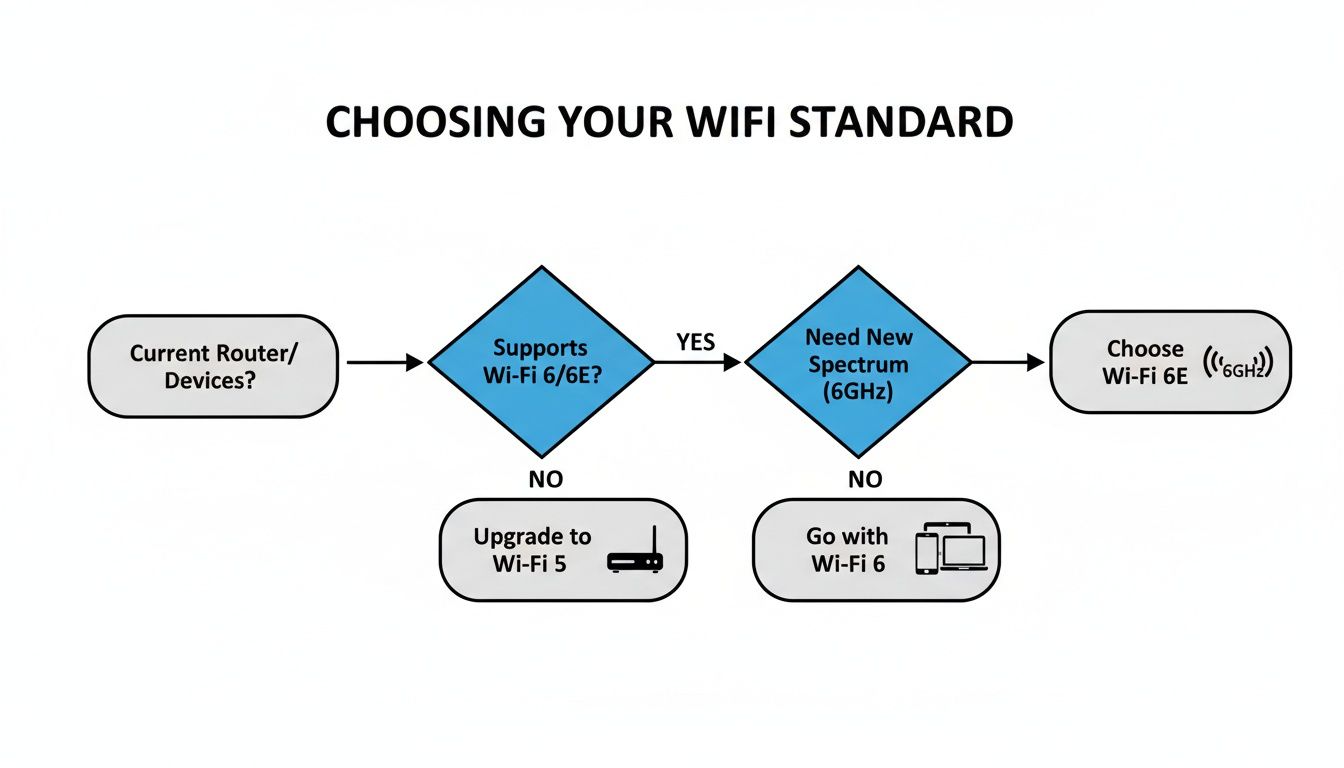
As you can see, newer standards like Wi-Fi 6 are built to manage a house full of devices, and Wi-Fi 6E opens up a whole new frequency. These advancements are key to keeping speeds fast and stable, especially as you spread that signal across a larger area.
When a Single Router Makes Sense
A single router works best when it has a clear line of sight to most of your connected devices. You place it in a central location, and it blankets a moderate-sized area with a strong, reliable signal.
This setup is usually the perfect fit for:
- Apartments and smaller homes, typically under 1,500 sq ft.
- Open-concept layouts that don’t have a ton of walls or obstructions.
- Anyone on a budget who doesn’t need perfect wall-to-wall coverage in a huge house.
But the moment you introduce distance, a second story, or signal-blocking materials like brick and concrete, the limits of that single broadcast point become painfully obvious.
The Power of a Mesh Network
This is where a mesh Wi-Fi system changes the game. Instead of one broadcast point, it uses a team of units—a primary router connected to your modem and one or more satellite "nodes" that you place around your home. Together, they create one big, unified network that delivers seamless coverage everywhere.
The real magic of mesh is that you stay connected to the same network (one name, one password) no matter where you are. As you move from the living room to the upstairs bedroom, your phone or laptop automatically hands off its connection to the nearest, strongest node without you ever noticing. You’ll never have to manually switch networks like you did with those clunky old Wi-Fi extenders.
A mesh network is like having a perfectly coordinated team of signal boosters blanketing your home. Instead of one person shouting from the middle of the house, you have messengers in every key area, making sure the signal arrives strong and clear everywhere.
This is exactly why mesh has become the go-to solution for larger or more complicated homes. A traditional router can handle about 1,500-2,500 sq ft effectively, but with households now juggling over 10 devices on average, dead zones are popping up more frequently, causing speed drops of 30% or more at the edges of coverage.
If your home is larger than 3,000 sq ft, a mesh system is practically a must-have. Tests show that mesh can achieve 99% coverage in these environments compared to just 70% for a single high-powered router. It’s no surprise that its adoption rate jumped by 25% after the pandemic cemented work-from-home culture. You can dig into these market trends on PR Newswire if you’re curious.
Making the Right Choice for Your Home
So, what's the verdict for you? The choice really boils down to your space.
- For homes under 2,000 sq ft with a simple layout: A powerful Wi-Fi 6 single router is probably all you need. It’s simpler to set up and easier on the wallet.
- For multi-story homes or properties over 2,000 sq ft: A mesh system is the clear winner for killing dead zones and guaranteeing consistent performance everywhere.
- For homes with tricky materials (brick, plaster, concrete): Mesh is almost always the better choice. Its multiple nodes can work around these Wi-Fi-killing obstructions much more effectively than a single router can.
If you find that even a powerful router isn't quite cutting it, you can explore our detailed guide on how to extend your Wi-Fi range for more advanced strategies. But for most people, deciding between a single unit and a mesh system is the first and most important step to getting that perfect home Wi-Fi coverage.
Essential Router Features You Should Not Overlook

Alright, you've narrowed down the Wi-Fi standard and decided between a single router and a mesh system. Now it’s time to dig into the details that separate a good router from a truly great one.
These are the features that quietly shape your daily internet experience. They work in the background, but their impact is massive—from keeping your video calls from stuttering to shielding your network from intruders. Overlooking these specs now can lead to major headaches later.
Why Physical Ports Still Matter
In a wireless world, it's easy to forget about the humble Ethernet port. That’s a mistake. For certain devices, nothing beats the raw speed and rock-solid stability of a wired connection.
A physical LAN (Local Area Network) port is your best friend for anything where lag is the enemy.
- Serious Gaming: Plugging in your PC or console can dramatically lower your latency (ping), giving you that split-second advantage.
- Media Servers & NAS Drives: If you stream movies from a local Network Attached Storage (NAS) drive, a wired link ensures smooth, buffer-free playback.
- Home Office Hubs: Your desktop computer or a network printer will always perform more reliably when physically cabled in.
Take a look at the back of any router you're considering. Most come with four LAN ports, which is fine for most homes. If you're a power user with a lot of wired gear, either find a model with more ports or plan on grabbing a cheap network switch to expand your capacity.
Master Your Traffic with Quality of Service
Ever been on a critical video call only to have your screen freeze the second someone else starts downloading a massive game? You’ve just experienced a network traffic jam. This is where Quality of Service (QoS) comes in.
QoS is essentially the traffic cop for your home network. It lets you prioritize which devices or applications get first dibs on your internet bandwidth. You can tell your router that video conferencing and gaming are more important than file downloads or software updates, ensuring your crucial connections always run smoothly.
Think of QoS as creating a high-speed carpool lane on your digital highway. Your Zoom call gets to zip past all the slow-moving traffic from Netflix streams and system updates, resulting in a flawless connection for what matters most.
Modern Security Is Non-Negotiable
Your router is the front door to your entire digital life, so its security features are absolutely vital. When you're comparing routers, don't just glance over the security specs. Following the best practices for protecting your Wi-Fi network is just as important as getting top speeds.
Here's what to look for in any modern router:
- WPA3 Encryption: This is the latest security standard. It's a huge step up from the older WPA2, offering much stronger protection against password-guessing attacks.
- Guest Network: A must-have feature. It creates a completely separate, isolated network for your visitors. They get internet access without ever being able to see or connect to your personal computers, smart speakers, or other private devices.
- Automatic Firmware Updates: Cyber threats are always changing. A router that updates its own firmware automatically is a set-it-and-forget-it way to stay protected against the latest vulnerabilities without you having to do a thing.
With the number of IoT devices now topping 15 billion worldwide, an insecure router is a massive liability. In fact, routers without automatic updates suffer from three times higher hack rates. For a deeper dive, check out our guide on home network security best practices.
Budget vs. Future-Proofing: Making the Final Call
Alright, you've done the hard work. You've mapped out your home, figured out the Wi-Fi standards that matter, and decided between a single router and a mesh system. Now comes the final piece of the puzzle: matching your ideal setup with your budget, while keeping one eye on the future.
This is where the rubber meets the road. A router isn't just a gadget; it's an investment in your home's digital backbone. Skimping now can lead to frustrating buffering and a forced upgrade sooner than you'd like. On the flip side, buying the most powerful rig on the market might be overkill. Let's find that sweet spot.
Finding the Right Price Point
Routers can go from under $100 to well over $500, and the difference is more than just marketing. You're paying for performance, features, and longevity. Here’s a realistic breakdown of what to expect at different price tiers.
-
Budget Routers (Under $150): Perfect for smaller apartments or homes with moderate internet plans (think up to 500 Mbps). These are generally solid Wi-Fi 6 models that can handle fewer than 25 devices. They get the job done but won't have the bells and whistles like multi-gig ports or advanced traffic management.
-
Mid-Range Routers ($150 – $300): This is the sweet spot for most people. In this range, you'll find powerful Wi-Fi 6 routers and great entry-level mesh systems. They're built to handle gigabit speeds, a house full of smart gadgets, and provide solid coverage for a typical family home.
-
High-End Routers ($300+): This is where you invest in top-tier performance and future-proofing. We're talking Wi-Fi 6E or even the latest Wi-Fi 7 models. Expect features like multi-gig Ethernet ports, robust security software, and processors that can juggle dozens of high-demand devices without breaking a sweat.
Think of it this way: if your family's work, school, and entertainment depend on a rock-solid connection, investing in that mid-to-high-end range isn't a splurge. It’s a practical necessity for modern life.
The Future-Proofing Question
"Future-proofing" isn't about buying the most expensive thing you can find. It’s about making a smart, strategic choice that won't feel obsolete in a couple of years. As our internet speeds climb and things like 4K streaming, online gaming, and AR/VR become standard, your network's demands are only going to increase.
Here are a few features worth paying a little extra for today to save you headaches tomorrow:
- Wi-Fi 6E or Wi-Fi 7: Wi-Fi 6 is fantastic right now, but a router with the 6 GHz band is your ticket to an uncongested digital superhighway as more compatible devices become available.
- Multi-Gig Ethernet Ports: ISPs are already rolling out plans faster than 1 Gbps. A router with a 2.5 Gbps or 10 Gbps port ensures that your hardware won't be the bottleneck holding you back from the speeds you're paying for.
- Expandable Mesh Systems: Life changes. You might move to a bigger house or finish the basement. Choosing a mesh system that lets you easily add another node gives you the flexibility to grow your network without starting from scratch.
One Last Compatibility Check
Before you hit that "buy" button, do this one last thing. Double-check that the router is compatible with your Internet Service Provider (ISP) and modem.
It sounds basic, but it can save you a world of hurt. Most routers work with any provider, but sometimes an ISP has a weird requirement, especially if you're using their supplied modem/router combo.
A quick search on your ISP's website or a five-minute call to support can confirm everything. If you plan on using your own router alongside one from your ISP, ask them if you can put their device into "bridge mode." This is critical—it turns off the built-in router function on their box, letting your new, more powerful router take full control and preventing frustrating network conflicts.
Your Smart Router Buying Checklist
So, after everything we've covered, how do you pull it all together and make a final decision? I've put together this quick-reference checklist to help you do just that.
Think of this as your personal guide to cut through the marketing noise. It’s not about finding the best router on the market; it's about finding the absolute best router for you and your home. Let's make sure you walk away with a router that's a perfect match for your lifestyle.
First Things First: Your Home and Habits
Before you even look at a single router model, you need a clear picture of what your network has to handle. Answering these questions honestly will instantly filter out dozens of unsuitable options, leaving you with a handful of great contenders.
- Home Size & Layout: What's the approximate square footage? Is it a sprawling single-story ranch or a multi-level home with a basement? Thick plaster, brick, or concrete walls will demand a more powerful signal.
- Device Overload: Take a quick inventory. How many devices are actually on your Wi-Fi? Don't forget the smart plugs, thermostats, security cameras, and TVs—they all add up and place a strain on your network.
- Your Main Activities: What’s the most demanding thing you do online? Are you a competitive gamer where every millisecond counts? Does your family stream 4K movies on multiple screens at once? Or are you running a home office with constant video calls?
Nailing Down the Tech Specs
With a solid understanding of your needs, you can now start matching them to the right technology. This is how you avoid paying for features you'll never touch or, even worse, buying a router that can't keep up from day one.
Here's my take: For any home with more than 20 connected devices, Wi-Fi 6 should be your starting point. And if you're dealing with a larger home plagued by dead spots, a mesh system is almost always the right answer.
- The Right Wi-Fi Standard: Based on your activities and device count, which standard makes sense? Wi-Fi 5 is fine for basic browsing, but Wi-Fi 6 is the sweet spot for modern smart homes. If you're an early adopter with the latest gadgets, Wi-Fi 6E or 7 is your ticket to top-tier performance.
- Single Router or Mesh System?: Can a powerful, well-placed single router cover your entire space? Or do you need the seamless coverage of a multi-unit mesh system to kill those frustrating dead zones for good?
- Security Must-Haves: Does the router support WPA3 encryption? It’s the current standard and a non-negotiable for keeping your network secure. Also, look for features like a guest network and, critically, automatic firmware updates.
- Wired Connections: Count your wired devices. Do you need more than the typical four LAN ports for things like a gaming PC, a NAS drive, or a smart TV that you want hardwired for maximum stability?
To make this process even simpler, I’ve created a printable checklist. Fill this out before you start shopping to keep your priorities straight.
Quick-Reference Router Feature Checklist
Use this table as your guide when comparing models. Fill in your specific needs, and you'll have a clear, personalized spec sheet to take with you.
| Feature/Consideration | My Requirement (Fill In) | Notes / Priority |
|---|---|---|
| Home Size (sq ft) | e.g., ~2,200 sq ft |
Multi-story, so range is a high priority. |
| Connected Devices | e.g., 35+ |
Lots of smart home gear. |
| ISP Speed | e.g., 1 Gig |
Router needs to support these speeds. |
| Wi-Fi Standard | Wi-Fi 6 (AX) |
Need the capacity for many devices. |
| Form Factor | Mesh System (2-3 units) |
To cover the dead spot in the back office. |
| Required LAN Ports | e.g., At least 3 |
For PC, TV, and gaming console. |
| USB Port? | Yes, for a network drive |
Priority: Medium |
| Security Standard | WPA3 mandatory |
Non-negotiable. |
| Advanced Features | e.g., QoS for gaming |
High priority for lag-free gaming. |
| Budget | e.g., ~$250 |
Willing to go slightly over for the right features. |
Having this filled out before you shop transforms a potentially confusing process into a simple matching game. You'll know exactly what to look for and can confidently pick the perfect router for your home.
Answering Your Lingering Router Questions
Even with a solid plan, a few questions always seem to pop up right before you pull the trigger on a new router. That's perfectly normal. Let's walk through some of the most common ones I hear, so you can make that final choice with confidence.
Should I Buy My Own Router or Just Use the One From My ISP?
This is the classic dilemma. Using the router your Internet Service Provider (ISP) gives you is definitely the easy route, but "easy" rarely means "best." Think of the ISP's equipment as a one-size-fits-all solution—it’s built to be just good enough for the average person, not optimized for a connected home humming with smart devices.
When you buy your own router, you take back control.
- Real-World Performance: You get to pick a model with the latest Wi-Fi standard and hardware that won't buckle under pressure.
- Meaningful Features: The good stuff—like robust parental controls, Quality of Service (QoS) for prioritizing your video calls, or a secure guest network—is often stripped down or missing entirely on ISP gear.
- Full Control: You decide when to update the firmware and get full access to every setting. This is huge for tweaking performance and locking down your network's security.
Yes, there's an upfront cost. But most people end up saving money in the long run by ditching those monthly equipment rental fees, meaning the router pays for itself over time.
Is It Worth Upgrading My Router if My Internet Plan Is Slow?
One hundred percent, yes. It's easy to think the router can't outrun your internet plan, but your router is the traffic cop for your entire home network. Even with a modest internet speed, a modern router can dramatically improve how your devices talk to each other.
For instance, a new Wi-Fi 6 router will transfer files between your laptop and your network storage drive at lightning speed, completely independent of your internet connection. It will also juggle traffic from dozens of smart plugs, speakers, and cameras far more efficiently, preventing your 4K movie stream from stuttering just because someone turned on a smart light.
A good router ensures you squeeze every last drop of speed out of the plan you pay for, making your whole network feel more stable and responsive.
A common misconception is that a router can't be faster than your internet plan. While it can't magically boost your ISP's speed, an old, underpowered router absolutely can slow it down, acting as a bottleneck that prevents you from even using the bandwidth you already have.
How Often Should I Actually Replace My WiFi Router?
There isn’t a single magic number, but a good rule of thumb is to start thinking about an upgrade every three to five years. Wi-Fi technology evolves surprisingly fast. In that short time, new standards are released, security protocols get major upgrades, and the number of connected gadgets in our homes seems to explode.
You’ll start to feel the signs it's time for a change. Look out for:
- Constant buffering when you're trying to stream.
- Frustrating network dropouts or persistent slow-downs.
- Your router's manufacturer has stopped releasing security updates (this is a big one!).
- You paid for a faster internet plan, but your Wi-Fi speeds haven't budged.
Putting your money into a new router is honestly one of the single best upgrades you can make for your entire home's digital life.
At Automated Home Guide, we're committed to helping you build a smarter, more connected home. Explore our guides to find the perfect technology for your lifestyle at https://automatedhomeguide.com.










Leave a Reply