
So, how much does it actually cost to turn your house into a smart home? The honest answer is: it depends. You could dip your toes in with a simple DIY setup for under $500, or you could go all-in with a professionally installed, fully integrated system that runs upwards of $15,000.
The final price tag really comes down to your ambition, the gear you choose, and whether you call in the pros. Let's break down what you can expect to spend and help you map out a realistic budget.
Understanding Your Total Smart Home Installation Cost
Jumping into home automation is exciting, but the first question everyone asks is about the cost. It's less of a fixed price and more of a flexible budget that grows with your vision. You can start small, maybe with a few smart plugs and bulbs, and build out from there. Or, you can plan a fully connected home right from the get-go.
Your initial investment really boils down to two things: the hardware (the actual smart devices) and the labor to get everything talking to each other perfectly. Think of it like a kitchen remodel—the final cost is a direct reflection of your choices in appliances, materials, and who you hire to do the work.
Key Variables That Shape Your Bill
A few key factors will heavily influence the final quote for your smart home. Getting a handle on these will help you build a solid budget and sidestep any surprise costs later on.
- Project Scope: Are you just looking to automate the lights in your living room? Or are you dreaming of a home where security, climate, and entertainment systems are all seamlessly connected? The number of devices and rooms is easily the biggest driver of cost.
- Device and Brand Quality: Just like with cars, you've got your entry-level, mid-range, and luxury smart home brands. High-end gear often comes with better reliability, more advanced features, and slicker designs, but you'll definitely pay a premium for it.
- DIY vs. Professional Installation: Labor is a huge part of the equation. Going the DIY route can save you a ton of money if you're handy, but hiring a pro guarantees a polished, integrated system without the troubleshooting headaches.
Your smart home is an investment in convenience, security, and efficiency. Viewing it this way helps frame the initial cost against the long-term benefits, such as lower energy bills and increased property value.
Recent data shows that a starter smart home automation system typically lands somewhere between $2,000 and $4,000. This makes getting started more accessible than ever and usually covers the essentials like a central hub, a handful of smart bulbs, and a few sensors.
Of course, professional installation will add to that. You might pay $300 for a simple job or well over $5,000 for a complex, whole-home integration. You can dive deeper into these smart home cost projections to see what they mean for homeowners. This flexibility is great because it lets you build a system that fits your budget now while leaving the door open for future expansion.
Smart Home Installation Cost at a Glance
To give you a clearer picture, here’s a quick breakdown of what you might expect to spend on different smart home systems, comparing DIY and professional installation costs.
| System Type | Average DIY Cost Range | Average Professional Install Cost Range |
|---|---|---|
| Smart Lighting | $100 – $800 | $300 – $2,000 |
| Smart Security | $300 – $1,500 | $800 – $3,500 |
| Climate Control | $200 – $700 | $400 – $1,200 |
| Home Entertainment | $500 – $5,000+ | $1,000 – $10,000+ |
| Comprehensive System | $1,500 – $7,000 | $5,000 – $15,000+ |
Keep in mind, these numbers are a starting point. A single smart thermostat is one thing; a multi-zone HVAC system integrated with smart vents and sensors is a completely different ballgame. The key is to decide what matters most to you and budget accordingly.
How Different Smart Systems Impact Your Budget
Your total smart home installation cost isn't one giant number. It's really the sum of its parts, with each "system"—lighting, security, climate—adding its own piece to the final bill. Think of it like building a custom car; the engine, the sound system, and the interior all have their own price tags that combine to create the total cost.
Breaking it down this way helps you see where your money is going and prioritize what matters most. You can decide if you want to start small with a single high-impact upgrade or go all-in on a complete system from the get-go. Let's look at what you can expect to spend on the most popular smart home setups.
Smart Lighting Control
Smart lighting is the classic entry point into home automation, and for good reason. It’s relatively cheap, simple to set up, and you see the benefits immediately. You can dip your toes in the water with a single smart bulb for as little as $10-$20 or swap out a standard switch for a smart dimmer for around $50-$70.
From there, the cost really just depends on how far you want to take it. A solid multi-room setup with five to ten bulbs and a couple of switches will likely run you $300 to $800 for the gear alone. If you hire an electrician to install those switches—which is a good idea for any electrical work—plan on adding $100 to $200 per switch for their time.
- Starter Project: A few smart plugs for your lamps ($50 – $100).
- Mid-Range Project: Smart bulbs and dimmers for the main living area and kitchen ($400 – $900).
- Whole-Home Project: Fully integrated lighting with smart switches in every room could easily top $2,000+.
Smart Security Systems
Home security is a huge reason people get into smart tech, but the costs are all over the map depending on the level of protection you need. A DIY starter kit from brands like SimpliSafe or Ring, with a hub and a few sensors for doors and windows, will probably cost between $200 and $500. Most people can get these up and running in a single afternoon.
Going the professional route adds to the price but buys you a lot of peace of mind. A professionally installed system with multiple cameras, sensors, and a smart lock typically starts around $800 and can climb past $3,500. And don't forget about the subscription fees. Many systems offer optional professional monitoring, which usually adds $20 to $60 a month to your long-term costs.
Investing in a comprehensive smart security system isn't just about deterring intruders; it can also lead to tangible savings. Many home insurance providers offer discounts of up to 20% for homes with professionally monitored security and fire detection systems.
Smart Climate Control
Smart thermostats are one of the few smart home investments with a crystal-clear return. A top-tier thermostat from Nest or Ecobee will set you back $150 to $250. If your wiring is compatible, you can probably install it yourself in under an hour. If not, a pro will charge about $100 to $200 to get it done.
The real win here is the energy savings. These devices learn your routine and can cut your heating and cooling costs by 10% to 15% every year, meaning the thermostat often pays for itself in just a couple of years. If you want to get even more granular, you can add smart vents ($50-$90 each) or smart ceiling fans for room-by-room climate control, though that will add to your initial investment.
Smart Entertainment Systems
This is where the budget can really start to balloon. A simple setup might just be an Amazon Echo or Google Nest speaker ($50 – $100) to control your TV with voice commands. But a true smart entertainment system is a whole different beast.
Here’s a rough idea of how a more advanced setup might stack up:
- Central Hub: This is the brain of your entertainment system. Something like a Logitech Harmony remote is a great starting point, but high-end controllers from brands like Control4 are in another league entirely. Expect to spend anywhere from $250 to over $1,500. Our smart home hub comparison can help you figure out what you actually need.
- Audio: A multi-room audio system from a company like Sonos can start with one $200 speaker and quickly expand into a whole-home setup costing thousands.
- Video: Tying together smart TVs, projectors, and automated screens takes serious planning. Professional installation for a dedicated home theater can easily run $5,000 to $10,000+ once you factor in all the equipment and labor.
By looking at these systems individually, you can mix and match to build a smart home that fits both your life and your wallet.
What Really Drives Up the Cost of a Smart Home?
Ever wonder why one smart home quote comes in at a few thousand dollars while another soars into five-figure territory? The answer rarely lies just with the gadgets themselves. A handful of "hidden" factors can dramatically inflate your final bill, turning what seems like a simple project into a much bigger financial commitment.
Think of it like buying a car. You see the sticker price for the base model, but once you add the premium sound system, the more powerful engine, and all the advanced safety features, the final cost looks completely different. It's the same with your home; its unique layout, age, and your taste in brands are what truly shape the budget.
Your Home’s Age and Size
The first and most significant cost factor is the house itself. A larger home naturally requires more gear—more smart bulbs, more security sensors, more speakers—which all adds up. Just as important, you'll need a robust Wi-Fi network that can reach every corner without dead spots. If your current router can't handle the job, you might be looking at a mesh Wi-Fi system or network extenders, which can easily add a few hundred dollars to the bottom line.
Older homes throw a whole different set of curveballs. Houses built decades ago simply weren't designed for our connected world. Their wiring is often outdated and may not support modern smart switches, many of which require a neutral wire that older electrical systems lack.
An older home's electrical system is the biggest wildcard in any smart home project. What looks like a simple switch swap can quickly spiral into a major rewiring job if the existing setup isn't up to code.
This is where you can get hit with unexpected costs. An electrician might open up a wall and find that new wiring is essential to install your gear safely. Our guide on smart home electrical installation dives deeper into what this can involve and why it’s a job you absolutely want a pro to handle.
Brand Tier and Ecosystem Compatibility
Let's be clear: not all smart devices are created equal. Just like with cars or clothes, you have brands that run the full spectrum from budget-friendly to ultra-premium.
- Entry-Level Brands: Think companies like Wyze and TP-Link. They make solid, affordable devices that are perfect for dipping your toes in the water or solving a single problem, but they don't always offer the seamless integration of higher-end systems.
- Mid-Tier Brands: This is home to the big names you know, like Google Nest, Amazon Ring, and Philips Hue. They hit that sweet spot of great features, reliability, and fair pricing, all within well-developed ecosystems where devices play nicely together.
- Premium Brands: At the top, you have names like Control4, Savant, and Lutron. Their products are built for professional-grade performance and flawless whole-home automation, but they come with a price tag to match.
Trying to save a buck by mixing and matching brands can seem like a smart move, but it often leads to compatibility nightmares. Forcing a Google thermostat to cooperate with an Amazon security system can require third-party hubs or clunky workarounds, adding both complexity and cost. Sometimes, sticking to a single ecosystem costs more upfront but saves you a world of headaches later.
Labor and Professional Expertise
Finally, don't underestimate the cost of labor. It’s a huge variable. Going the DIY route is obviously cheaper, but professional installation brings experience and know-how that can prevent costly mistakes down the line.
The demand for this expertise is skyrocketing. The global market for smart home installation services is on track to hit $31.45 billion by 2030. That intense demand is pushing prices up, with installation labor costs jumping 18% between 2022 and 2024 alone. These smart home market trends show why some homeowners are tackling projects themselves while others are turning to subscription services to keep costs manageable.
Ultimately, the more complex your project—from basic device setup to intricate, custom programming—the more you can expect to pay for a professional to get it done right.
Choosing Your Path: DIY vs. Professional Installation
When it comes to getting your smart home up and running, you'll hit a major fork in the road. Do you roll up your sleeves and go the Do-It-Yourself (DIY) route, or do you bring in a professional to handle the technical heavy lifting? There's no single right answer—it really boils down to your budget, your comfort level with technology, and how much time you're willing to sink into the project.
Think of it like building furniture. A simple smart plug or a smart speaker is like assembling a small bookcase from a kit; most people can handle it on a weekend with a few basic tools. But designing and installing a whole-home system with integrated lighting, security, and climate control? That's more like building a custom wall unit. It’s a job best left to someone with experience, precision, and all the right equipment.
This flowchart helps visualize how the scale of your project, from the brands you pick to the size of your home, really dictates the complexity and, by extension, the final cost.
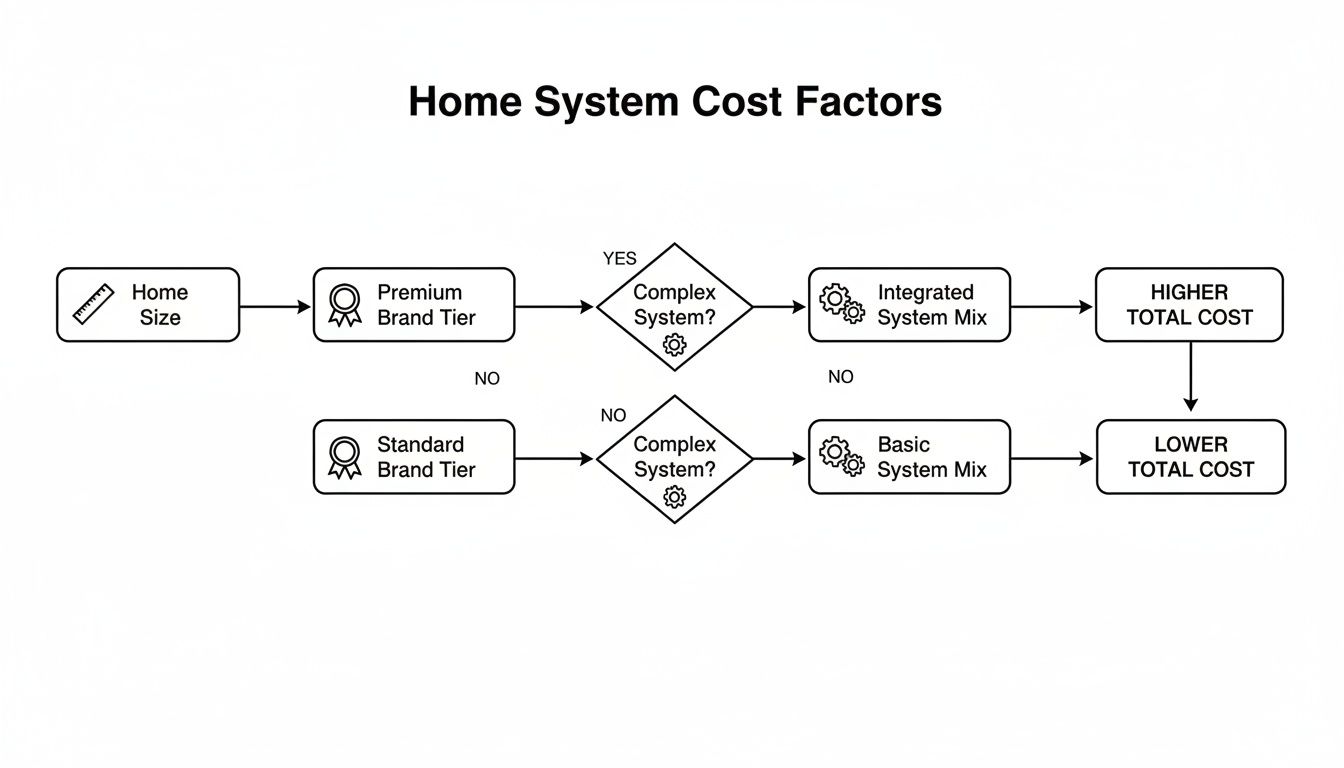
The main takeaway here is pretty clear: as your ambitions grow and you start weaving together more premium, interconnected devices, the path almost always leads toward a professional installer to make sure everything actually works together.
The Case for DIY Installation
Let’s be honest, the biggest draw for the DIY approach is saving money. By cutting out labor costs, you can seriously reduce the upfront hit to your wallet. This path is a fantastic fit for tech-savvy homeowners who genuinely enjoy tinkering, troubleshooting, and figuring things out.
There's also a real sense of satisfaction that comes from getting your hands dirty. You learn the ins and outs of your own system, which makes it much easier to manage, customize, and add new gadgets down the road.
But the DIY route isn’t all smooth sailing. A task that looks simple on YouTube can quickly turn into a weekend-long headache. If you run into compatibility snags or tricky wiring, you can easily find yourself in over your head, potentially damaging your brand-new devices or even your home's electrical system. For those leaning towards a hands-on approach, a detailed DIY guide for installing smart locks can be a great resource to see what you're in for.
The Value of Professional Installation
Hiring a professional installer is about more than just convenience—it's an investment in expertise and pure peace of mind. A seasoned pro has the field experience to design a robust, reliable system that’s actually tailored to your home and how you live in it. They know which brands play nicely together and how to sidestep the common pitfalls that trip up even the most determined DIYer.
From the initial consultation to the final setup and showing you how to use everything, they handle the entire process. This "white-glove" service ensures all your devices are perfectly integrated and working at their best from day one.
Of course, that expertise comes at a price. Professional labor can add anywhere from $50 to $150 per hour to your total budget, depending on how complex the job is. For a deeper dive into the process, our guide to home automation installation breaks down what to expect.
Comparing Your Options Head-to-Head
To help you make the call, let's put DIY and professional installation side-by-side and see how they stack up across the factors that matter most.
Comparing DIY vs Professional Smart Home Installation
This table compares the key aspects of installing a smart home yourself versus hiring a professional, helping you decide which is the right fit for your project.
| Factor | DIY Installation | Professional Installation |
|---|---|---|
| Cost | Significantly lower upfront cost, limited to hardware expenses. | Higher initial investment due to labor fees and consultation charges. |
| Time Commitment | High. Requires hours of research, setup, and troubleshooting. | Low. The installer handles the entire process, saving you valuable time. |
| Complexity | Best for simple, single-device setups or small, contained systems. | Ideal for complex, multi-system integrations and whole-home automation. |
| Expertise | Requires a good degree of technical skill and patience. | No technical knowledge needed; you're paying for their expertise. |
| Support | You are your own tech support, relying on forums and manufacturer guides. | Often includes ongoing support, warranties, and training for your system. |
Ultimately, the choice is yours. If you're just starting out with a few smart plugs and a voice assistant, the DIY path is a fantastic, budget-friendly way to dip your toes in. But if you’re dreaming of a comprehensive system with unified security, lighting, and climate control, investing in a professional will pay for itself in reliability and a frustration-free experience.
Budgeting for Your Smart Home and Seeing a Return
When you start adding up the costs of a smart home, it's easy to see it as just another big expense. But that’s only half the story. The real secret is to stop thinking about it as a one-time cost and start seeing it as an investment—one that can actually pay you back.
A great way to avoid sticker shock is to build your smart home in stages. You don't have to do everything at once. Start small with a few high-impact, low-cost devices. Think smart plugs or a single voice assistant. These give you an immediate taste of convenience without breaking the bank.
Once you’ve got the hang of it, you can move on to the next phase. Maybe you’ll focus on energy savings with a smart thermostat or beef up security with smart locks and cameras. This step-by-step approach not only spreads out the cost but also lets you figure out what you truly need and love as you go.
Calculating Your Smart Home ROI
The real financial magic of a smart home is its ability to save you money and add value to your property. It’s less like buying a new TV and more like a kitchen remodel that actually puts cash back in your pocket. The return on investment (ROI) comes from a few key places.
First up: energy efficiency. Smart thermostats are the undisputed champions here. They learn your family's routines and adjust the heating and cooling automatically, so you're not wasting energy when no one's home. It’s not uncommon for them to cut your energy bills by 10-15% every year. Beyond the initial purchase, the long-term benefits of smart thermostats really make the investment worthwhile.
Then there are the insurance discounts. Many providers will lower your premium by 5% to 20% if you have a professionally monitored smart security system. We're talking about things like smart smoke detectors, water leak sensors, and alarm systems. Those monthly savings might seem small, but they add up to a significant amount over time.
Boosting Your Property Value
Maybe the most powerful financial reason to go smart is the bump it gives your home's resale value. A thoughtfully integrated smart home is a huge selling point that makes your property stand out from the rest. Buyers today are looking for homes that offer built-in security, convenience, and energy efficiency.
A smart home is no longer just a luxury feature; it's becoming a key differentiator in the real estate market. Buyers are increasingly willing to pay a premium for a home that's already equipped with intelligent, connected technology.
This isn't just a hunch. Smart homes genuinely command higher prices. Depending on the market, especially in tech-savvy areas, a smart home can list for significantly more than a comparable "dumb" one.
This is where that phased budgeting approach really shines.
- Year 1: Start with voice control and smart lighting ($500-$1,000).
- Year 2: Add security and energy management ($1,000-$2,000).
When you plan it out, a smart home becomes a smart financial move. By starting with a clear budget, building your system in manageable phases, and choosing devices that offer real returns, you turn an upfront expense into an asset that makes your life better—and your home more valuable.
Finding and Vetting the Right Smart Home Pro
Going the professional route for a smart home installation is a solid choice, especially when you're wading into more complex systems. But let's be honest, finding the right expert can feel daunting. You're not just hiring a handyman to mount a TV; you're bringing in someone to design and install the tech backbone of your entire home.
The right pro can make your smart home dream a reality, creating a system that just works. The wrong one? They can leave you with a mess of buggy gadgets, endless headaches, and a hole in your wallet. The trick is to approach this like you would any other major home project—with a healthy dose of due diligence.
Your Hiring Checklist
To make sure your smart home installation cost is money well spent, use this checklist to thoroughly vet anyone you're considering. Don't be shy about asking detailed questions; a real expert will appreciate an engaged homeowner and have the answers you need.
-
Check for Certs and Insurance: Is the installer certified by an organization like CEDIA (Custom Electronic Design and Installation Association)? That's pretty much the gold standard. Just as crucial, make sure they have both liability insurance and worker's compensation. This protects you in case anything goes wrong on the job.
-
Ask for a Portfolio and Real References: Any installer worth their salt will be eager to show off their past work. Ask to see projects similar to what you have in mind and, more importantly, ask for a few client references you can actually call. A quick chat with a past customer is one of the best ways to gauge what the experience will really be like.
-
Confirm Their Brand Experience: Have your heart set on a specific ecosystem like Control4, Lutron, or Savant? Then you absolutely need an installer who is an authorized dealer or has deep, proven experience with that particular brand. You don't want your home to be their training ground for a system they've never touched before.
A detailed, itemized quote isn't just nice to have—it's essential. It should break down every single piece of hardware and clearly spell out all labor charges and warranty terms. If all you get is a vague, one-line estimate, consider it a major red flag.
Questions to Ask Potential Installers
Once you've narrowed your list down to a few good candidates, it's time to get into the nitty-gritty. How they answer these questions will tell you a lot about their expertise and how they run their business.
- How do you handle service calls and support after the installation is complete?
- What kind of warranty do you provide on your own installation work, separate from the product warranties?
- Can you walk me through how you'll design the system so I can easily add to it later on?
- What's your process for teaching me and my family how to actually use everything?
Following these steps will give you the confidence to hire a pro who won't just meet your expectations, but will build a smart home that genuinely makes your life easier.
Got Questions About Smart Home Costs? We've Got Answers.
Even after you've mapped out a budget, a few specific questions always seem to pop up. Let's tackle some of the most common ones that people have right before they pull the trigger on a project. Think of this as the final check-in to clear up any lingering doubts.
Getting these details ironed out now means you can move forward with confidence, without any last-minute surprises.
Is a Smart Home Really Worth the Initial Price Tag?
It absolutely can be, but you have to look at it as a long-term investment, not just another household expense. Sure, the upfront cost can feel a bit steep, but the payoff down the road is often significant. Just look at smart thermostats—they can trim your annual heating and cooling bills by 10-15%, which means they often pay for themselves in under two years.
And it doesn't stop there. A thoughtfully designed smart home can actually bump up your property's resale value. More and more homebuyers are on the lookout for homes with smart features already built-in, turning it into a real selling point that makes your house stand out from the rest.
What About Hidden Fees or Monthly Subscriptions?
This is a fantastic and crucial question. The short answer is yes, sometimes. Many smart devices, especially security cameras and full-blown alarm systems, come with optional subscription plans. These unlock premium features like cloud video storage or professional 24/7 monitoring.
You can expect these plans to run anywhere from $3 to $20 per month for a single camera, or $20 to $60 per month for a complete security package. While you don't have to subscribe, these services are often what make the hardware truly powerful.
The true cost of a smart device isn't just the price on the box. Always investigate potential subscription fees to understand the long-term financial commitment before you buy.
Can I Save Money by Installing in Phases?
Definitely. In fact, taking a phased approach is one of the smartest ways to manage your budget and avoid getting overwhelmed. There's no rule that says you have to automate your entire home in one weekend. Start with one high-impact area that gives you an immediate win, like installing smart lighting in the living room or putting in that smart thermostat to start saving on energy right away.
Here’s one way to break it down:
- Phase 1: Start small. Pick a single problem to solve, like basic security, with a simple DIY starter kit.
- Phase 2: A few months down the line, expand to another area. Maybe add smart lighting or some smart plugs.
- Phase 3: Once you have a few systems in place, you can think about integrating them with a central hub or calling in a pro to tie everything together.
This strategy lets you spread the smart home installation cost over several months or even years, making it much easier on your wallet. It also gives you a chance to live with the technology and figure out what you really want before you go all-in on a bigger, more complex setup.
At Automated Home Guide, we provide the expert insights you need to build a smarter, safer, and more efficient home. Explore our guides to make informed decisions for your next project at https://automatedhomeguide.com.
Leave a Reply