

At its heart, a smart home is really just a home where everyday objects are connected to the internet. This allows you to control things like your lights, thermostat, and door locks from your phone, or even better, have them run on their own schedule. It’s all about making your living space more responsive and convenient by letting your devices talk to you and to each other.
How a Smart Home Actually Works

To get your head around how it all clicks together, think of your smart home as a symphony orchestra.
Every smart device—a lightbulb, a lock, a speaker—is an individual musician. The network that connects them (like your Wi-Fi or other protocols) is the sheet music they all follow. And the central controller, which is usually an app on your phone or a smart hub, is the conductor, telling everyone what to play and when.
So, when you tap a button in an app or ask Alexa to dim the lights, you're giving a command to the conductor. The conductor then sends that instruction out over the network, and the right "musician" (the lightbulb) performs its action. This simple process is what turns a collection of gadgets into a cohesive, intelligent system.
The Three Pillars of a Smart Home
No matter how simple or complex the setup, every smart home is built on three core components. Once you understand these, the whole concept becomes much clearer. They are the essential building blocks that work in concert to turn your commands into real-world actions.
Here's a quick breakdown of how these pillars support the entire system:
| Pillar | What It Is | Real-World Example |
|---|---|---|
| The Devices | The physical gadgets that do the work. They are the hands and feet of your smart home. | A smart thermostat, a motion sensor, or a video doorbell. |
| The Network | The invisible communication layer that lets devices talk to each other and the internet. | Your home's Wi-Fi network or other protocols like Zigbee or Z-Wave. |
| The Controller | The command center that translates your instructions into signals the devices understand. | The Google Home app on your phone or an Amazon Echo smart speaker. |
These three elements—the devices, the network, and the controller—are the foundation for everything a smart home can do.
This interconnected system is more than just a neat trick; it's fundamentally changing how we interact with our homes. The global smart home market was valued at a whopping $149.43 billion in 2025 and is expected to soar to $633.2 billion by 2032.
Those numbers aren't just industry jargon—they show how many people are embracing the comfort, security, and efficiency that a connected home offers. If you're interested, you can explore more about these smart home market trends to see just how fast this space is growing.
The Building Blocks of Your Smart Home
Every smart home, from a single smart bulb to a fully automated house, is built from the same basic parts. Getting a handle on these building blocks is the first step to understanding how it all works. Think of it like a recipe; you have your ingredients, your mixing bowl, and your instructions. They all have a different job, but you need all three to bake the cake.
Your smart home is essentially made up of three key hardware categories. These pieces work together to form a sort of central nervous system for your home, turning your commands into real-world actions. Let's look at what each one does.
The Things: Your Smart Devices
First up, you have the "Things." These are the boots on the ground—the actual smart devices and sensors that do the work and collect information. They're the physical gadgets you see and interact with every day, like a smart thermostat on the wall, a security camera over the door, or a lightbulb that dims on command.
These devices are the hands, eyes, and ears of your entire system. They're what make your home more comfortable, secure, and efficient.
At its core, a smart device is just a regular object that’s been given a way to talk. It can send and receive information over a network, which lets you control it from anywhere and allows it to cooperate with other devices. That simple capability is what makes a smart coffeemaker different from a standard one.
Many of these devices use sensors to understand what's happening around them. For instance, knowing the different temperature sensor types helps explain how a smart thermostat can make such fine-tuned adjustments to keep your house perfectly comfortable without you lifting a finger.
The Brain: The Central Hub or Controller
Next is the "Brain." This is the central hub or controller that acts as the traffic director for your whole setup. It takes your commands and makes sure they get to the right device. It also helps all your different devices talk to each other. Without a brain, your smart gadgets would just be a bunch of disconnected tools that can't work as a team.
A hub is also a translator. It can take a signal from a Wi-Fi smart speaker and send it to a Zigbee light switch, making sure everything is speaking the same language. Popular hubs include the Amazon Echo, Google Nest Hub, and Apple HomePod, or more dedicated systems from SmartThings or Hubitat.
The Interface: Your Command Center
Finally, you have the "Interface." This is simply how you tell your smart home what to do. The interface is the connection between you and the brain of your system. This could be an app on your smartphone, a dedicated smart display on your counter, or—most common these days—your voice.
When you say, "Alexa, lock the front door," you're using a voice interface. You give a command to the brain (your Amazon Echo), which then tells the thing (the smart lock) what to do. A good, clean interface is what makes a smart home feel effortless instead of complicated.
These three components are the foundation of any smart home you'll encounter.
- The Things: Devices like smart locks, cameras, plugs, and sensors.
- The Brain: A hub like an Amazon Echo, a Google Nest Hub, or a dedicated controller.
- The Interface: A mobile app like Google Home or Amazon Alexa, or voice assistants.
Put them all together, and you have a responsive, connected environment. Once you understand the role each part plays, it’s much easier to see how a home can be set up to learn your habits and make life a little bit easier. The real magic isn't in any one gadget, but in how these three elements work together so seamlessly.
How Your Smart Devices Communicate
For a smart home to feel, well, smart, all its different parts need to talk to each other. Think of these connections as invisible languages, or what the industry calls communication protocols. Just like people use different languages to get their point across, your smart devices use protocols like Wi-Fi, Zigbee, Z-Wave, and Thread to send and receive commands.
Each of these "languages" has its own strengths and weaknesses. Some are incredibly fast and can handle a ton of data, while others are built for efficiency and rock-solid reliability, even over long distances. Getting a handle on these communication methods is the key to understanding the magic that happens behind the scenes.
This simple diagram breaks down the basic flow between your smart home's core components—the devices, the brain, and the interface you use to control it all.
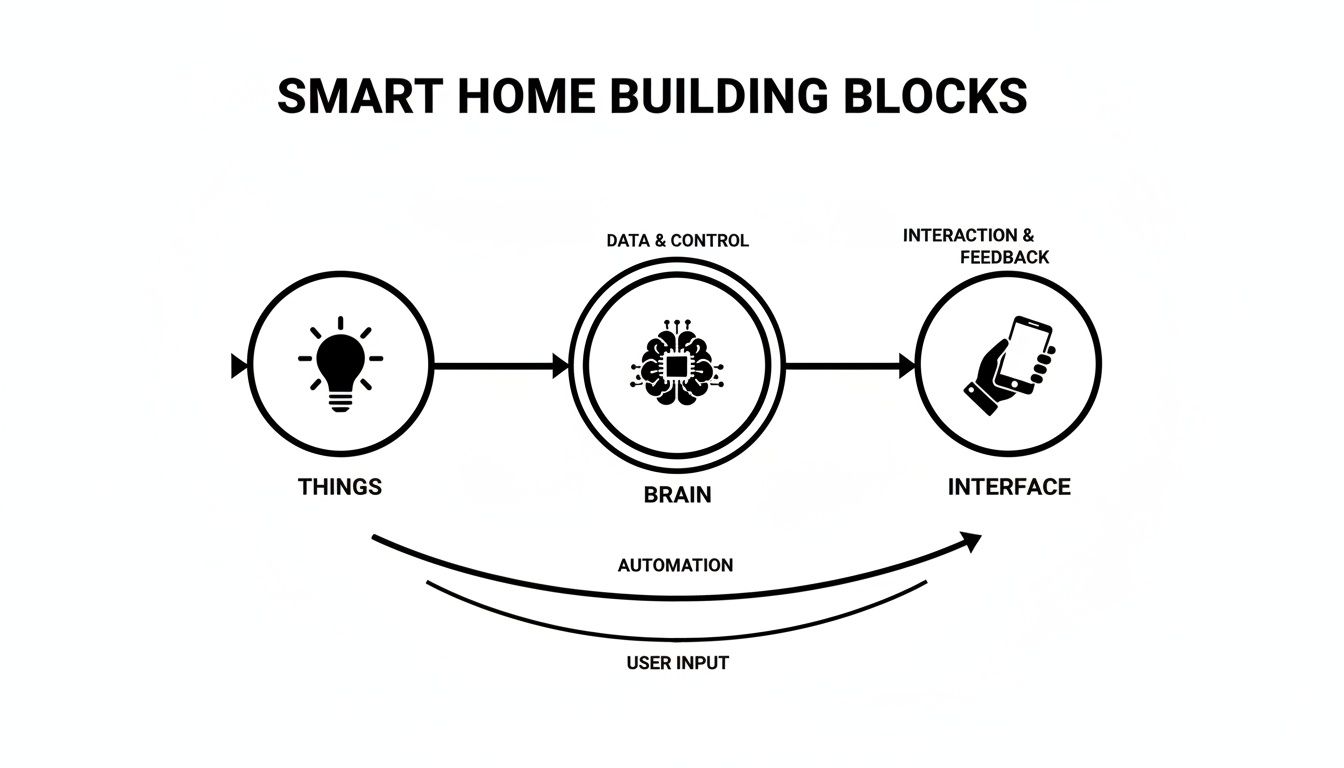
As you can see, the "Things" (your devices) are managed by the "Brain" (a hub or controller), which takes its orders from your "Interface" (an app or your voice). These communication protocols are the invisible threads tying everything together.
Wi-Fi: The Familiar High-Speed Connector
Wi-Fi is the one protocol you definitely already know. It’s the backbone of internet access in most homes, making it a super convenient and popular choice for many smart devices. Because it offers high bandwidth, it's perfect for gadgets that need to send a lot of data, and fast.
A high-definition security camera streaming live video to your phone is a perfect example. Same with a smart speaker playing your favorite playlist from the cloud. These jobs demand a speedy, robust connection, and that's exactly what Wi-Fi delivers.
But Wi-Fi isn't perfect for everything. It can be a real power hog, which is why you rarely see small, battery-operated sensors that rely on it. Piling dozens of smart gadgets onto your network can also create congestion, potentially slowing down your internet for important things like movie night or online gaming.
Still, its popularity is undeniable. The market for Wi-Fi-enabled smart devices is exploding, with shipments growing at a 21% compound annual rate through 2025. This growth fueled a U.S. market that hit an incredible $31.45 billion in 2022. These numbers show just how central this high-speed connection is to the modern smart home.
Zigbee and Z-Wave: The Low-Power Specialists
While Wi-Fi connects every device directly to your router, Zigbee and Z-Wave do things a bit differently. They create their own dedicated network called a mesh network.
In a mesh network, devices don't just talk to the central hub—they can also talk to each other. This creates multiple pathways for a signal to travel, making the whole system incredibly reliable and extending its reach well beyond what a single Wi-Fi router could manage.
This unique structure makes them a perfect fit for small, low-power devices that need to be dependable but don't need blazing-fast speeds. Think door sensors, smart light bulbs, and motion detectors.
- Zigbee: Known for being fast and flexible, you'll find Zigbee in many popular smart lighting systems and sensors.
- Z-Wave: This protocol is prized for its reliability and low interference, making it a go-to for security essentials like smart locks and garage door openers.
Because they operate on their own frequencies and sip power, they won't clog up your home's Wi-Fi. The trade-off? They usually require a central hub to act as a translator between their network and your router, so you can control them from your phone.
Thread and Matter: The Universal Translators
For years, one of the biggest headaches in the smart home world was the "language barrier." Getting devices from different brands to work together was often a nightmare. This is exactly the problem that two newer standards, Thread and Matter, were designed to solve.
-
Thread: Much like Zigbee and Z-Wave, Thread is a low-power mesh networking protocol. It's built to be fast, secure, and "self-healing," meaning it can automatically reroute signals if one device in the mesh happens to go offline.
-
Matter: Now, Matter isn't a communication protocol itself. Instead, it’s an application layer that sits on top of protocols like Wi-Fi and Thread. Think of Matter as a universal translator. If a device is Matter-certified, it can communicate with any other Matter-certified device, no matter who made it.
The goal of Matter is beautifully simple: make everything just work together, right out of the box. As more and more manufacturers get on board, building a powerful, multi-brand smart home is finally becoming as easy as it should have been all along. To dive deeper, take a look at our guide on choosing the right smart home protocol for what you want to achieve.
Comparing Smart Home Communication Protocols
To help you visualize where each protocol shines, here's a quick breakdown of their strengths, weaknesses, and the kinds of devices they're best suited for.
| Protocol | Primary Benefit | Common Devices | Key Consideration |
|---|---|---|---|
| Wi-Fi | High speed & no hub needed | Security cameras, video doorbells, smart speakers | Can be power-hungry & congest your network |
| Zigbee | Fast, flexible & low power | Smart lighting, motion sensors, smart plugs | Requires a compatible hub to connect to the internet |
| Z-Wave | Highly reliable & low interference | Smart locks, thermostats, garage door openers | Also needs a hub and can be slower than Zigbee |
| Thread | Secure, self-healing mesh & low power | Smart sensors, lighting, smart plugs | A newer protocol, so device selection is still growing |
Choosing the right technology really depends on the job at hand. For a simple setup with a few high-data devices, Wi-Fi might be all you need. But for a more complex home with dozens of small sensors and lights, a mesh network using Zigbee, Z-Wave, or Thread is a much more robust and reliable solution.
Putting the Smart in Your Home with Automation
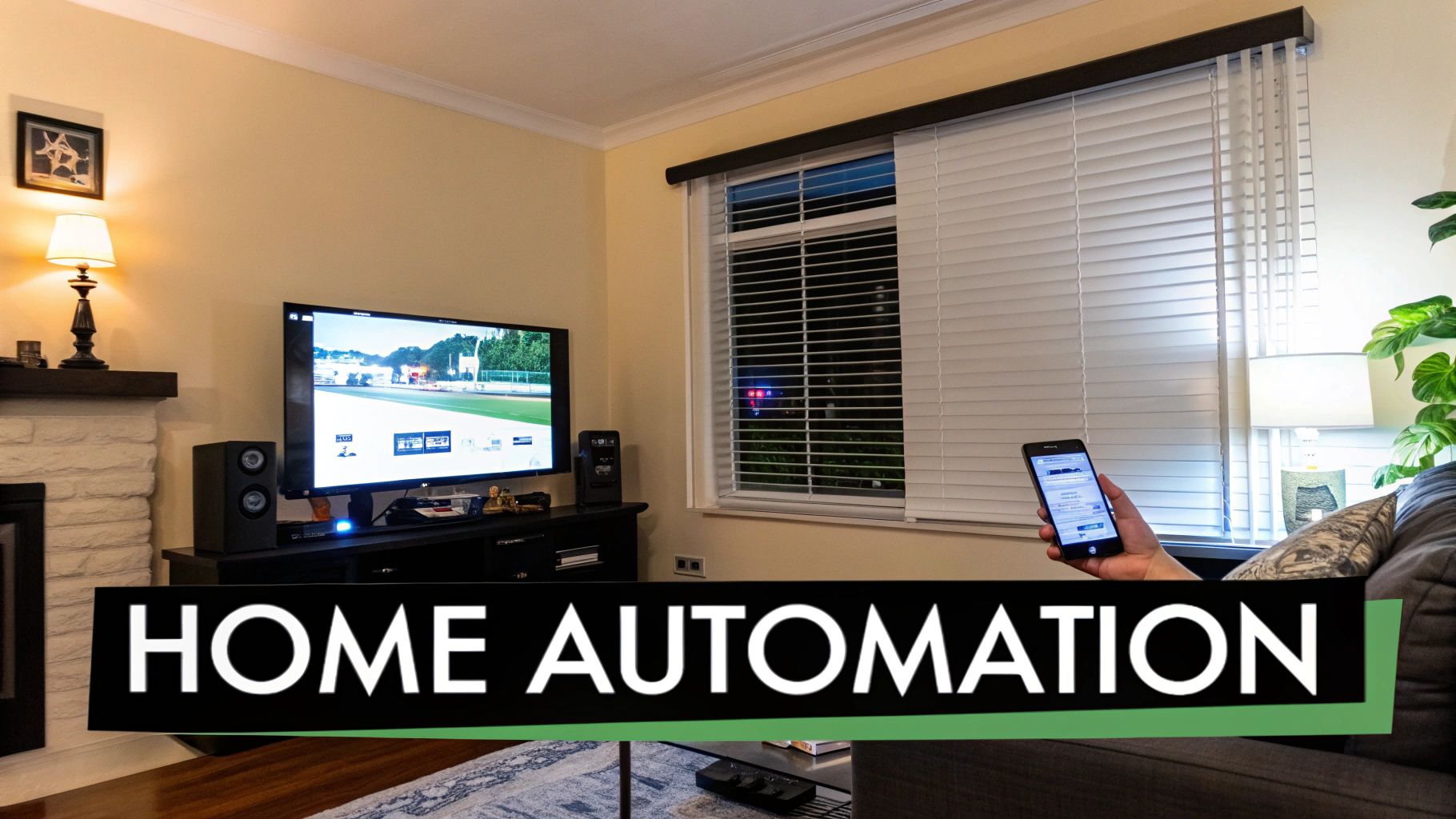
Controlling a light from your phone is neat, but let's be honest—it’s not truly smart. The real magic happens when your home starts working for you, anticipating your needs without you having to lift a finger. This is the world of automation, where your devices talk to each other to handle tasks on their own.
Automation is what elevates your home from a collection of remote-controlled gadgets to a genuinely helpful ecosystem. It's the difference between a reactive home (one that waits for your commands) and a proactive one (one that knows what you need before you do).
The Simple Logic Behind Smart Actions
At its core, nearly all home automation runs on a beautifully simple principle: If-Then logic. You might also hear this called a trigger-action sequence.
Think of it as setting up a series of basic house rules. The "If" is the trigger—an event your smart home detects. The "Then" is the action—what a device (or multiple devices) does in response. It’s that straightforward.
Here are a few classic examples of this in action:
- If the front door opens after sunset, then turn on the entryway lights.
- If the smoke detector goes off, then turn on all the lights and unlock the smart locks.
- If the living room TV turns on, then dim the lamps to 30% brightness.
This simple formula is the building block for almost every helpful routine you can imagine, making it feel like your home is actively taking care of you.
From Single Actions to Powerful Scenes
While one-to-one rules are useful, the real fun starts when you bundle multiple actions into "scenes" or "routines." A scene is just a pre-set collection of device settings you can fire off with a single command.
Instead of fiddling with four different apps or switches, you just trigger the scene.
A scene is like a pre-programmed mood for a room or your entire house. It’s a shortcut that orchestrates multiple devices at once to create the perfect environment for whatever you’re doing—waking up, watching a movie, or heading out for the day.
Let’s say you create a "Movie Night" scene. With one tap or a simple voice command like, "Hey Google, start Movie Night," you could set off a chain reaction:
- The living room lights dim to a soft, warm glow.
- The smart blinds automatically lower to kill the glare.
- The smart TV turns on and opens your favorite streaming app.
- The thermostat bumps the temperature up to a cozier setting.
Suddenly, you've got the perfect setup without having to adjust four or five different things every single time. That’s how a smart home simplifies your life.
The Role of Sensors in Automation
For your home to react intelligently, it needs to know what’s going on. It needs senses. That's where sensors come in—they are the eyes and ears of your system, providing the crucial data that acts as the "If" for your automation triggers.
This data-driven approach is what makes a smart home work so seamlessly. In fact, it's so important that over 70% of new smart home products are focused on improving this experience, like adding better voice recognition to kick off these complex routines. You can dig into more data on the smart home market to see how this trend is evolving.
Different types of sensors provide different triggers for your automations:
- Motion Sensors: Turn on lights when you walk into a dark hallway.
- Door/Window Sensors: Can trigger a security alert or a "welcome home" lighting scene.
- Temperature/Humidity Sensors: Tell your smart thermostat or dehumidifier when to kick on.
- Light Sensors: Can tell your blinds to close when the afternoon sun gets too intense.
When you combine these sensors with scenes, you create a home that doesn’t just respond to your commands, but to your presence and the environment itself. This is the key to building a truly intuitive living space.
Navigating Smart Home Security and Privacy
Once you start adding smart devices to your home, the conversation always shifts to security and privacy. It's a valid concern. The thought of a digital backdoor into your life can feel a bit unnerving, but here’s the good news: protecting your smart home is completely manageable.
It all starts with thinking of your home network as your digital front door. You wouldn't leave your physical door unlocked, right? The same logic applies to your Wi-Fi. A strong, unique password is your first and most important line of defense. Pair that with a modern router that supports WPA3 encryption, and you've already built a solid foundation.
Strengthening Your Defenses
Beyond a great password, a few extra layers of protection can make a world of difference. These aren't complicated technical maneuvers, just simple habits that massively boost your smart home's resilience.
First up, always enable two-factor authentication (2FA) whenever an app or service offers it. With 2FA, a stolen password becomes almost useless to a hacker because they’d also need a second code, which typically gets sent right to your phone. It’s a simple but incredibly effective roadblock.
Equally important is keeping your devices updated. Manufacturers are constantly finding and fixing security holes, and they push these fixes out as firmware updates. Just turn on automatic updates, and your gear will stay protected without you having to lift a finger.
Your smart home is only as secure as its weakest link. Consistently applying best practices across all your devices—from your router to your smart plugs—creates a layered defense that is far more difficult to penetrate than a single, strong password alone.
This focus on safety isn't just a recommendation; it's a huge driver in the market. The home security sector is projected to surge from $86 billion in 2020 to $150 billion by 2025, largely because people want the peace of mind that connected cameras, locks, and sensors can provide.
Practical Steps for a More Secure Home
Putting these ideas into action doesn't require a degree in cybersecurity. It's really just about forming smart digital habits. For a deeper look at the hardware and systems involved, our guide on smart home security systems is a great next step.
Here are three simple things you can do right now to lock down your network:
- Create a Guest Network: Nearly all modern routers can create a separate Wi-Fi network for guests. Use this for visitors' devices and maybe even some of your less-critical smart gadgets. This walls them off from your main network where your personal computer and other sensitive data live.
- Review Device Permissions: When you install a new app for a smart device, be mindful of what it's asking for. Does your smart lightbulb really need access to your contacts? If a permission feels off, don't grant it.
- Audit Your Devices Regularly: A couple of times a year, just pull up your router’s app and look at the list of connected devices. If you spot something you don’t recognize or a device you no longer use, kick it off the network.
For those who want to take it a step further, implementing network segmentation best practices can offer even more robust protection. By taking these straightforward, proactive steps, you can enjoy all the benefits of a connected home with confidence.
More Than Just Cool Gadgets
Sure, telling your speaker to play a song or killing the lights from the couch is fun. But if you think that's all a smart home is good for, you're only scratching the surface. The real magic happens when you look past the convenience and see how these connected systems can genuinely make life better, safer, and more efficient.
This is where all those interconnected devices start working together, creating a home that’s not just clever, but also incredibly helpful.
A Smarter Way to Manage Energy
One of the most practical benefits of a smart home is its knack for cutting down on energy waste. We're not talking about just saving a few pennies here and there. This is about an automated system that actively trims your utility bills and shrinks your carbon footprint, all without you having to lift a finger.
Take a smart thermostat, for instance. It’s way more than a fancy programmable timer. It actually learns your family's habits—when you head out for work, when everyone's usually asleep—and dials the heating or cooling back automatically. No more wasting money conditioning an empty house.
And it doesn't stop with the thermostat. Other smart devices chip in to make your home a lean, mean, energy-saving machine:
- Smart Plugs: These little wonders can cut power to devices that are notorious for sipping "vampire power" even when turned off, like your TV console or phone chargers.
- Automated Lighting: With motion sensors, lights pop on when you walk into a room and switch off when you leave. It's a simple, brilliant way to make sure you never pay for lighting an empty space.
- Smart Blinds: Imagine your blinds automatically closing during the hottest part of a summer afternoon. That simple action takes a huge load off your air conditioner, saving both energy and money.
These small, automated tweaks add up fast. A well-designed smart home can cut energy consumption by as much as 20-30% from smart thermostats and lighting alone. It's this kind of tangible benefit that explains why the smart home market is expanding so quickly. You can explore more on the smart home market growth at Precedence Research.
A Home That Helps You Live More Independently
Here’s where a smart home’s purpose gets truly profound: fostering independence for the elderly and people with mobility challenges. When getting around is difficult, everyday tasks that most of us take for granted can feel like huge hurdles. Voice control completely changes that game.
Think about it. A person with limited mobility can suddenly manage their entire environment without needing help. From their favorite chair, they can adjust the temperature, turn lights on or off, check that the doors are locked, and even see and talk to who's at the front door through a video doorbell.
This isn't just about convenience; it's about dignity and autonomy. Smart speakers can be set up to call for help with a simple phrase. Routines can be created to announce medication reminders or to automatically turn on pathway lights at night to prevent falls. The smart home becomes a supportive partner, giving peace of mind to both residents and their families. It proves that this technology, at its best, is deeply human.
Your Top Questions Answered
Even after you get the hang of the basics, some practical questions always pop up. Let's tackle some of the most common ones that people ask when they're just starting their smart home journey.
Do I Need Super-Fast Internet for a Smart Home?
Not always, but a stable connection is what really matters. Many devices using protocols like Zigbee or Z-Wave create their own internal network, talking directly to a hub without clogging up your Wi-Fi for simple commands.
Where your internet speed really comes into play is with anything that needs to connect to the outside world. Think streaming video from a security camera, asking Alexa for the weather, or changing the thermostat when you're not home. If your internet can handle streaming Netflix without constant buffering, you're likely in good shape for most smart home setups.
What Happens to My Smart Home if the Internet Goes Down?
This is a great question, and the answer really depends on how you've built your system. If your devices are all Wi-Fi-based and rely on cloud services, they'll lose their "smart" functionality. You'll have to flick that light switch manually, just like the old days.
But, if you've built your system around a hub that processes commands locally (like Hubitat or Home Assistant), many of your automations will keep chugging along just fine. A motion sensor can still turn on the hallway lights because that entire conversation happens inside your house. You just won't be able to use your phone app for remote control or talk to your voice assistant until the internet comes back online.
A smart home with a local hub is a game-changer for reliability. It keeps your core routines running smoothly, even when your internet connection takes a break.
Can I Mix and Match Smart Home Gear from Different Brands?
Absolutely! This is where things get really interesting, but you have to pay attention to compatibility. For a long time, this meant carefully checking if all your gadgets spoke the same language (like Z-Wave) or if they were all supported by a central hub that could act as a universal translator.
The good news is that the new Matter standard was designed to fix this exact headache. Think of Matter as a common language that all smart devices can learn to speak. If you see the Matter logo on a product, you can be confident it will work with any other Matter-certified gear, no matter who made it. This is making it easier than ever to build a truly flexible and future-proof smart home.
At Automated Home Guide, our mission is to help you create a safer, more efficient, and more convenient home with the right technology. Dive into our guides and reviews to make smart choices for your living space. https://automatedhomeguide.com










Leave a Reply