
When you’re trying to decide between Siri, Alexa, and Google, the right answer really comes down to what you value most in your smart home. If you're all-in on Apple, Siri is a natural fit, offering a smooth, integrated experience. If your goal is to connect the widest possible range of gadgets and build complex automations, Alexa is the clear front-runner. And for those who want the most intelligent, context-aware conversations and quick, accurate answers, Google Assistant is tough to beat.
Choosing Your Smart Home Voice
Picking a voice assistant is one of the first big decisions you'll make when building a smart home. It’s about more than just which speaker sits on your counter; you're choosing the central brain that will run everything. This choice will shape which devices you buy, how you set up automations, and how smart your home actually feels day-to-day.
Think of it as the foundation of your home's tech. Just like developers need a practical guide to choosing the right software stack to build an application, you're picking the core platform for your home. We're going to dive deep into what actually matters in the real world, moving past the marketing hype to help you create a truly responsive and helpful home.
Let's break down the core philosophies of each assistant:
- Siri (Apple): Built for those who live in the Apple world. Its main draws are tight integration with iPhones, Macs, and Apple TVs, and a strong focus on user privacy with its HomeKit framework.
- Alexa (Amazon): The tinkerer's dream. Alexa boasts the largest ecosystem of compatible third-party devices, making it the go-to for anyone who wants maximum flexibility and powerful automation routines.
- Google Assistant: The smart one in the room. It leverages Google's massive search index to provide incredibly accurate, context-aware answers and handle more natural, conversational commands.
Voice Assistant Quick Comparison
To get a quick sense of where each platform shines, this table lays out their core strengths. It’s a great starting point for seeing which assistant aligns with your vision for your smart home. To see how these assistants pair with dedicated hardware, our https://automatedhomeguide.com/smart-home-hub-comparison/ offers a more detailed look.
| Assistant | Best For | Core Strength | Primary Ecosystem |
|---|---|---|---|
| Siri | Apple Users | Seamless Integration & Privacy | Apple HomeKit |
| Alexa | Device Customizers | Unmatched Device Compatibility | Amazon Alexa |
| Google Assistant | Information Seekers | Conversational Intelligence | Google Home |
Each assistant has carved out a unique space in the smart home world. Now, let’s dig into the specifics to see how they stack up in the areas that matter most.
How Well Do They Actually Understand You?
Let's be honest, a smart assistant is only smart if it actually understands what you're saying. Having to repeat yourself or carefully phrase a simple question totally defeats the purpose. This is where the rubber meets the road, and you can really feel the difference in the core intelligence of Siri, Alexa, and Google Assistant.
It's not just about recognizing words; it's about understanding context. The best assistants can follow a conversation, remembering what you just asked. This ability to handle follow-up questions without making you start from scratch is what makes the interaction feel natural instead of clunky.
When you're comparing Siri vs Alexa vs Google, this conversational flow is a massive deal. Imagine you're in the kitchen with your hands full and ask, "How many ounces in a cup?" and then immediately follow up with, "Okay, what about for flour?" Which assistant can keep up without getting confused?
Google Assistant: The Conversational Leader
When it comes to understanding complex, multi-part questions, Google Assistant is in a league of its own. It’s backed by the full power of Google's search engine and years of natural language processing research, which allows it to grasp context in a way the others just can't match.
You can throw some seriously layered questions at it. For example, asking, "Who was the lead actor in Gladiator, and what other movies was he in?" is a breeze for Google. It gets that "he" in the second half of the question refers back to the actor from the first part. This is the kind of stuff that makes interactions feel genuinely helpful, not robotic.
The numbers back this up, too. Recent studies on intelligent virtual assistant statistics show Google Assistant boasting a 95% voice recognition accuracy and a 93.7% correct answer rate. It's hands-down the most reliable for getting things right on the first try.
Alexa: The Capable and Ever-Improving Contender
Amazon's Alexa has come a long way and is more than capable for most daily tasks. It’s fantastic at handling direct commands and has an approachable, friendly personality that people love. Its real power shines when you're controlling its massive ecosystem of skills and smart home gadgets.
Alexa is an action-oriented powerhouse. A command like, "Turn on the living room lights and play my cooking playlist on Spotify," is where it excels. It executes tasks flawlessly. Where it can sometimes trip up is with those layered, informational questions that require it to remember the context from your last query.
While Alexa is brilliant at executing direct commands and Skills, it often needs you to be more specific with follow-up questions. Its conversational memory just isn't as robust as Google's, so you might find yourself repeating the subject of your query more often.
Siri: The Private and Personal Assistant
Siri's biggest advantage is its deep, native integration into the Apple ecosystem. It’s incredibly good at personal tasks. It can read your latest texts, create reminders that instantly sync to your Mac and iPad, and manage your calendar without a hitch. For anything that lives within your Apple devices, Siri is often the fastest way to get it done.
However, Siri tends to lag behind when it comes to general knowledge and holding a conversation. It often treats each question as a totally separate event, losing the thread of what you were just talking about. This means you’ll probably have to repeat yourself and re-establish the context for any follow-up questions, which can feel frustrating.
This makes Siri best for quick, device-focused commands—not for having a real back-and-forth dialogue. While its focus on on-device processing is a big win for privacy, it does limit its ability to tap into the vast, real-time data that makes Google so powerful.
Building Your Connected Home Ecosystem
A voice assistant is much more than just a speaker you talk to; it's the brain of your entire smart home. The real power in the Siri vs. Alexa vs. Google debate comes alive when you start connecting other devices. The assistant you choose will fundamentally define the hardware you can use, from smart plugs and light bulbs to security cameras and thermostats.
This ecosystem is where your smart home stops being a collection of gadgets and becomes a genuinely automated environment. Each platform has its own philosophy on device support, and that directly impacts how big and flexible your setup can be.
Alexa: The Undisputed Compatibility King
When it comes to the sheer number of compatible devices, Amazon's Alexa is in a league of its own. It works with well over 140,000 smart home products from thousands of brands, giving you an almost unbelievable amount of freedom. If a smart device exists, chances are it works with Alexa.
This massive compatibility is a huge win for homeowners who want to mix and match brands or find that one perfect niche product. Whether you're eyeing smart blinds from a startup or a thermostat from a big-name manufacturer, Alexa is your safest bet.
Alexa's secret sauce is its "Skills" platform. Think of Skills as apps for your voice assistant. This open-door policy allows third-party developers to easily integrate their products, creating an enormous and diverse marketplace of compatible gear.
If you're just getting started, our guide on how to connect devices to Alexa can help you get your bearings. For most devices, the setup is dead simple, often just requiring a quick scan in the Alexa app or a simple voice command.
Google Assistant: A Strong and Growing Contender
Google Assistant, running on the Google Home platform, has made some serious ground in catching up to Alexa. While its device library isn't quite as massive, it supports all the major players you'd expect, including Philips Hue, Nest, August, and Wyze.
Google’s real strength is the quality of its integrations. Instead of just giving you basic on/off commands, Google often provides deeper, more granular control right from the Google Home app. This makes for a much more cohesive and satisfying user experience.
Siri and HomeKit: The Walled Garden
Apple takes a completely different path with Siri and its HomeKit platform. Instead of going for sheer numbers, Apple puts a premium on security, privacy, and reliability. Before any device can get that "Works with Apple HomeKit" certification, it has to pass Apple's strict hardware and software encryption standards.
The result is a smaller, more carefully curated list of compatible devices. You won't find the overwhelming volume of options that Alexa offers, but the devices that are supported tend to work flawlessly and with a higher degree of built-in security.
For HomeKit devices, the setup is often the easiest of the three. You just scan a QR code on the device with your iPhone, and it's instantly part of your Home app. It’s that simple.
Smart Home Device Compatibility
The table below breaks down the key differences between these ecosystems, showing the trade-offs you'll make between maximum choice, balanced integration, and premium security.
| Feature | Siri (HomeKit) | Alexa | Google Assistant |
|---|---|---|---|
| Number of Devices | Thousands | Over 140,000 | Tens of Thousands |
| Setup Process | Easiest (QR code scan) | Simple (app or voice) | Simple (app discovery) |
| Integration Philosophy | Security and reliability | Maximum compatibility | Quality and deep control |
| Best For | Apple users who want a secure, curated system. | Homeowners demanding the widest possible device choice. | Users seeking a balance of compatibility and deep integration. |
Ultimately, picking an ecosystem is a long-term commitment. Alexa gives you the most freedom, Google provides a polished and powerful alternative, and Siri delivers an incredibly secure but more restrictive experience for those already in the Apple world. The decision you make here will define the boundaries of your smart home for years to come.
Mastering Routines and Home Automation
True smart home magic isn't about telling a speaker to play a song. It's about your home anticipating what you need and acting on it. This is where automation comes in, transforming a collection of smart gadgets into a genuinely intelligent environment.
The real test in the siri vs alexa vs google matchup is how well they can string multiple actions together. A simple "Goodbye" command should do more than turn off a single bulb—it should lock the doors, arm the security system, adjust the thermostat, and shut down every light in the house. This is the heart of home automation.
Each ecosystem has its own flavor. Alexa has its powerful Routines, Google Assistant offers its own streamlined version, and Siri splits its muscle between Home Automations and the incredibly deep Shortcuts app. The differences in how they work, what can trigger them, and how easy they are to build are massive.
To get a better handle on the concepts behind making your home run on its own, it’s helpful to understand the basics of workflow automation. The same principles apply here, just on a domestic scale.
Alexa Routines: The Power of Choice
If you're the kind of person who loves to tinker and build complex, layered automations, Alexa is your undisputed champion. Its main advantage is the sheer number of triggers and actions it supports. You can kick off an Alexa Routine with almost anything.
You can start routines based on:
- Voice Commands: The classic "Alexa, good night."
- Time of Day: Automatically dim the living room lights every day at sunset.
- Location (Geofencing): Tell your thermostat to warm up the house when you're a mile away from home.
- Smart Device Sensors: Have the porch lights turn on the instant your camera's motion sensor is tripped.
- Sound Detection: Create a routine that plays calming music when Alexa hears a baby crying.
This incredible flexibility makes Alexa the tinkerer's dream. It lets you connect thousands of third-party devices in creative ways, making the possibilities feel almost infinite. If one of your smart devices has a sensor, odds are Alexa can use it to trigger an action on a completely different device.
Google Assistant Routines: Simple and Effective
Google's approach to Routines is all about simplicity and getting the job done without a fuss. It might not have Alexa's laundry list of sensor-based triggers, but it excels at creating the reliable, everyday automations most people actually want.
Google also makes it easy to manage a multi-person household. It offers "Household" routines that anyone can use, alongside "Personal" routines that are tied specifically to your voice. The "Home & Away" routines, which use your phone's location to figure out if people are home, are also rock-solid and work beautifully for adjusting the thermostat or lights automatically.
While Google keeps the main interface simple, it has a hidden gem for power users: a "script editor." This feature lets you write code-like logic for highly specific and powerful automations that go way beyond the standard tap-and-select options.
For most homes, Google provides more than enough power. Setting up a "Movie Night" routine to dim the lights and fire up the TV is a breeze in the Google Home app. The whole experience is clean and prioritizes ease of use over an overwhelming number of options.
Siri Shortcuts: The Deep Integration Powerhouse
Siri’s automation power is a tag-team effort between Home Automations and the Shortcuts app. Home Automations live right in the Home app and are perfect for straightforward, device-focused tasks like turning on the entryway light when you get home. They are dead simple and tightly integrated with HomeKit devices.
But the real secret weapon is the Shortcuts app. This is less of a smart home tool and more of a full-blown automation platform for your entire digital life. With Shortcuts, you can build incredibly detailed sequences that control your home and interact with the apps on your iPhone, iPad, or Mac.
For instance, you could build a single "Heading to Work" shortcut that:
- Turns off every light in the house.
- Sets the thermostat to an energy-saving "Away" mode.
- Pulls up directions to your office in Apple Maps.
- Starts playing your favorite podcast through CarPlay.
This kind of deep-level integration with the operating system itself is something Alexa and Google just can't match. If you're all-in on Apple gear, Shortcuts offers a degree of personal power and customization that is simply in a class of its own.
Navigating Privacy and Data Security
Placing a smart speaker in your home means inviting an always-on microphone into your most private spaces. That’s a big deal, and it naturally raises some serious questions about data security. When you’re weighing Siri vs. Alexa vs. Google, how each company handles your personal information is just as important as any feature they offer.
It helps to remember what each company's main business is, because that directly shapes its approach to your data. Apple sells hardware. Amazon sells products. Google sells targeted advertising. Those core differences are the key to understanding their privacy policies and the controls they give you.
To make a smart choice, you have to look beyond the marketing slogans and dig into the actual default settings and data management tools each one provides.
Apple’s Privacy-First Approach with Siri
Apple has staked its reputation on a pro-privacy stance, and Siri is a central part of that promise. A whole lot of Siri's processing happens directly on your device, which is a crucial distinction. It means many of your requests never even leave your iPhone or HomePod, minimizing the data sent to the cloud in the first place.
When a more complex query does need to be sent to Apple's servers, the data is anonymized and not linked to your personal Apple ID. Apple also gives you clear, easy-to-find controls in your device settings to manage and delete your Siri history.
Apple’s HomeKit Secure Video really drives this point home. It analyzes video from compatible security cameras on your local hub (like a HomePod or Apple TV) before encrypting it and sending it to iCloud. This design ensures that not even Apple can see your footage.
Amazon’s Data Strategy with Alexa
Amazon’s main objective is to make shopping and using its services as frictionless as possible. Alexa collects data from your interactions to improve the service and personalize your experience—which, yes, can include product recommendations on Amazon.com. By default, Amazon saves your voice recordings to help make Alexa more accurate.
That said, Amazon has put some robust tools in your hands for managing this data in the Alexa Privacy Hub. You can go in and review your entire voice history, delete specific recordings one-by-one, or set them to auto-delete after three, 18, or 36 months. You also have the option to opt-out of letting them use your recordings for new feature development.
Google’s Personalized Data Model
Google Assistant's magic comes from its ability to tap into what it knows about you from other Google services like Gmail, Calendar, and Search. This deep integration is what makes it so uncannily good at answering complex questions and anticipating what you might need next.
Much like Amazon, Google saves your audio recordings by default to fine-tune its voice recognition tech. You get total control over this data in the Google My Activity portal. From there, you can listen to, delete, and manage every interaction you've had. Google also provides a helpful auto-delete feature for your activity data.
For an even deeper dive into securing your entire connected home, check out our guide on home network security best practices. The tips there apply no matter which assistant you end up with.
Ultimately, while all three companies have been under the microscope for their data practices, they also give you powerful tools to stay in control. The best choice really comes down to your personal comfort level, weighing Apple’s on-device philosophy against the powerful, data-driven personalization you get from Amazon and Google.
Which Voice Assistant Is Right for You?
Deciding between Siri, Alexa, and Google Assistant isn’t about picking a universal "best" option. It's about figuring out which one fits your life—your tech, your habits, and how you imagine your smart home working. The right choice for someone all-in on Apple will look totally different from what a dedicated smart home hobbyist needs.
This final breakdown goes beyond simple feature lists. We’ll look at a few common user profiles to help you see which assistant will genuinely make your life easier, not just add another gadget to your counter. The goal here is to match the assistant's real-world strengths to your specific needs.
This decision tree helps visualize the core trade-offs you'll be making, especially when it comes to privacy versus convenience.
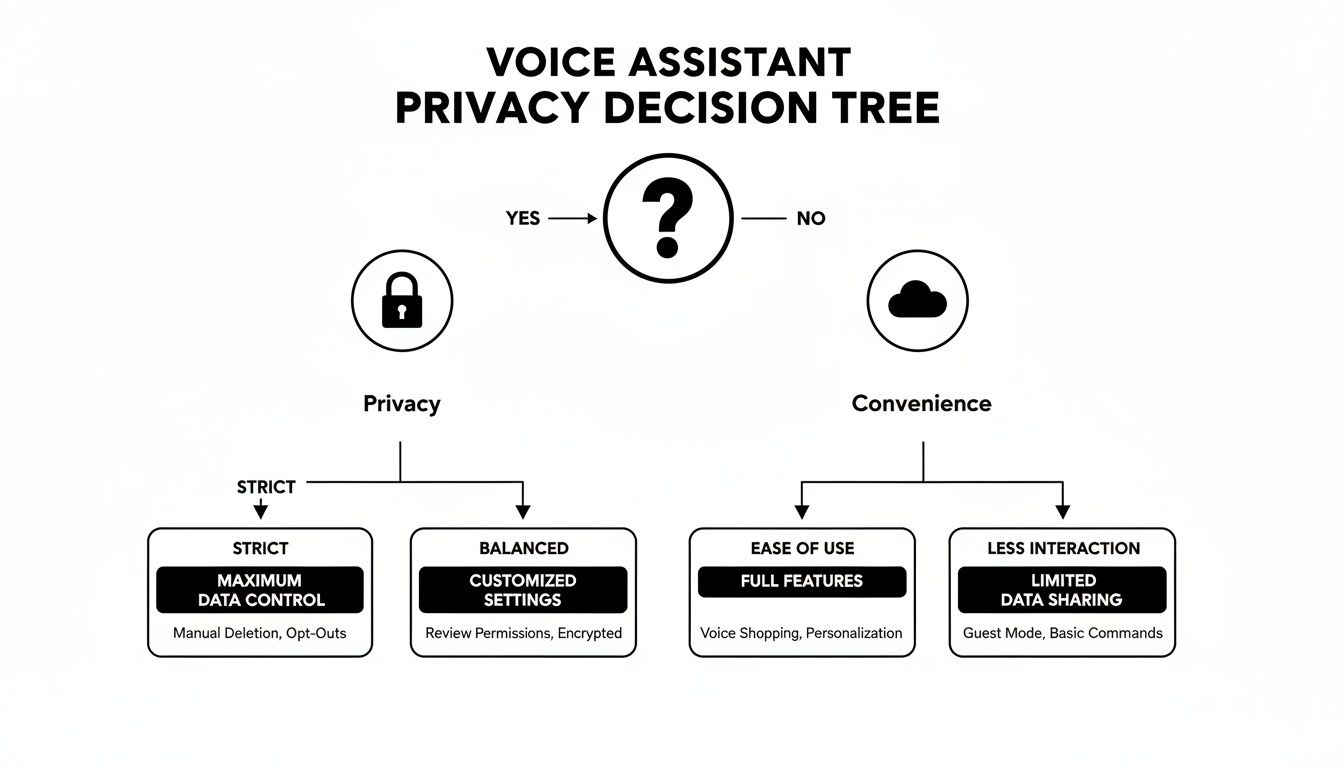
As you can see, the central question for any smart home user is this: Are you willing to trade a little convenience for maximum privacy, or vice versa?
For the Apple Loyalist: Siri Is the Obvious Choice
If your home is already filled with Apple gear—iPhone, Mac, Apple Watch, Apple TV—then choosing Siri is a no-brainer. Its biggest advantage isn’t that it's inherently smarter, but that it works so seamlessly within that tightly controlled ecosystem.
The experience is just incredibly smooth. Set a reminder on your HomePod, and it instantly pops up on your iPhone and Mac. You can start a playlist on your phone and ask Siri to "hand it off" to your living room speaker without skipping a beat. That's a level of native integration Alexa and Google simply can't touch inside the Apple world.
Siri shines as a personal, on-device assistant. For managing your calendar, sending messages, controlling Apple Music, and running powerful Shortcuts, it offers a secure and deeply integrated experience that's second to none for anyone using Apple products.
On top of that, Apple’s strict privacy standards for its HomeKit platform offer real peace of mind. If you value security and a curated, reliable experience over endless customization, Siri provides a polished and trustworthy foundation for your smart home.
For the Smart Home Tinkerer: Alexa Reigns Supreme
If your goal is to build the ultimate, highly customized smart home using devices from dozens of different brands, Amazon Alexa is the undisputed champion. Its massive ecosystem, with compatibility for over 140,000 products, gives you unparalleled freedom to connect, experiment, and automate to your heart's content.
Alexa’s power comes from its "Skills" platform, which is essentially an open app store for your smart home. This means you can find niche gadgets and creative integrations that just don’t exist on other platforms. From smart blinds and robot vacuums to connected kitchen appliances, if you can dream of automating it, you can probably do it with an Alexa Routine.
This makes Alexa the perfect playground for the hands-on homeowner who loves to fine-tune their environment. Its advanced routine triggers—like motion sensors, sound detection, and geofencing—allow for complex automations that can make a home feel truly intelligent.
For the Knowledge Seeker: Google Assistant Is Unmatched
When your top priority is getting fast, accurate, and context-aware answers, Google Assistant is in a league of its own. It taps into the full power of Google's search engine and sophisticated language processing to deliver a conversational experience that feels miles ahead of the competition.
Google Assistant is brilliant at handling complex, multi-part questions and actually remembering the context of your conversation. You can ask a follow-up question without having to repeat the original topic, which makes talking to it feel more like a natural dialogue and less like a series of commands.
This makes it the perfect assistant for curious families, students, or anyone who constantly uses their smart speaker as an information hub. It's also fantastic in the kitchen for asking about recipes, converting units, and getting nutritional info on the fly. While its smart home ecosystem is strong, its true identity is being the smartest, most helpful assistant in the room.
Ultimately, the Siri vs Alexa vs Google debate comes down to what you value most. Let your existing devices, your desire to tinker, and your need for information guide your choice—it will shape your connected home for years to come.
Frequently Asked Questions
As you weigh the pros and cons of Siri, Alexa, and Google, a few final questions always seem to pop up. Let's tackle them head-on so you can feel confident in whichever ecosystem you choose.
Can I Use Alexa and Google Assistant in the Same House?
You absolutely can, and many people do. It's actually a pretty smart way to get the best of both worlds. For instance, you could run your main living room hub on an Amazon Echo for its massive device compatibility while keeping a Google Nest Hub in the kitchen, where its on-screen recipe guides and search capabilities really shine.
The two systems don't interfere with each other. They operate on their own separate tracks, each controlling only the devices you’ve specifically linked to it in its respective app.
Which Assistant Is Best for Home Security Systems?
This really comes down to the security brand you already own or plan to buy. Generally speaking, Alexa has a slight lead because it works with a huge number of third-party systems. It’s the native choice for Ring (which Amazon owns) but also plays nicely with major players like SimpliSafe and ADT.
Google Assistant is fantastic with its own Nest security products and is continuously adding more partners. Meanwhile, Siri offers a highly private and secure option through HomeKit Secure Video, but the list of compatible cameras and systems is much smaller.
The golden rule here is to check compatibility before you buy. Always confirm that the security camera or alarm system you're eyeing is supported by the voice assistant you plan to use.
What Are the Hidden Costs of Building a Smart Home?
The voice assistant itself is free, but the smart home ecosystem is where the costs lie. The initial investment in smart plugs, bulbs, locks, and thermostats is the most obvious expense, and it can add up fast.
But don't forget about the potential for ongoing subscriptions. These are the "hidden" costs many people don't consider:
- Cloud Storage: Most security cameras charge a monthly fee if you want to save video recordings.
- Music Services: To unlock ad-free, on-demand music, you'll likely need a premium subscription to a service like Spotify or Apple Music.
- Premium Features: Some smart device brands will lock their most advanced automation features or integrations behind a recurring paywall.
At Automated Home Guide, our mission is to help you build a home that's smarter, safer, and works for you. For more expert guides and in-depth reviews, head over to https://automatedhomeguide.com.












Leave a Reply