
Thinking about setting up a smart home? The secret isn't buying a bunch of cool gadgets. It's about figuring out what you actually want to do. Start by pinpointing a specific problem you're tired of dealing with, whether it's trimming your energy bills, beefing up security, or just making your daily grind a little smoother. A clear goal is what makes your first project a genuine win.
Mapping Out Your First Smart Home Project
Diving into home automation can feel overwhelming, with a sea of brands and competing technologies. The trick is to stop thinking about the tech and start thinking about your life. Before you even look at a smart hub, take a walk through your house and think about your daily routines. What are the little annoyances? What tasks do you find yourself doing over and over?
The whole point here is to find places where automation can add real, tangible value. Don't start with a shopping list—start with a purpose. Honestly, this planning phase is the single most important step. It’s the difference between a smart home you love and a drawer full of useless gadgets.
Define Your Primary Goal
Every great smart home starts with a clear mission. What’s driving you? Usually, it boils down to one of these three things:
- Convenience: You want to automate those repetitive, everyday tasks. Think lights that turn on and off automatically, a thermostat that adjusts itself, or a coffee maker that starts brewing the moment your alarm goes off. It’s all about making your home work for you.
- Security: This is all about peace of mind. We're talking smart locks that you can check from your phone, cameras that alert you when a package is delivered, or lights that make it look like you're home, even when you're thousands of miles away.
- Energy Savings: Want to use tech to cut down on your utility bills? A smart thermostat that learns your schedule is a classic example. Or, you could use smart plugs to completely cut power to devices that suck up energy even when they're turned off.
Pick one. Just one, for now. Focusing on a single goal will keep you from getting sidetracked by shiny new tech that doesn't actually solve your problem. Once you've nailed that, you can always expand.
Start Small and Create a Scalable Plan
Your very first project should be simple. It needs to give you a quick, noticeable win. If you try to automate your entire house in one weekend, you're just setting yourself up for a massive headache and an empty wallet. A much better way to go is to pick one room or one specific problem and tackle that.
I see this all the time: people buy a mishmash of devices from different brands without thinking about how they'll work together. You end up with a pile of disconnected gadgets, not a truly smart home. The magic happens when devices communicate and work in concert.
Let's say your goal is convenience. A great place to start is the living room. You could pop in a few smart bulbs and a smart plug for a floor lamp. With that simple setup, you can create a "Movie Night" scene that dims the lights with a single voice command. It's a small victory, but it immediately shows you the power of automation and builds your confidence. As you get more ambitious, looking at things like high-tech kitchen concepts can give you some amazing ideas for how deeply you can integrate smart devices into your home down the road.
Set a Realistic Budget
Let's talk money. You need a budget to get started without breaking the bank. For a good sense of what things cost, our guide on smart home installation cost is a great resource.
Your budget should tie directly back to that initial goal you set. If you're just focused on smart lighting for a single room, your initial investment might be under $100. But if you're jumping into a full-blown security system with cameras and sensors, you could be looking at $500 or more. By keeping your first project small and focused, you naturally put a cap on your spending and make sure you're putting your money toward tech that will actually improve your life.
Picking a Brain for Your Smart Home
With your goals mapped out, it's time to choose the central nervous system for your smart home. Think of this as the brain of the whole operation—a hub or ecosystem that lets all your different gadgets talk to each other. Get this part right, and you're on your way to a smooth, responsive, and frustration-free setup.
This decision is foundational. It shapes which devices you can buy, how you'll control them, and just how creative you can get with your automations. And it’s a big decision, with a market that’s absolutely booming. The global home automation market is on track to hit a staggering USD 211.21 billion by 2031, according to projections from Mordor Intelligence. It's clear people are all-in on this stuff.
The Big Three: Alexa, Google, and Apple
For most people diving in, the choice really boils down to three major players. Each is built around a voice assistant, which makes controlling things and setting up basic routines incredibly easy.
- Amazon Alexa: If you want the absolute widest selection of compatible gadgets, Alexa is king. Its Echo devices work with an enormous range of third-party products, from smart plugs to quirky kitchen appliances. For sheer choice, Alexa is often the safest bet.
- Google Home (Google Assistant): Google's strength has always been its voice assistant. It's brilliant at understanding natural conversation and handling complex questions. While it supports tons of devices, the list isn't quite as long as Alexa's. It's a natural fit if you’re already in the Google world with Nest, Chromecast, or Android phones.
- Apple HomeKit: For Apple devotees, HomeKit offers a deeply integrated and secure experience. It’s famous for its strict privacy standards and how seamlessly it works across your iPhone, iPad, and Mac. The trade-off? A more curated (i.e., smaller) list of compatible devices, but it's growing all the time.
Not sure which way to lean? Sometimes your main goal can point you in the right direction. This decision tree can help you visualize the best path forward.
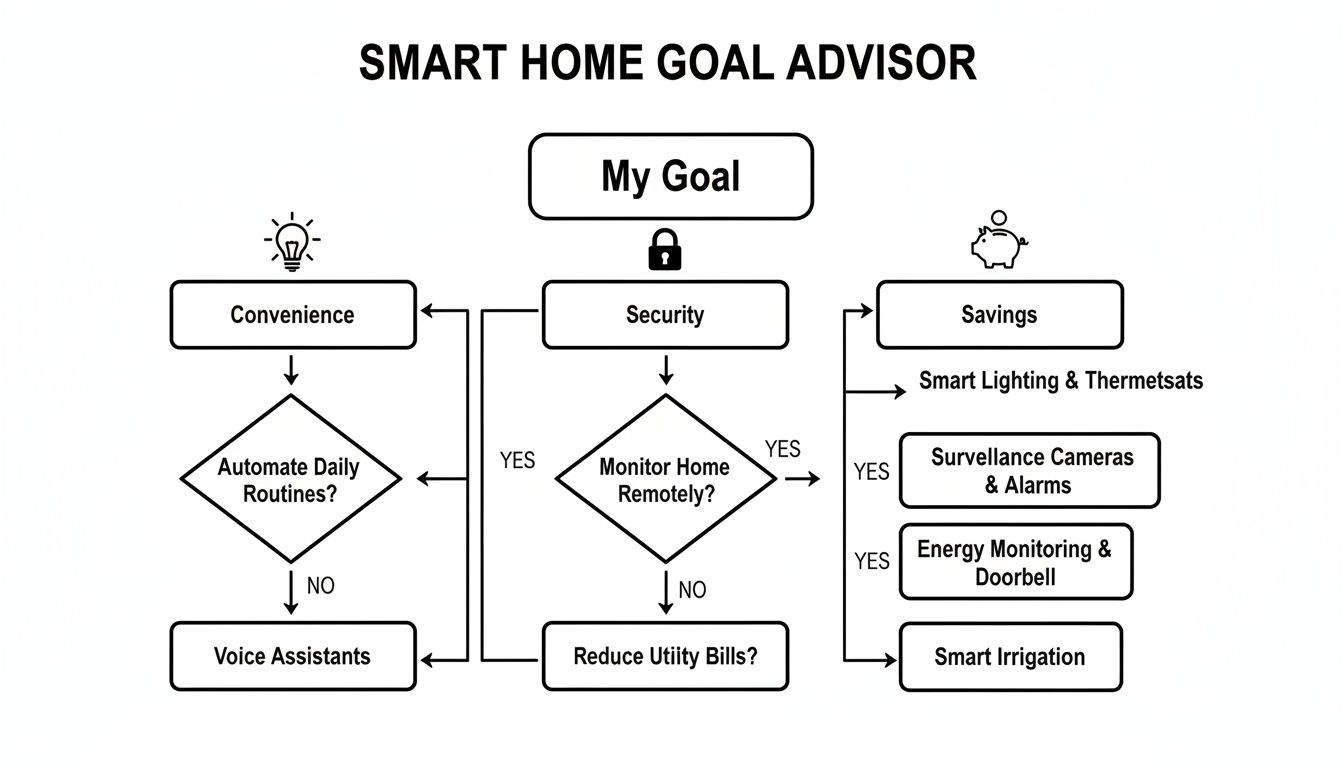
As you can see, if convenience is your top priority, an ecosystem with broad device support makes sense. If security is paramount, you might gravitate toward a platform known for tighter privacy controls.
Understanding the Languages Your Devices Speak
Beyond the brand names, you need to think about the wireless protocols—the behind-the-scenes languages your devices use to communicate. A reliable system depends on devices that speak the same language or having a hub that can act as a translator.
I see this all the time: people buy a bunch of Wi-Fi-only devices because they're simple to set up. But as you add more, they start to crowd your home network, leading to sluggish internet and spotty performance.
For a deep dive into how different hubs handle these protocols, check out our comprehensive guide to smart home hubs.
To get you started, here's a quick look at the main protocols you'll run into. This table breaks down the key wireless protocols to help you choose devices that will play nicely together.
Comparing Smart Home Communication Protocols
| Protocol | Best For | Range | Power Consumption | Key Consideration |
|---|---|---|---|---|
| Wi-Fi | High-bandwidth devices like security cameras, video doorbells, and speakers. | Excellent, covers most homes. | High | Can congest your home network if you have too many devices. |
| Zigbee | Low-power devices like sensors, light bulbs, and smart plugs. | Moderate, but creates a mesh network. | Very Low | Requires a Zigbee-compatible hub. Devices can create a self-healing mesh. |
| Z-Wave | Smart locks, thermostats, and sensors where reliability is critical. | Good, better at penetrating walls. | Very Low | Also requires a hub. Operates on a different frequency, avoiding Wi-Fi interference. |
| Matter | Future-proofing your setup for universal compatibility. | Varies (uses Wi-Fi/Thread). | Varies | The new universal standard. A "Matter" logo means it will work with any Matter hub. |
Essentially, Wi-Fi is for speed, while Zigbee and Z-Wave are for reliability and efficiency in smaller devices. And Matter? That's the future, designed to make all this a whole lot simpler.
For the Power User: Taking Full Control
If you're the type who wants ultimate control and deep customization, you might want to look past the mainstream options. Dedicated, multi-protocol hubs like Home Assistant or Hubitat are built for enthusiasts.
These platforms let you connect devices from hundreds of different brands and create incredibly powerful automations. Better yet, they run locally on your network, so your smart home keeps working even if your internet goes down. They definitely have a steeper learning curve, but the payoff is unparalleled power to create a truly bespoke smart home.
Selecting Smart Devices That Actually Make a Difference
Alright, you've picked your ecosystem. Now for the fun part: choosing the gear that will bring your smart home to life. The market is absolutely flooded with gadgets, but the real goal isn't just to collect tech. It's about picking devices that solve actual problems and make your day-to-day life a little easier. Let's look past the brand names and focus on the categories that give you the most bang for your buck.
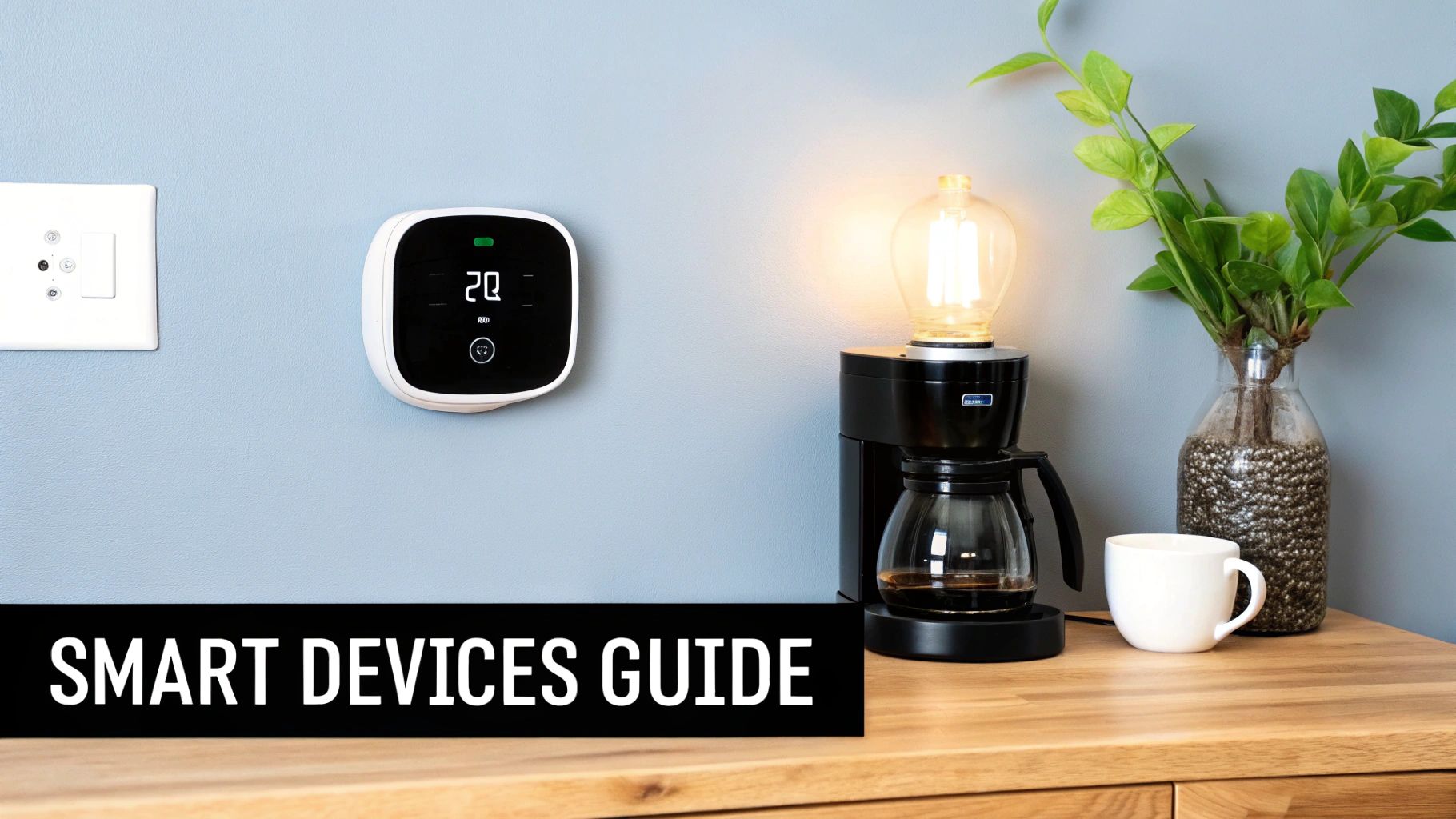
Transform Your Environment with Smart Lighting
Smart lighting is the classic gateway into home automation, and for good reason. It’s relatively cheap, simple to set up, and you immediately see—and feel—the difference it makes. The first decision you'll face is a big one: bulbs or switches?
- Smart Bulbs: These are perfect for targeted control, like a single floor lamp you want to dim or a bedside light you want to change colors with. The downside? They have a glaring weakness. If someone instinctively flips the physical light switch off, the bulb loses power and goes completely "dumb" until it's switched back on.
- Smart Switches: This is my preferred route for most overhead lighting. You replace your existing wall switch, giving you full smart control over the entire circuit while still letting everyone use the physical switch like they normally would. It’s the best of both worlds, especially for fixtures with multiple bulbs.
Here's a pro tip I learned the hard way: never install a smart bulb in a fixture that's already controlled by an old-school dimmer switch. It's a recipe for flickering, buzzing, and can even shorten the bulb's lifespan. If you want dimming, either use a dedicated smart dimmer switch or put your smart bulb in a standard, non-dimmable fixture.
Master Your Home Climate and Energy Use
This is where your smart home starts paying you back. Climate control devices can make a real dent in your energy bills while keeping you more comfortable. A smart thermostat is the obvious starting point, learning your family's comings and goings to heat and cool the house more efficiently.
But to really level up, you need more data. Adding a few smart temperature sensors in key rooms gives your thermostat the information it needs to make much smarter decisions. For example, it can focus on keeping a chilly nursery perfectly warm overnight without cranking the heat for the whole house.
Energy efficiency is a huge reason home automation is taking off. Governments are even jumping in. North America’s USD 8.8 billion Inflation Reduction Act, for instance, offers subsidies for certain smart devices, which is expected to boost adoption by 2.4% pretty quickly. It just goes to show that what starts with a few smart plugs to monitor appliance usage can grow into a full system that saves money and even improves safety with things like smart water leak detectors. You can find more insights on this trend over at Data Bridge Market Research.
Bolster Your Home Security and Awareness
Smart security is about so much more than just catching burglars. It’s about peace of mind and staying connected to what’s happening at home, whether you're at the office or on vacation.
When you're shopping around, think about your specific worries and find the features that address them:
- Video Doorbells: A must-have for screening visitors and keeping an eye on package deliveries. I'd recommend looking for models with package detection alerts and the widest possible field of view.
- Smart Locks: The convenience of letting the dog walker in remotely or just checking that you remembered to lock the front door is a game-changer. Key features to look for are auto-locking after a set time and, crucially, a physical key backup.
- Indoor/Outdoor Cameras: For general monitoring, think about what you need to see. Features like person detection (to avoid alerts for every squirrel), two-way audio, and the option for local storage can save you from monthly cloud subscription fees.
Think about how these devices can work together. A smart lock paired with a video doorbell is a classic combo. When the kids get home from school, the doorbell pings your phone, you see it's them, and you can unlock the door right from your app. No more lost house keys.
Create Seamless Entertainment Experiences
Finally, let's talk about tying your entertainment setup together. Smart devices can eliminate that pile of remote controls on your coffee table. This is where creating "scenes" becomes incredibly powerful.
A "Movie Night" scene is the perfect practical example. With one voice command or a single tap in your app, you can kick off a whole sequence:
- The main living room lights dim down to 10%.
- Your smart accent lights shift to a cozy, warm color.
- The TV and soundbar power on.
- A smart plug connected to your subwoofer clicks on, bringing the bass to life.
That's what it's all about. This kind of integration turns a normal activity into a truly seamless experience. It’s a fantastic example of how picking the right devices and a little bit of planning can make your home feel genuinely intelligent.
Laying the Groundwork: Power, Network, and Installation
You've got a vision for your smart home and a list of devices ready to go. Now for the crucial part: building the reliable foundation everything will run on. Honestly, getting the wiring and network right from the start is the single biggest factor that separates a truly "smart" home from one that's just a constant source of headaches.
While screwing in a smart bulb is simple enough, other installations require a bit more respect for what's behind the wall. Knowing where to draw the line between a quick DIY job and a call to a professional is non-negotiable.
Know When to DIY and When to Call a Pro
It's tempting to try and install everything yourself, but electrical work is no place for guesswork. A simple rule of thumb can save you a lot of trouble.
- Good DIY Projects: If it plugs into an outlet or runs on batteries, you're generally good to go. Think smart speakers, cameras, sensors, and smart plugs. Swapping out a standard lightbulb for a smart one also falls squarely in this camp.
- Call a Professional For: Anything that involves hardwiring into your home’s electrical circuits. This means smart switches, dimmers, outlets, and some thermostats. Messing this up isn't just about a device not working—it's a genuine fire hazard.
A professional installation for something like a smart switch might run you $100 to $250. It’s a small price for the peace of mind that comes with knowing the job was done safely and correctly. Never gamble with your home's electrical system.
If you're building a new home or doing a major renovation, you have a golden opportunity to plan ahead. Our guide to home smart wiring is a great resource for thinking through a more structured, built-in approach.
Your Wi-Fi Network Is Your Smart Home’s Lifeline
Think of your Wi-Fi network as the central nervous system for your smart home. If it’s weak, spotty, or overloaded, your entire system will feel sluggish and unreliable. Unresponsive lights and delayed voice commands are almost always a network issue.
Before you even start unboxing devices, grab your phone and do a quick network audit. Download a free Wi-Fi analyzer app and walk through your home, mapping out your signal strength. Pay special attention to the exact spots where you'll be placing devices, especially those on the edge of your property like a video doorbell or a smart lock on a detached garage.
If you find Wi-Fi dead zones or areas with a consistently weak signal, your single router just isn't going to cut it. It’s time to upgrade. For any serious smart home, a mesh Wi-Fi system is less of a luxury and more of a necessity.
Why a Mesh Network Is a True Game-Changer
A traditional router is like a loudspeaker in your living room—the farther away you get, the fainter the sound. A mesh system, on the other hand, uses multiple access points, or "nodes," placed around your house. They work together to create one massive, seamless web of high-speed Wi-Fi.
Here's why this is so critical for a home full of smart gadgets:
- Kills Dead Zones: You can place a node wherever you need one, blanketing your entire property—from the basement to the backyard—in a strong, consistent signal.
- Handles the Traffic: A modern smart home can easily have 30, 50, or even more devices all talking to the network at once. Mesh systems are built to manage this kind of congestion, intelligently routing data to keep everything running smoothly.
- Incredibly Simple to Manage: Most mesh systems come with a slick smartphone app that makes setup and management a breeze. You can see every device on your network and monitor performance with just a few taps.
Making Your Smart Home Truly Automated
Owning a bunch of smart devices is one thing, but having a home that actually anticipates what you need? That's a whole different ballgame. This is where your gadgets stop being fancy remote controls and start working together as a single, intelligent system. This is what true automation is all about—letting your home work for you without you having to lift a finger.
The magic happens when you start creating scenes and routines (which are often just called automations). A "scene" is like a preset—a bundle of actions you fire off manually with a tap or a voice command. A "routine," on the other hand, is the real powerhouse. It’s a sequence of actions that kicks off automatically when a specific condition, or trigger, is met.
Understanding Triggers and Actions
At its core, every automation runs on a simple "if this, then that" logic. The "if" part is your trigger, and the "that" part is the action (or actions) you want to happen. The real power comes from stringing multiple actions together into a seamless flow.
You have a ton of potential triggers at your disposal:
- Time of Day: Think sunset, sunrise, or a specific time like 7:00 AM.
- Device State: A smart lock unlocking or a contact sensor on a window opening.
- Sensor Detection: A motion sensor picking up movement or a temperature sensor hitting a certain degree.
- Location (Geofencing): Your phone arriving home or leaving the neighborhood.
- Voice Command: A specific phrase you say to your voice assistant.
When a trigger fires, it can set off a whole chain reaction of events, turning a connected house into a home that genuinely serves you.
Crafting Your First Automation Recipes
Alright, enough theory. Let's get practical with some real-world examples you can probably set up right now. Think of these as "recipes" that show how simple triggers can create powerful automations that genuinely improve your day-to-day life.
The best way to start is to identify a routine you already have and just let your smart home take it over. What do you do every morning when you wake up? Or when you leave the house? Or as you wind down for the night? Those are your first and best candidates for automation.
This kind of practical benefit is precisely why the home automation market is exploding. In North America alone, the market is projected to hold a 37.10% global share in 2025, reaching a value of USD 43.36 billion. This growth isn't just about cool tech; it's driven by people wanting integrated systems that simplify daily life. You can dig deeper into these trends in this in-depth industry report.
Ready to get started? Here are a few automation ideas to get your gears turning.
Below are some practical automation ideas you can set up today, built on common triggers and actions. They show just how easy it is to make your home more comfortable and efficient.
Example Automation Recipes for Your Smart Home
| Automation Name | Trigger | Actions | Benefit |
|---|---|---|---|
| Good Morning | Your first alarm of the day is dismissed. | 1. Bedroom lights slowly fade on to 50%. 2. Smart plug in the kitchen turns on the coffee maker. 3. Smart speaker announces the day's weather. |
A gentle, automated start to your day without fumbling for switches or your phone. |
| Movie Night | You say, "Hey Google, it's movie time." | 1. Living room lights dim to 15%. 2. Smart TV and soundbar turn on. 3. Smart blinds close. |
Instantly create the perfect cinematic atmosphere with a single, simple voice command. |
| Leaving Home | Your smartphone's GPS detects you've left the house. | 1. All lights turn off. 2. Thermostat enters "Away" mode. 3. Front door smart lock engages. |
Peace of mind that your home is secure and energy-efficient, with no effort required. |
| Welcome Home | The garage door smart sensor detects it has opened after 5 PM. | 1. Entryway and kitchen lights turn on. 2. Thermostat adjusts to your preferred temperature. 3. Your favorite playlist starts on the living room speaker. |
A warm and inviting welcome, so you never have to walk into a dark, silent house again. |
These examples are just a starting point, of course. The key is to begin with one or two simple routines that solve a real annoyance for you. Once you get a taste of that convenience, you'll naturally start spotting more and more opportunities to make your home work smarter.
Got Questions? We've Got Answers
As you start piecing together your smart home, you're bound to have some questions. That's a good thing! It means you're thinking through the details. Here are some of the most common things people ask when they're just getting started, along with some straightforward, experience-based answers.
What's This Actually Going to Cost Me?
This is probably the number one question, and the honest answer is: it's completely up to you. That's the beauty of it. You don't have to automate your entire house overnight.
You can get your feet wet for less than $100 by grabbing a smart speaker and a few smart plugs. Seriously. That simple setup alone can make a huge difference in your daily routine.
For a more comprehensive system that covers the essentials—think lighting, climate, and some basic security for an average-sized house—you’re probably looking at a budget between $1,500 and $5,000. If you're dreaming big with a professionally installed setup featuring whole-home audio, advanced security, and slick motorized shades, that number can easily soar past $20,000.
The key takeaway on cost is this: start with what matters most to you. Pour your initial budget into the one or two automations that will solve a real annoyance or bring you the most joy. You can always expand from there.
This "start small" approach keeps you from overspending and guarantees every device you bring into your home actually has a purpose.
Do I Need to Be a Tech Genius to Do This?
Not at all. The days of needing a computer science degree to automate your lights are long gone. The big players in this space—Amazon Alexa, Google Home, and Apple HomeKit—have poured millions into making their platforms incredibly intuitive for the average person.
Most smart devices are designed to be plug-and-play. The setup for something like a Philips Hue bulb usually looks like this:
- Screw in the new bulb.
- Download and open the brand's app on your phone.
- The app finds the bulb and walks you through connecting it to your Wi-Fi in just a few taps.
Sure, if you’re getting into hardwired smart switches or outlets, it's always best to call a professional electrician. But the fun part—setting up routines and making your home respond to you—is all done through simple, user-friendly apps.
What Are the Biggest Security Risks I Should Know About?
Great question. When it comes to smart home security, vulnerabilities almost always boil down to two culprits: lazy passwords and forgetting to update your gear. Think of every connected device as a potential door into your home network. You just need to make sure you keep those doors locked.
Make these habits second nature from day one:
- Ditch the Default Password: The very first thing you should do is change the factory-set username and password. Make it something long, unique, and strong for every single device.
- Turn on Two-Factor Authentication (2FA): It's a non-negotiable. 2FA adds an essential shield to your accounts by requiring a code from your phone before anyone can log in.
- Keep Your Firmware Fresh: Enable automatic updates whenever you can. These updates aren't just for new features; they often contain critical patches for security flaws.
- Buy from Brands You Trust: Stick with manufacturers who have a proven track record of supporting their products with regular security updates.
What Happens If My Internet Goes Down?
This is a fantastic question because it separates a good smart home from a great one. The answer really depends on how you build your system.
Many Wi-Fi-based devices are cloud-dependent. They need to phone home to a server over the internet to get their instructions. If your internet connection drops, they become "dumb" again. You can still flip the light switch manually, but your voice commands and automations won't work.
The more robust solution is a system built around a local control hub that uses protocols like Zigbee or Z-Wave.
Here’s how that plays out in the real world:
- Cloud-Reliant System: Your internet is out. The motion sensor in your hallway can't tell the cloud to turn on the Wi-Fi bulb. You're walking in the dark.
- Local Control System: Internet's out? No problem. The motion sensor speaks directly to the Zigbee bulb via your local hub. The light snaps on instantly, no internet needed.
If you want your core automations to be rock-solid and reliable no matter what, investing in a hub that champions local processing is the way to go. Look into options like Hubitat or a Home Assistant setup. This ensures your home keeps running smoothly, online or off.
At Automated Home Guide, our mission is to help you build a smarter, more secure, and more efficient home. Dive into our detailed reviews and practical guides to make your next project a success. Visit us at https://automatedhomeguide.com to learn more.










Leave a Reply