
For almost any household with more than a single internet-connected device, the answer is a resounding yes. Think of your internet service as a single, high-speed highway that runs to your front door. A WiFi router is the traffic controller that builds a network of local streets, directing that internet traffic safely and efficiently to every laptop, phone, and smart gadget in your home.
Why Your Home Network Needs a Router
People often throw around the terms "modem" and "router" as if they're the same thing, but they do two very different—and equally critical—jobs.
Your modem is the on-ramp to the internet. It takes the signal from your internet service provider (ISP) and translates it into a format that a single computer can understand, usually through a wired Ethernet cable. That's it. One device, one connection.
A WiFi router is what takes that single connection from the modem and magically turns it into a private wireless network for your whole house. It's the central hub for all your devices.
Without a router, you could only get one device online at a time, and it would have to be physically tethered to the modem. A router changes the game by:
- Creating a wireless network: It broadcasts that familiar WiFi signal, letting dozens of devices connect without a jungle of cables.
- Managing traffic: It’s like a digital mail carrier, making sure the data for your Netflix stream goes to your TV and not the laptop where your partner is on a video call.
- Providing security: A good router acts as a basic firewall, creating a protective barrier between your personal devices and the open internet.
Understanding Your Needs at a Glance
For most of us, this is a pretty easy call. A single person living alone with just one desktop computer might be able to get by without a router by plugging directly into the modem. But let's be honest, that scenario is almost a relic of the past. The moment you add a smartphone, a smart TV, or a gaming console to the mix, a router becomes absolutely essential.
This flowchart paints a clear picture of the decision-making process.
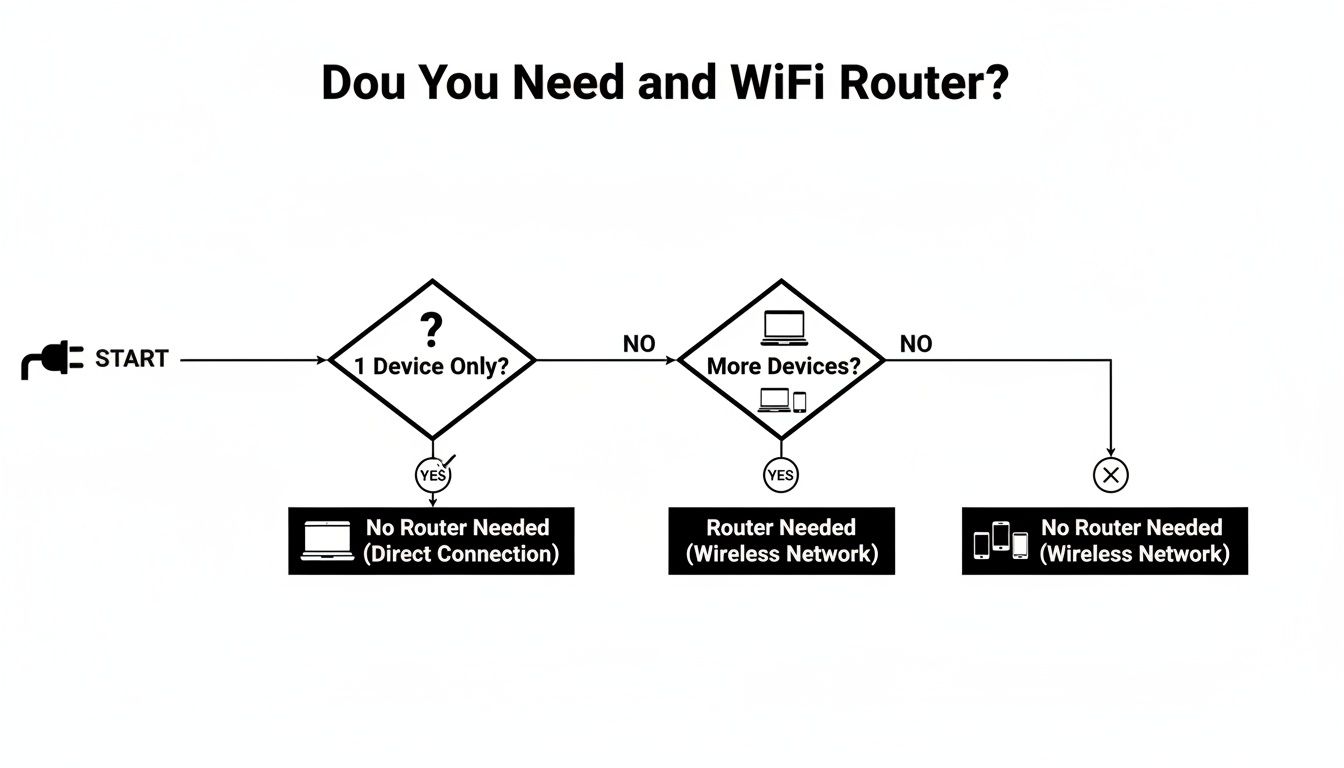
As you can see, nearly every path leads to needing a router as soon as you have more than one device that needs to get online.
To make it even simpler, this table breaks down a few common living situations to help you see where you fit.
Router Necessity At a Glance
| Your Situation | Is a Router Necessary? | Why It Matters |
|---|---|---|
| Single user, one computer | Optional | You can plug directly into the modem, but you're giving up the freedom of wireless and connecting any other devices. |
| Family or multiple users | Yes, Absolutely | Everyone's laptops, phones, and tablets need to get online at the same time without fighting over one cable. |
| Smart home owner | Yes, Absolutely | Your smart speakers, lights, thermostats, and security cameras are useless without a stable WiFi network to connect them. |
| Renting an apartment | Yes, Absolutely | It creates your own secure, private network, keeping your traffic separate and safe from your neighbors' connections. |
Ultimately, a WiFi router has become a foundational piece of tech for the modern home, turning a single internet connection into a powerful, multi-device network that supports everything we do online.
What a WiFi Router Actually Does for Your Home
So, what does a router really do besides just blink in the corner? Think of it less like an accessory and more like the air traffic controller for your entire digital life. It’s the device that turns a single internet connection into a powerful, private network that all your gadgets can share. Answering "do I need a WiFi router?" starts with understanding the crucial jobs it's doing every single second.
Let’s use an analogy. Imagine your internet service is a single, high-speed water pipe coming into your house. Without a router, you could only connect one faucet to it. A router is the complex plumbing system that branches off from that main pipe, sending water to your kitchen sink, your shower, your washing machine, and your garden hose—all at the same time.
This sophisticated process breaks down into a few key functions that keep your digital home humming along.
Creating and Managing Your Private Network
First off, a router creates your private Local Area Network (LAN). This is your home's own exclusive digital bubble, totally separate from the vast, public internet. It then plays administrator, assigning a unique local IP address—like a specific street address—to every single device that connects, whether it's your laptop, your smart TV, or your video doorbell.
Think about a typical evening at home:
- Someone’s streaming a 4K movie on the big screen.
- You’re on a crucial video call for work.
- The smart speakers are playing a dinner playlist.
- A gaming console is downloading a massive update.
Your router is the unsung hero juggling all these demands at once, making sure the video call doesn't stutter just because the game download is a data hog. This intelligent traffic management is what stands between a smooth online experience and a whole lot of frustration.
Serving as Your First Line of Defense
Just as critical is the router's role as your network's security guard. It has a built-in firewall that stands watch between your private home network and the potential dangers lurking on the public internet. It inspects incoming information, blocking malicious traffic and shady access attempts before they ever get a chance to poke around on your personal devices.
Key Takeaway: A router does so much more than make a Wi-Fi signal. It manages every connection, prioritizes traffic to prevent logjams, and provides an essential security shield for all your connected devices.
This role has only gotten more important. The global home Wi-Fi router market has seen massive growth, jumping from $1.9 billion in 2021 and on track to hit $3.1 billion by 2026. That explosion in value shows just how essential these devices have become to our connected lives.
A router also unlocks modern conveniences by blanketing your home in a wireless signal. For instance, features like WiFi calling rely on that strong home network to let you make crystal-clear calls even when your cell service is spotty. Without a router managing everything, these kinds of capabilities simply wouldn't work.
Using Your ISP Router vs Buying Your Own
When you sign up for internet, your provider hands you a router. It’s convenient, sure. Plug it in, and you're online. If something breaks, one phone call handles it. For a lot of people, that’s good enough.
But as you add more smart speakers, cameras, and laptops, you might start asking yourself, "Is this basic box holding my internet back?" That's a really important question.
The router your Internet Service Provider (ISP) gives you is built to be "good enough." It’s a one-size-fits-all solution for millions of customers. While it certainly gets the job done, it can also become a hidden bottleneck, silently capping your network's true potential.
The Simplicity of Renting an ISP Router
Let's be fair—there are good reasons to stick with the ISP's gear, and simplicity is at the top of the list. You don't have to get lost in a sea of tech specs or worry about whether a particular model will work with your service.
- Easy Setup: Most of the time, the technician sets it all up for you. They make sure it works before they walk out the door.
- Unified Support: When your internet dies, you have one number to call. They can check both the service line and the hardware, which makes troubleshooting a whole lot less painful.
- No Upfront Cost: You don't have to shell out a hundred bucks or more right away. Instead, it’s just a small fee tacked onto your monthly bill.
That "small fee," usually $10 to $15 per month, is the catch. It might not seem like much, but it adds up fast. Over two years, you could easily pay over $300 for a router you’ll never even own.
The Case for Buying Your Own Router
Buying your own router is less like an expense and more like an investment in your home’s digital nervous system. It’s about taking the reins and getting control over your network's speed, reach, and security.
Often, the biggest immediate upgrade is performance. ISPs are notorious for handing out older hardware that can't actually deliver the speeds you're paying for, especially when multiple devices are competing for bandwidth. A modern router ensures your gadgets can tap into the full speed of your internet plan.
This is why premium wireless routers are becoming so common. The market for these high-performance devices, currently valued at $4.77 billion, is projected to hit $7.24 billion by 2034. That growth is fueled by our demand for smooth 4K streaming, lag-free cloud gaming, and sprawling smart home setups. You can dive deeper into these trends and find more market insights from Intel Market Research.
Key Insight: Buying your own router isn't just about dodging rental fees. It's about getting the performance, features, and security your connected home actually needs to thrive.
Before we get into the advanced features, let's break down the core differences in a side-by-side comparison.
ISP Router vs Purchased Router: A Head-to-Head Comparison
Choosing between renting and buying comes down to what you value most: convenience or control. This table lays out the trade-offs.
| Feature | ISP-Provided Router | Purchased Router |
|---|---|---|
| Cost | Monthly rental fee ($10-$15/mo); no ownership. | Upfront purchase cost; no recurring fees. |
| Performance | Often basic; may not support your plan's top speeds. | Typically higher-end; unlocks full internet speed. |
| Coverage | Standard range, often struggles in larger homes. | Superior coverage, especially with mesh systems. |
| Features | Limited; basic parental controls and settings. | Advanced features like QoS, guest networks, robust controls. |
| Security | Dependent on ISP for firmware updates. | You control updates, ensuring faster security patches. |
| Technical Support | Single point of contact for all issues. | You manage the router; ISP only supports the service. |
| Customization | Locked down; very few options to change. | Full control to tailor the network to your needs. |
Ultimately, the ISP's router is a simple, no-fuss option that works. But if you want to get what you pay for and customize your network for how you actually use it, buying your own is the way to go.
Advanced Features and Greater Control
Once you own your router, you unlock a suite of powerful tools that ISP equipment almost never includes. These features let you shape your network to fit your life perfectly.
- Better Coverage: Aftermarket routers, particularly mesh WiFi systems, are designed to blanket your entire home in a strong, consistent signal. They’re the ultimate fix for those frustrating dead zones in the back bedroom or basement.
- Advanced Parental Controls: Go way beyond simple on/off switches. High-quality routers let you filter specific types of content, set daily time limits for each device, and see exactly where your kids are spending their time online.
- Quality of Service (QoS): This is a game-changer. QoS lets you tell your router what's most important. You can prioritize bandwidth for your work-from-home video calls or your Xbox, ensuring those activities never stutter or lag, even when someone else starts streaming a movie.
- Enhanced Security: You’re in charge of security. This means you can install critical firmware updates the moment they’re released, protecting your network from the latest online threats without waiting for your ISP to push an update.
Investing in your own router gives you the freedom to build a network that just works—for everyone and every device. You can set up a separate, secure network for guests, fine-tune your settings for competitive gaming, or simply enjoy a stable connection in every corner of your home.
If you're now wondering what kind of WiFi you should get, exploring the different types of routers is the perfect next step. Check out our guide on what WiFi you should get to learn more.
Is Your Router the Reason Your Internet Feels Slow?
Let's be honest. We've all been there—staring at that dreaded buffering wheel during movie night or losing a video call at a critical moment. It’s easy to blame your internet provider, but more often than not, the real culprit is hiding in plain sight: your Wi-Fi router.
If you’ve ever found yourself asking, "Do I need a better Wi-Fi router?" the answer probably starts with diagnosing those daily frustrations. Paying for a high-speed internet plan with an underpowered router is like putting a V8 engine in a car with bicycle wheels. You have all that potential, but you can’t actually put the power down where it counts.
This performance gap is a huge reason why so many people are upgrading. In North America alone, the wireless router market hit about $6.14 billion and is still climbing. Why? Because smart homes are now the norm, and they demand a rock-solid network to run smoothly. You can dig into the regional wireless router market trends here if you're curious.
Spotting the Red Flags
Think of this as a quick health check for your home network. If any of these sound painfully familiar, your router is likely the bottleneck.
- The Buffering Circle of Doom: Does your 4K movie constantly pause to catch up? A modern router knows how to prioritize that heavy video stream so it plays without a hitch, even if someone else is browsing Instagram.
- Wi-Fi Dead Zones: If you have to stand in a specific corner of the living room to get a signal, or the Wi-Fi disappears completely in the upstairs bedroom, your router just doesn't have the range for your home.
- Sluggish Smart Devices: Your smart speaker shouldn't take five seconds to tell you the weather. When your security camera feed is choppy or your smart lights are slow to respond, it's often because the router is struggling to juggle all those connections.
- The Family Internet Jam: As soon as one person starts gaming online, does the internet slow to a crawl for everyone else? That’s a classic sign your router can’t manage multiple high-demand activities at once.
These issues are especially common with the basic, no-frills routers that internet providers often give you. They were fine for a laptop and a phone, but they just weren't built for the connected chaos of today’s homes.
Key Insight: Your internet is only as good as its weakest link. For millions of households, that weak link is an outdated router that can't handle the speed, range, and sheer number of devices we rely on every day.
When Your Smart Home Outgrows Your Router
The smart home revolution completely changed the game. Just a few years ago, a family might have had a handful of devices online. Now, it's not unusual to have 25 or more gadgets all talking to your router at once:
- Smart Speakers and Displays: Amazon Echos and Google Nests are always on, always listening, and always connected.
- Security Systems: Every smart doorbell, camera, and motion sensor needs a stable connection to keep you safe.
- Smart Lighting and Plugs: Each of those little smart bulbs is another client on your network, competing for attention.
- Streaming Sticks and TVs: Streaming in 4K requires a serious, uninterrupted slice of your bandwidth.
Each device places a small but constant demand on your router. Add them all up, and an older router’s processor simply gets overwhelmed, leading to network-wide slowdowns and dropped connections. A new router is built with a more powerful "brain" designed specifically to manage dozens of simultaneous connections without breaking a sweat.
If your smart home feels more frustrating than futuristic, a router upgrade is one of the most effective fixes you can make.
How to Choose the Right WiFi Router
So, you've figured out you need a new router. That’s the easy part. Now comes the hard part: wading through a sea of Wi-Fi standards, frequency bands, and mesh systems. It can feel like you need a degree in network engineering just to buy a piece of hardware.
Let's cut through that noise and focus on what actually matters for your home.
Picking the right router isn't about grabbing the one with the most antennas or the highest price. The real goal is simple: find a router that delivers the internet speed you pay for to every corner of your home, without wasting money on features you'll never touch.
Understanding the Core Technologies
Before you can pick a router, you need to know what a few key terms on the box mean. Think of these as the engine specs for your home network.
First up is the Wi-Fi Standard. You'll see terms like Wi-Fi 5 (802.11ac), Wi-Fi 6 (802.11ax), and the newer Wi-Fi 6E. For most modern homes, Wi-Fi 6 is the sweet spot. It was built from the ground up to handle dozens of devices at once, which is perfect for a home buzzing with phones, laptops, smart speakers, and security cameras.
Next, you'll run into dual-band and tri-band. Picture your Wi-Fi as a highway. A dual-band router gives you two lanes: a 2.4 GHz lane (slower, but its signal travels farther) and a 5 GHz lane (much faster, but with a shorter range). A tri-band router adds a whole second 5 GHz lane, which is like opening up an express lane just for your most important traffic.
Key Takeaway: If your house is full of streamers, gamers, or people working from home, a tri-band router is a game-changer. It dedicates an entire lane to your most demanding devices, so they never get stuck in digital traffic jams.
Just getting a handle on these basics puts you way ahead of the curve. For an even more detailed breakdown, our guide on how to choose a Wi-Fi router can fill in any gaps.
Matching the Router to Your Home Size
The single biggest factor in your decision should be the size and layout of your home. A beast of a router is totally useless if its signal dies before it reaches your home office or basement TV.
Small Apartments & Studios (Under 1,500 sq ft): A solid, standalone Wi-Fi 6 dual-band router is more than enough. You don’t need to spend a fortune to get fantastic coverage in a smaller, more open space.
Medium to Large Homes (1,500 – 3,000 sq ft): This is where you have a choice. A high-performance tri-band router might do the trick if your home has a simple layout. But if you have multiple floors or thick walls made of brick or concrete, it's time to start thinking about a mesh system.
Very Large or Complex Homes (Over 3,000 sq ft): For a large home with a tricky layout, a mesh Wi-Fi system is pretty much non-negotiable. Instead of one central router, a mesh system uses several smaller "nodes" you place around the house. They work together to create one giant, seamless Wi-Fi network, letting you walk from one end of the house to the other on a video call without ever losing the signal.
A Practical Checklist for Your Next Router
Shopping is always easier with a checklist. When you're comparing models, here are the minimum specs you should be looking for to make sure your network is ready for today and tomorrow.
| Feature | Recommended Minimum | Why It Matters |
|---|---|---|
| Wi-Fi Standard | Wi-Fi 6 (802.11ax) | Gives you much better performance and efficiency, especially in a home crowded with devices. |
| Bands | Dual-Band (Tri-Band for heavy use) | Separates your network traffic to cut down on interference and deliver faster speeds. |
| Security | WPA3 Encryption | This is the latest and most robust security available, protecting your network from unwanted visitors. |
| Processor & RAM | Quad-core CPU, 512MB RAM | Your router needs a powerful "brain" to manage dozens of connections without slowing to a crawl. |
| Ports | Gigabit Ethernet Ports | Ensures that anything you plug in directly—like a gaming PC or a smart TV hub—gets the absolute fastest speed possible. |
Armed with this knowledge, you can confidently figure out not only if you need a new router but, more importantly, exactly which one is the right fit for your connected life.
Essential Router Security You Can Set Up Today
Think of your router as the digital front door to your entire home. Just as you wouldn't leave your physical door unlocked, securing your Wi-Fi router is the single most important step you can take to protect your family, your data, and all your smart devices from prying eyes.
The good news? You don't need a degree in cybersecurity to lock things down. The most effective security measures are actually quite simple and take just a few minutes to set up.
Change Your Admin Login Immediately
Every router ships with a default administrator username and password—things like "admin" and "password." These are public knowledge, and leaving them unchanged is like hiding your house key under the doormat. This should be the absolute first thing you do.
Create a strong, unique password for this administrator account. This one simple action stops outsiders from waltzing into your router's settings and taking control of your whole network.
Enable the Strongest Encryption Available
Encryption is what scrambles your Wi-Fi signal, turning it into unreadable gibberish for anyone without the password. When you dig into your router's settings, you'll see a few options, usually WEP, WPA, WPA2, and WPA3.
- WEP and WPA: These are ancient and completely broken. Never use them.
- WPA2: For years, this was the gold standard and still offers solid protection.
- WPA3: This is the latest and most secure protocol available. If your router and your devices support it, always choose WPA3.
Key Takeaway: Using WPA3 encryption is like having a secret code that's practically impossible for outsiders to crack. It’s your network’s best line of defense.
Set Up a Guest Network
A guest network is a fantastic feature that creates a separate, sandboxed Wi-Fi network just for your visitors. It gives them internet access without handing them the keys to your main network where your personal computers, files, and smart home gadgets live.
This is a huge security win. If a guest's phone or laptop happens to be compromised with malware, that infection can't jump over to your trusted devices. It’s a digital wall between your private life and your visitors. If you want to dive deeper into this, learning how to protect Wi-Fi from hackers is a great next step.
Keep Your Firmware Updated
The firmware is the router's internal software, its operating system. Manufacturers constantly release updates to patch security vulnerabilities and fix bugs. Many new routers handle this automatically, but it’s still a smart habit to log in every few months and check for updates yourself.
Running old, outdated firmware is one of the biggest and most easily avoided security risks. For those with advanced security needs, understanding the methods used in professional Wi-Fi pentesting can provide a fascinating look into how vulnerabilities are found and exploited.
Got Questions About Home Wi-Fi? We’ve Got Answers.
Even after you've decided to get a router, a few nagging questions always seem to surface. It's totally normal. Let's walk through the most common ones so you can feel confident you're making the right call for your home network.
What's the Difference Between a Modem and a Router Anyway?
It’s easy to get these two mixed up because people often use the terms interchangeably. But they do two completely different jobs, and knowing the difference is key.
Here’s a simple way to think about it: The modem is your home's on-ramp to the internet. It takes the signal from your internet service provider (ISP) and translates it into a usable connection for a single device. The router, on the other hand, is the traffic director for your home. It takes that one connection from the modem and shares it wirelessly with all your different gadgets—laptops, phones, smart TVs, you name it.
Your ISP might give you a single box that does both, but having separate devices often gives you much better performance and more control over your network. This distinction is exactly why the question "do I need a WiFi router" is so important, even if your provider already gave you a modem.
Will Buying a New Router Actually Make My Internet Faster?
This is probably the biggest point of confusion out there. A new router can’t increase the speed of the internet plan you pay for. If you have a 100 Mbps plan, a new router won't magically turn it into 200 Mbps.
However, a new router can make your Wi-Fi feel a whole lot faster. How? Your old router might be the bottleneck, struggling to keep up and preventing your devices from using the full speed you’re already paying for. Upgrading to a modern router removes that bottleneck, letting all your devices take full advantage of your internet plan. This means less buffering on Netflix, smoother video calls, and a much better experience, especially when everyone is online at once.
Key Insight: A better router doesn't buy you more speed from your ISP, but it unlocks the speed you already have, making your entire network more responsive and reliable.
What Is a Mesh Wi-Fi System? Do I Need One?
Think of a mesh Wi-Fi system as the ultimate fix for dead spots and weak signals. Instead of one powerful router trying to cover your whole house, a mesh system uses a main router plus several smaller hubs (or "nodes") placed in different rooms. Together, they create one big, seamless Wi-Fi network that covers every corner.
You should seriously look into a mesh system if your home:
- Is on the larger side (over 2,000 sq ft)
- Has more than one floor
- Features thick walls made of brick, plaster, or concrete that block Wi-Fi signals
A mesh setup blankets your home in strong, reliable Wi-Fi, from the basement office to the attic playroom. For larger or structurally tricky homes, it’s a game-changer.
At Automated Home Guide, we're dedicated to helping you build a smarter, more connected home. Explore our expert guides and reviews to find the perfect solutions for your needs. Learn more at https://automatedhomeguide.com.










Leave a Reply