
Picking the right Wi-Fi router really comes down to three things: your home's size, how many devices you’ve got connected, and what you actually do online. Getting a handle on these personal needs is the absolute first step. It's how you avoid paying for features you'll never use or, worse, getting stuck with a router that can't keep up.
Matching Your Router to Your Digital Life
Before you even glance at the tech specs on a box, take a minute to think about your own setup. It’s pretty simple: a high-end router built for a 3,000-square-foot smart home is complete overkill for a 700-square-foot apartment where you're just streaming Netflix on a laptop. On the flip side, a basic, budget router is going to choke and sputter if you have a family trying to run multiple 4K streams, intense online gaming sessions, and a few dozen smart home gadgets all at once.
The global market for wireless routers is expected to jump from USD 2.99 billion in 2024 to USD 5.54 billion by 2032. Why the huge leap? It’s all thanks to the explosion of smart home devices and our never-ending hunger for faster internet. This growth means the tech is always changing, so it's smart to choose a router that not only works for you today but also has a little room to grow.
Assess Your Home and Habits
First, think about the physical space. Do you have thick, Wi-Fi-killing plaster walls or multiple floors? A big house with a home office in the basement and bedrooms upstairs has totally different coverage challenges than a single-level, open-plan apartment.
Next, do a quick headcount of your devices. We're not just talking about phones and computers anymore. Smart thermostats, video doorbells, security cameras, smart speakers, and even kitchen appliances are all fighting for a slice of your Wi-Fi. The more of these gadgets you have, the beefier your router needs to be. Many of these devices also use different communication methods, so it's worth getting familiar with the various smart home protocols out there.
Real-World Scenarios
Let's break it down with a couple of common examples:
- The Apartment Streamer: You live in a smaller space, maybe with 5-10 devices. Your main activities are streaming shows, browsing the web, and hopping on video calls for work. A good dual-band Wi-Fi 6 standalone router is probably your sweet spot. It'll give you fantastic speeds without the cost or complexity of a bigger system.
- The Connected Family Home: We're talking about a larger, multi-story house with 30+ devices. Think smart TVs, gaming consoles, a full suite of security cameras, smart locks, and everyone's personal gadgets. This is a classic case for a mesh Wi-Fi system. It's the best way to wipe out dead zones and keep everything running smoothly when traffic gets heavy.
This flowchart is a great way to see how your home size and device load point you toward the right type of router.
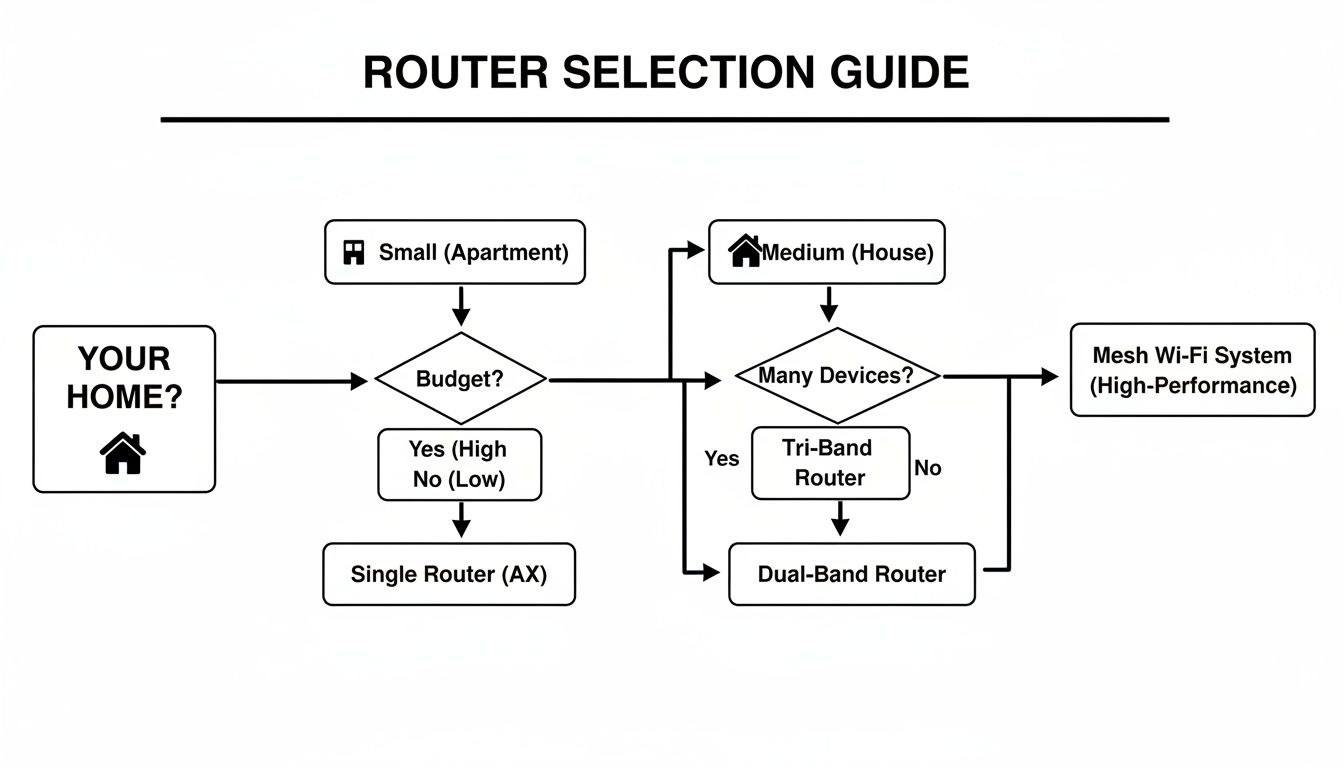
As you can see, once your space gets bigger and your device list grows, a standalone router just doesn't cut it anymore, and a mesh system becomes the clear winner. Before diving deeper into specific router models, a quick refresher on understanding your network's foundational elements can be really helpful. It gives you the context to make sure the router you pick is genuinely the right fit for your home.
Decoding WiFi Standards Like WiFi 6 and 6E
Trying to make sense of WiFi standards can feel like wading through alphabet soup. You’ll see terms like 802.11ac, WiFi 6, and WiFi 6E thrown around, and it's easy to get lost. But getting a handle on these is crucial if you want to pick a router that's going to work for you now and a few years down the road.
The easiest way to think about these standards is like different generations of technology—each one builds and improves on what came before. The jump from WiFi 5 to WiFi 6, for instance, isn't just about a potential speed boost. It's really about making your whole network smarter and far more efficient, especially when it’s juggling a ton of different devices.
WiFi 5: The Established Standard
For a long time, WiFi 5 (also known as 802.11ac) has been the reliable workhorse in most of our homes. It runs on the 5 GHz band, which is way less crowded than the old 2.4 GHz band, giving you solid speeds for streaming and browsing. It's a perfectly capable standard, but its architecture was designed for a world that didn't have dozens of connected gadgets in every room.
When too many devices try to talk to a WiFi 5 router at once, it's like a polite but slow-moving conversation where each device has to wait its turn. This is what causes that frustrating lag and buffering, especially when everyone is home and online.
WiFi 6: A Smarter Network for Modern Homes
This is where WiFi 6 (802.11ax) completely changes the game. It was built from the ground up for the high-density smart home. Instead of forcing devices to wait in line, WiFi 6 can chat with multiple devices at the same time using a clever technology called OFDMA (Orthogonal Frequency Division Multiple Access).
Picture a delivery truck that can drop off packages to several different houses on the same trip, instead of making a separate trip for each one. That’s the kind of efficiency boost WiFi 6 brings to your network. It not only cuts down on congestion but also lets low-power gadgets like smart sensors schedule their check-ins, which can make their batteries last way longer.
If your home has more than 15-20 connected devices—think phones, laptops, smart TVs, security cameras, and speakers—upgrading to a WiFi 6 router is one of the most impactful improvements you can make for your network's performance and stability.
The demand for better home networking is clear. The home router market is projected to skyrocket from $1.9 billion in 2021 to an expected $3.1 billion by 2026. This boom is driven by our need for faster speeds and networks that can handle a crowd, making WiFi 6 a must-have consideration. You can read more about the trends shaping the wireless router market to see where the industry is heading.
WiFi 6E: The Exclusive Superhighway
And then there's WiFi 6E. It takes all the smarts and speed of WiFi 6 and adds an exclusive, brand-new lane: the 6 GHz band. This is a fresh, wide-open frequency that older devices can't even see, meaning it's completely free from the interference that can clog up the 2.4 GHz and 5 GHz bands.
Think of it this way: the 2.4 GHz band is a busy local road, and the 5 GHz band is a multi-lane highway. The 6 GHz band is like a private, high-speed expressway reserved for the newest, fastest vehicles.
To help you visualize the differences, here’s a quick breakdown.
WiFi Standards at a Glance
| Feature | Wi-Fi 5 (AC) | Wi-Fi 6 (AX) | Wi-Fi 6E (AX) |
|---|---|---|---|
| Frequency Bands | 5 GHz, 2.4 GHz (optional) | 2.4 GHz, 5 GHz | 2.4 GHz, 5 GHz, 6 GHz |
| Key Technology | MU-MIMO | OFDMA, MU-MIMO | OFDMA, MU-MIMO |
| Best For | Basic internet use, fewer than 15 devices | Smart homes, 4K streaming, multiple users | VR/AR, competitive gaming, future-proofing |
| Main Benefit | Affordable, widely available | Manages device congestion, boosts efficiency | Ultra-low latency, exclusive high-speed band |
So, who really needs to spring for WiFi 6E? It’s a pretty specific group.
- Gamers: For the absolute lowest latency in competitive online matches.
- AR/VR Users: For a flawless, high-bandwidth experience.
- Content Creators: For wirelessly moving massive 4K or 8K video files.
- Future-Proofers: Anyone with the latest flagship phones, laptops, and other 6E-compatible gear who demands peak performance.
If your devices don't support WiFi 6E, you simply can't use the 6 GHz band. A 6E router is backward-compatible, so your other gadgets will connect just fine, but you're paying for a feature you can't use. For most households today, WiFi 6 still hits that sweet spot, offering the best balance of price and performance for a modern smart home.
Choosing Between a Mesh System and a Standalone Router
One of the biggest forks in the road when picking a router is deciding between a single, powerful standalone unit or a multi-point mesh system. This choice really defines how your network will perform and can be the difference between a smart home that just works and one that's a constant source of frustration.
There's no single right answer here. The best choice comes down to your home's size, its layout, and the unique signal challenges your space presents.
A traditional standalone router has been the default for years for a good reason. I like to think of it as a powerful lighthouse, beaming a strong signal out from one central spot. In the right environment—a smaller, single-level apartment or a house with a very open floor plan—this can be a fantastic and budget-friendly solution.
These routers often come loaded with features, packing multiple Ethernet ports and advanced settings that appeal to gamers and tech enthusiasts. If you need rock-solid, low-latency speed for a specific setup, like a gaming PC or a media server, a high-end standalone router is tough to beat for raw performance in a concentrated area.
The Case for Standalone Routers
The biggest draw of a standalone router is its direct, focused power. You have one device to set up, one point of connection to manage, and usually a lower upfront cost than a multi-unit mesh kit.
For a lot of people, this is genuinely all they need. A standalone router really shines in a few key scenarios:
- Small Apartments or Condos: If you're working with a space under 1,500 square feet, a single, well-placed router can easily blanket the entire area.
- Open-Concept Homes: With fewer walls and obstacles for the Wi-Fi signal to fight through, a single broadcast point is far more effective.
- Budget-Conscious Setups: A quality standalone router almost always costs less than a comparable mesh system, making it a great value if you don't need massive coverage.
And the demand for reliable connectivity is only growing. The wireless router market is projected to jump from USD 14.22 billion in 2024 to nearly USD 29.92 billion by 2033. This boom, especially in regions like Asia-Pacific and Europe, is fueled by the explosion of smart homes, which just highlights how crucial it is to pick the right system for your needs. You can dig into more details about the global wireless router market on renub.com.
When Mesh Wi-Fi Becomes a Necessity
The limits of a standalone router become painfully clear in larger or more complex homes. Signals get weaker with every wall, floor, and appliance they pass through, creating those dreaded "dead zones" where your connection crawls or drops completely.
This is exactly the problem mesh Wi-Fi was invented to solve.
Instead of one lighthouse, a mesh system acts like a series of interconnected beacons scattered throughout your home. A main router unit plugs into your modem, and one or more satellite "nodes" talk to it, blanketing your entire space in a single, seamless network. You get one Wi-Fi name and one password, and your devices intelligently switch to the strongest signal as you walk from room to room.
If you've ever tried to patch up dead spots with a traditional Wi-Fi extender, you know the headache of juggling different network names and clunky handoffs. Mesh systems get rid of that mess entirely, creating one truly unified network.
This approach is a total game-changer for certain homes:
- Multi-Story Houses: Pop a node on each floor, and you'll get a strong, consistent signal from the basement to the attic.
- Homes with Awkward Layouts: Brick walls, long hallways, or L-shaped floor plans are notorious signal killers. Mesh nodes work around these obstacles beautifully.
- Large Properties: For any home over 2,500 square feet, a mesh system is almost always the way to go for reliable, whole-home coverage.
The goal of a mesh system isn't maximum speed right next to the router; it's consistent speed everywhere. While a single node might not be as powerful as a beastly standalone router, their combined effect delivers a far superior experience across a large area. If you're constantly fighting with weak signals, our guide on how to extend WiFi range can offer more strategies to beef up your network.
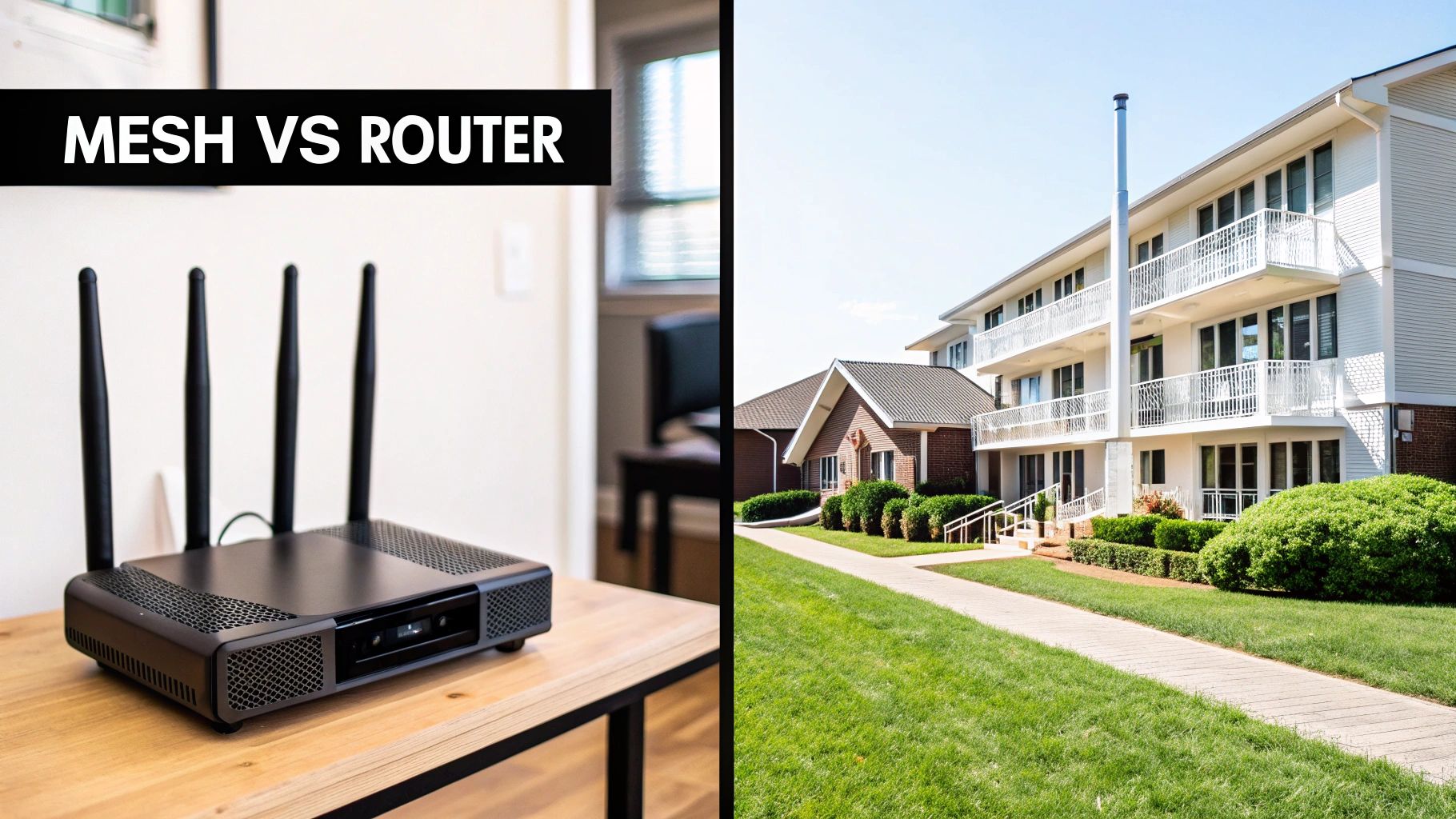
Ultimately, choosing between the two comes down to a simple trade-off: do you need concentrated power or distributed coverage?
Don't Just Look at Speed and Range—The Real Magic Is in the Features
When you're trying to figure out how to choose a WiFi router, it's so easy to get laser-focused on the big numbers: speed ratings and coverage area. But I've learned from years of setting up smart homes that the software and management tools are often what truly separate a good router from a great one. These features are the command center for your entire network.
Think of your router as more than just an internet gateway. It's a digital guardian, a traffic cop, and a parental supervisor all rolled into one. Buying a router based only on speed is like buying a car based on its horsepower without checking the brakes or the airbags. You're missing the features that really matter day-to-day.
Fortifying Your Network with Modern Security
In a home filled with smart speakers, cameras, and thermostats, your router's security is absolutely non-negotiable. It's the single point of entry for your entire digital life, and a vulnerability here puts everything at risk. This is why you have to be picky about security protocols.
The gold standard you should be looking for right now is WPA3 (Wi-Fi Protected Access 3). It’s a massive leap forward from the older WPA2, offering much stronger encryption that makes it incredibly difficult for anyone to guess your password or eavesdrop on your connection. Honestly, if a new router doesn't support WPA3, just walk away.
Beyond that basic encryption, many of the best routers now come bundled with comprehensive security suites, often powered by major cybersecurity companies. These packages can:
- Block malicious sites: Automatically stop you from landing on known phishing scams or malware-ridden websites.
- Prevent intrusions: Actively scan for and block any shady attempts to hack into your network.
- Quarantine infected devices: If your smart lightbulb gets compromised, the router can isolate it so it can't infect your laptop.
Investing in a router with a robust, built-in security package is one of the smartest moves you can make. It's like having a dedicated security guard for your home network, constantly monitoring for threats so you don't have to.
For those who want to take their digital defense even further, exploring a full range of home network security best practices can provide an added layer of protection for your family and data.
Smart Management Tools That Make a Difference
This is where things get really cool. The best routers give you an incredible amount of control over how your network actually behaves, helping you solve those common internet frustrations that drive everyone crazy.
Quality of Service (QoS)
Ever been on an important work video call, only for it to stutter and freeze because someone in the next room fired up Netflix in 4K? That's exactly what Quality of Service (QoS) is designed to fix. It lets you tell the router what traffic is most important.
With a good QoS system, you can prioritize your work laptop during the day, guaranteeing your Zoom calls get the bandwidth they need. In the evening, you can switch that priority over to your PS5 or Xbox for a buttery-smooth, lag-free gaming session. It's a game-changer for any busy household.
Advanced Parental Controls
Modern parental controls have come a long way from just blocking a few websites. A router with a top-notch control suite gives you powerful tools to manage your kids' online world responsibly. Look for routers that let you:
- Create individual profiles: Assign specific devices to each child's profile for tailored rules.
- Schedule internet time: Automatically shut off Wi-Fi access on school nights or pause it during dinner.
- Filter content: Block entire categories of websites, like social media or adult content, with a single click.
- View usage reports: Get a clear picture of what your kids are doing online and for how long.
These features aren't just about blocking things; they're about creating a healthier and safer digital environment. And while you're optimizing your network's brain, don't forget that a strong, consistent signal is just as crucial. If you've got everything set up but still have dead zones, you might want to learn how to improve your WiFi signal for better performance throughout the house.
Finalizing Your Choice with Budget and Setup in Mind

You’ve sorted through the specs, compared mesh vs. standalone, and figured out which Wi-Fi standard makes sense for you. Now, it’s time to land the plane. The final decision almost always comes down to two very real-world factors: what you're willing to spend and how easy it is to get everything up and running.
Getting this part right ensures you find that sweet spot between performance and price without pulling your hair out during setup.
How Much Should You Really Spend on a Router?
When you start browsing, you’ll see routers for less than a hundred dollars and others pushing well past $250. That price difference isn't just for show; it's a direct reflection of the hardware's power, the technology inside, and any extra bells and whistles like advanced security suites.
Here's a quick breakdown of what you can generally expect:
- Under $100 (Entry-Level): This is the territory of basic Wi-Fi 6 or older Wi-Fi 5 routers. They're a solid choice for a small apartment with a handful of devices, perfectly capable of handling web browsing and some HD streaming. Just don't expect them to juggle a house full of smart gadgets.
- $100 – $250 (The Sweet Spot): For most homes, this is the magic number. You'll find powerful Wi-Fi 6 routers and excellent entry-level mesh systems that deliver reliable performance for the typical smart home without breaking the bank.
- $250+ (High-Performance): Welcome to the top tier. Here you’ll find premium multi-unit mesh systems and cutting-edge Wi-Fi 6E routers designed for massive homes, gigabit internet plans, and seriously demanding users—think competitive gamers or remote workers moving huge files.
From my experience, it's best to budget based on your biggest headache. If dead zones are driving you crazy, put your money toward a solid mesh system. If your network grinds to a halt every evening from too many smart plugs and cameras, a powerful Wi-Fi 6 router should be your priority.
Placement Matters More Than You Think
You could have the most powerful router in the world, but if you shove it in a basement closet, you'll get terrible performance. It’s a simple truth that’s often overlooked. The goal is to give your Wi-Fi signal the best possible chance to reach every corner of your home.
Think of the signal like the light from a bare lightbulb—you want to place it somewhere it can shine freely.
A Few Router Placement Tips:
- Go Central and Open: Put your router as close to the middle of your house as you can. Avoid stuffing it in a cabinet, behind the TV, or near thick concrete walls.
- Get It Off the Floor: Wi-Fi signals tend to radiate outwards and slightly downwards. Placing the router on a high shelf or even mounting it on a wall can make a huge difference in coverage.
- Dodge Interference: Keep it away from big metal objects like a refrigerator. Also, steer clear of other electronics known for causing signal interference, like microwave ovens and older cordless phones.
Sometimes moving a router just a few feet can dramatically improve your connection. Don't be afraid to experiment to find the optimal spot.
Don't Sweat the Setup
If the thought of setting up a new network gives you anxiety, take a deep breath. The days of needing a computer science degree and a command-line interface are long gone.
Today, just about every router manufacturer has a streamlined mobile app that holds your hand through the entire process. It’s usually as simple as this:
- Plug in your new router and connect it to your modem with the included cable.
- Download the brand's app on your phone.
- Follow the step-by-step prompts to name your network and set a password.
Honestly, the whole thing often takes less than 10 minutes. These apps also serve as your network's control panel, letting you manage connected devices, set up a guest network, or run speed tests right from your couch.
Your Router Buying Checklist
Before you click "add to cart," take a moment to run through this final checklist. It’s the perfect way to make sure the router you’ve chosen really does tick every box for your home.
| Checklist Item | My Requirement | Notes |
|---|---|---|
| Wi-Fi Standard | (e.g., Wi-Fi 6, Wi-Fi 6E) | Based on my current and future devices. |
| Router Type | (e.g., Standalone, Mesh System) | Best for my home's size and layout. |
| Security Protocol | Must support WPA3 | Essential for protecting my smart home. |
| Key Features | (e.g., QoS, Parental Controls) | What management tools are important to me? |
| Budget | (e.g., $150 – $250) | Does this fit within my planned spending? |
| App Usability | Check reviews for the mobile app | Is the management app easy to use? |
Using this quick list confirms you've covered all your bases, from technical needs to practical, everyday usability. Now you can buy with confidence.
Your Top Router Questions, Answered
Even after doing your homework, a few lingering questions can pop up right before you pull the trigger on a new router. That's completely normal. Let's tackle some of the most common ones I hear, so you can make your final choice with confidence.
Is It Worth Upgrading My Router If My Internet Speed Is Unchanged?
Yes, absolutely. This is probably the biggest misconception out there. Your router does so much more than just pass through the internet speed you pay for—it's the air traffic controller for your entire home network.
An old, outdated router can become a serious bottleneck, even with a blazing-fast internet plan. Swapping it for a modern router, especially a Wi-Fi 6 model, dramatically improves how it juggles all your devices. The result is less lag, rock-solid stability for everything from your laptop to your smart lights, and a much smoother experience all around, no matter what speed your internet plan is.
Think of it this way: your internet plan is the speed limit on the highway, but your router is the on-ramp. An old router is like a single-lane ramp causing a massive traffic jam, even when the highway is wide open. A new one is a multi-lane, intelligently managed system that gets everyone moving smoothly.
Do I Need a New Modem When I Buy a New Router?
Probably not. For the most part, your current modem should work perfectly fine with a new router. A modem's only job is to bring the internet signal into your house; the router takes over from there, creating your Wi-Fi network and sharing the connection.
The big exception? If you're upgrading to a super-fast internet plan, like anything over 1 Gbps. An older modem might not be able to handle those speeds, effectively throttling your connection before it even reaches your shiny new router. It's always a good idea to double-check your modem's specs to make sure it can keep up with the internet speed you're paying for.
What Is a Guest Network and Should I Use It?
A guest network is a fantastic feature. It’s a separate, walled-off Wi-Fi network that your router creates just for visitors. It gives them internet access without letting them see or connect to any of the devices on your main network—like your personal computers, security cameras, or file servers.
And yes, you should absolutely use it. It's a simple but powerful security move. You can be a great host by offering Wi-Fi without ever worrying about a guest’s potentially compromised phone or laptop introducing a threat to your private network. Setting one up takes just a few minutes in your router's app and is a no-brainer for any smart home.
How Often Should I Replace My Router?
There's no hard-and-fast rule, but a good guideline is to look at upgrading every three to five years. Router technology and Wi-Fi standards evolve surprisingly fast. In that time, you'll see major improvements in speed, security, and the ability to handle more and more connected devices.
You might want to think about an upgrade sooner if you notice a few things:
- You've loaded up your home with a bunch of new smart devices.
- You’ve just upgraded to a much faster internet plan.
- Your current router has stopped getting security updates from the manufacturer (this is a big one!).
Keeping your router reasonably up-to-date is the best way to ensure your network is fast, reliable, and secure.
At Automated Home Guide, our goal is to help you build a smarter, more secure, and seamlessly connected home. For more deep dives and product reviews, head over to https://automatedhomeguide.com and explore our resources.








Leave a Reply